Complete Job & Schedule Remaining Work

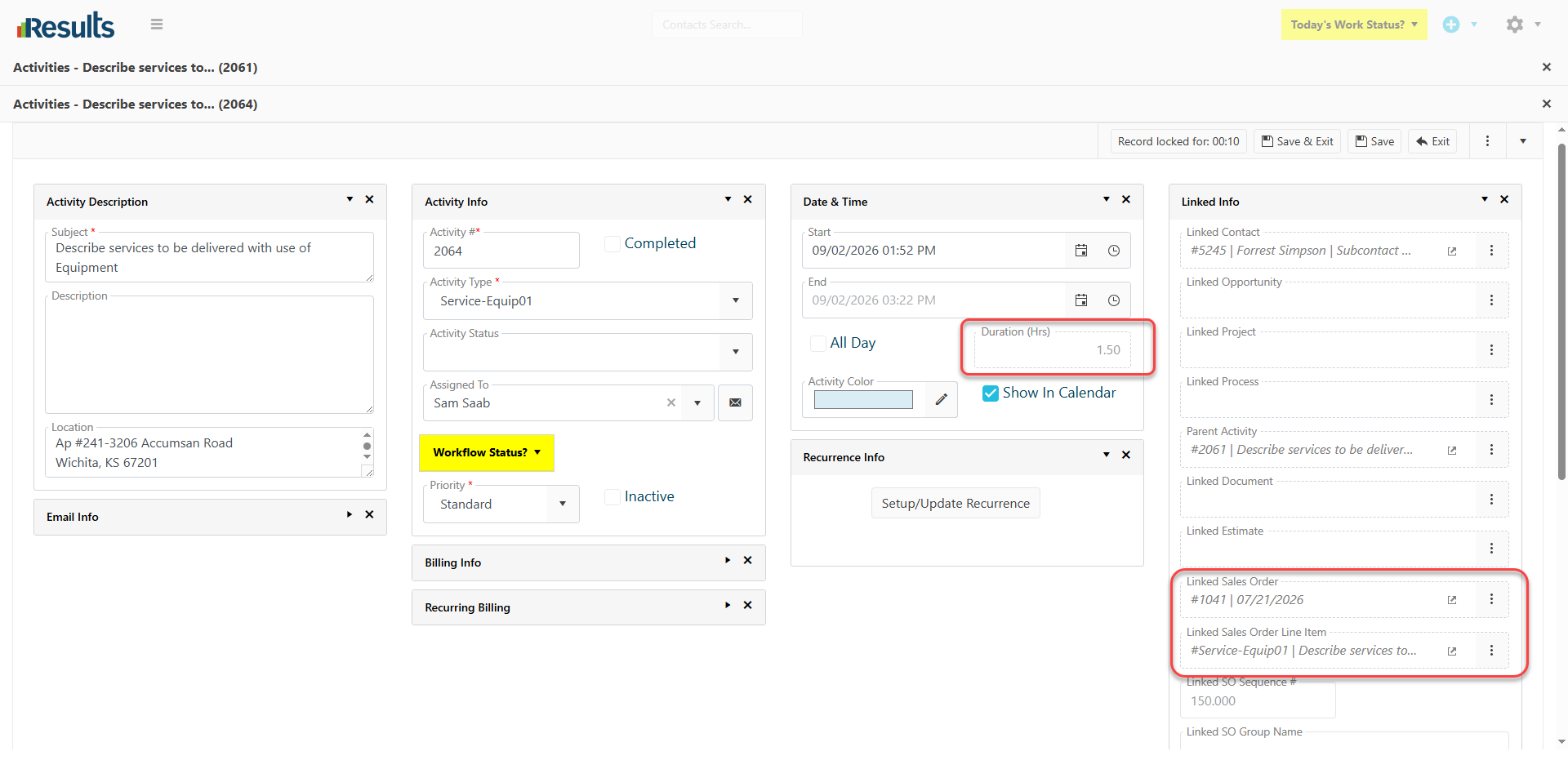
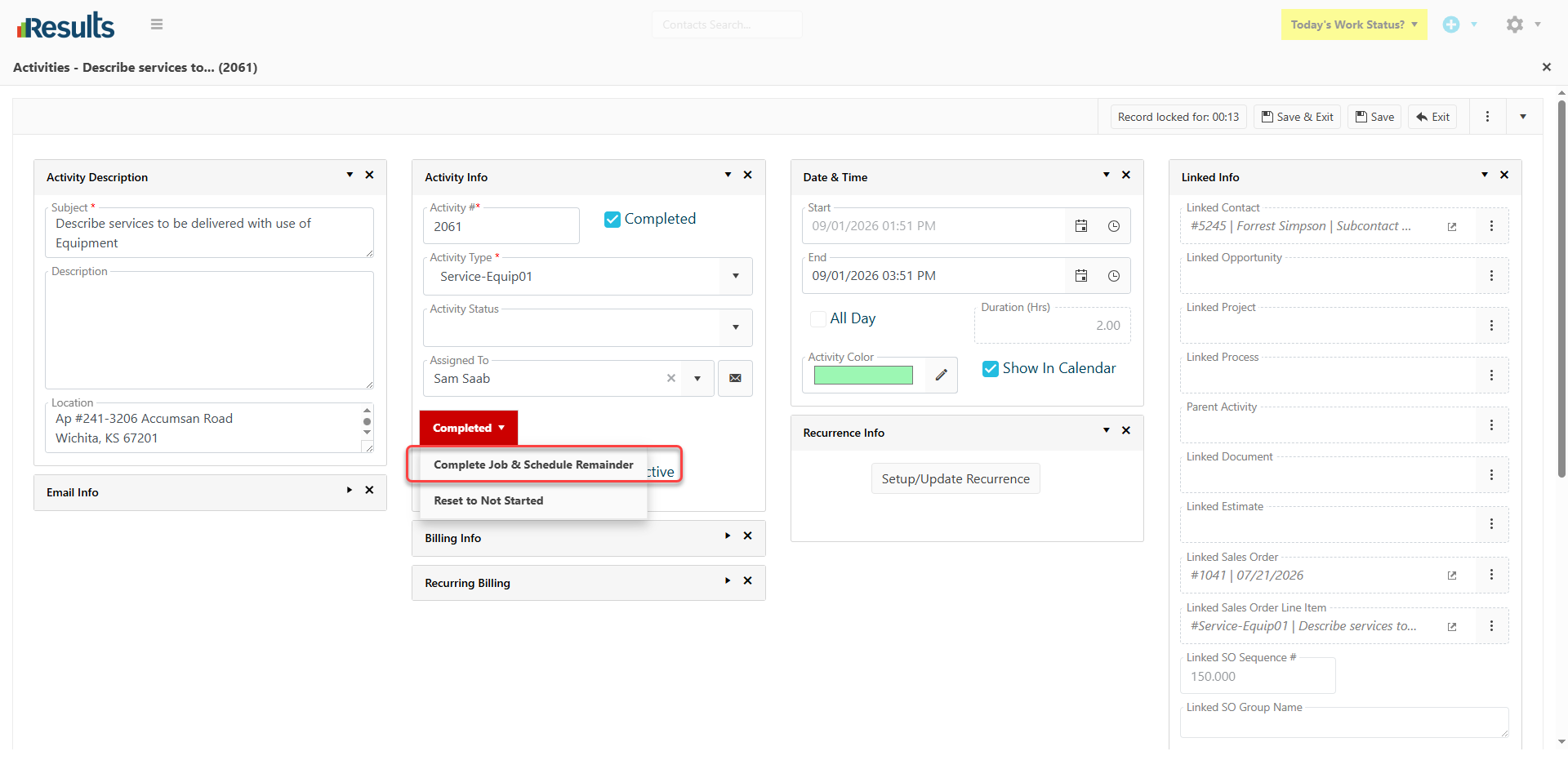
The new Complete Job & Schedule Remainder option allows users to manage Activities after job completion and before all planned work is performed by completing the current Activity and automatically scheduling the remaining work as a Follow-Up Activity.

What's New?

Complete Job & Schedule Remainder – A new ‘Complete Job & Schedule Remainder’ option has been introduced in the Workflow Status dropdown. It appears after the Activity is moved to Ended status and can also be accessed once the status is set to Completed. When selected, Results will:

  • Automatically create a new Activity for the remaining work.
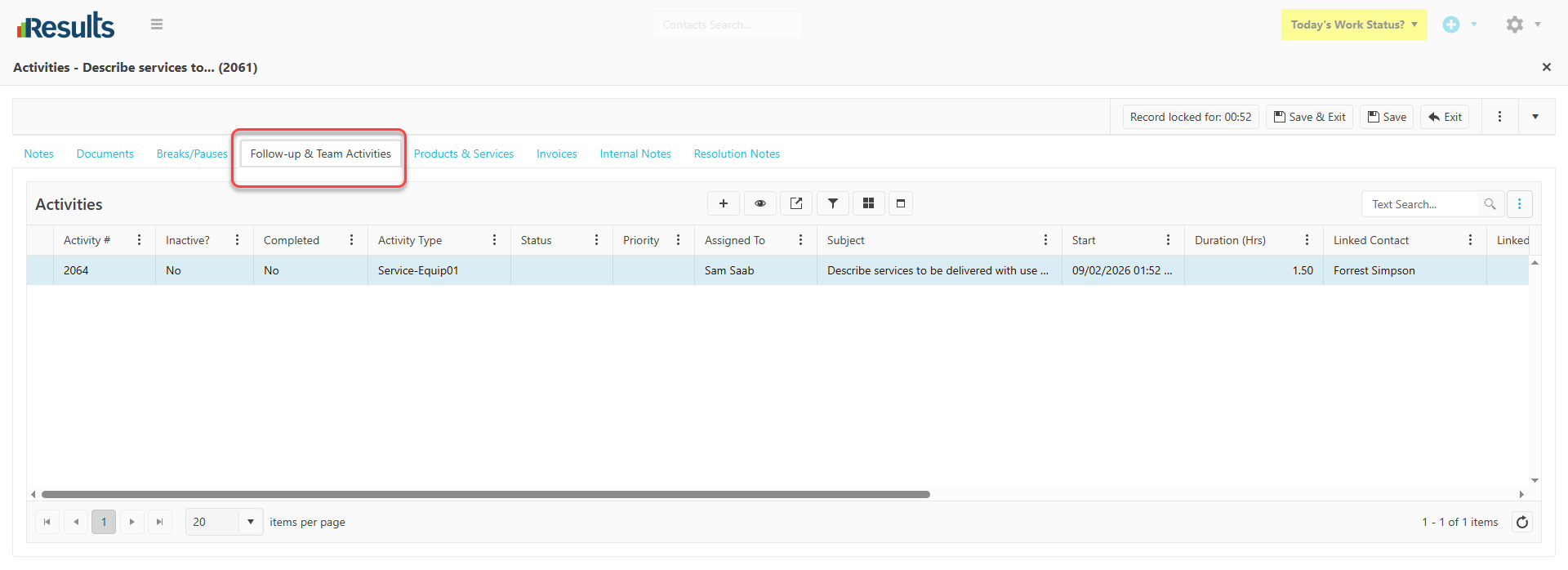
  • Link the new Activity back to the original Activity as its Parent Activity.
  • Carry over the same Sales Order group, sequence number, and other relevant Activity details, eliminating the need to re-enter information and supporting the creation of the new T&M Invoice.
  • Prompt the user to select the date and time for scheduling the remaining work.

Automatic Remaining Duration Calculation – Results automatically determines the duration for the Follow-Up Activity based on the available Sales Order or Activity information.

  • If a Linked Sales Order Line Item exists and its Unit of Measure is Hour, the Line-Item Quantity determines the planned duration.
  • If no Linked Sales Order Line Item is available, the system uses the Activity Type’s standard duration.
  • Results calculates the Duration for the Follow-Up activity by subtracting the time already logged on the original Activity from its planned duration. The remaining time is automatically set as the Duration of the new follow-up Activity.
Why This Matters?

      • Easily Manage Incomplete Work – Complete the current job while automatically scheduling any remaining work, rather than manually creating a Follow-Up Activity or creating very long Pauses for the Job.
      • Save Time – Sales Order, Activity, and scheduling details are automatically transferred, minimizing repetitive data entry.
      • Accurate Remaining Duration – The system calculates the remaining work based on the original planned duration and time already logged.
      • Maintain Activity History – The new Activity is associated with the original as its Parent Activity, forming a clear link between the finished work and what remains scheduled.
      • Improve Scheduling – Select the required date and time for the remaining work and let Results automatically create and schedule the Follow-Up Activity

    Standard Payment Receipt Enhancement

    Results includes a Standard Payment Receipt in the Payments module, giving users a convenient way to generate and access a standardized receipt for payment records. Standard Payment Receipt –...

    FSM Portal Job Card Quick Access Enhancements

    Results now provides improved navigation on the FSM Portal with new Quick Access buttons on the Job Card, allowing users to jump directly to key sections of a job. These shortcuts help field service...

    Create a QB Job Along with an Opportunity or a Project

    Results makes it easier to create QuickBooks (QB) Jobs from Parent Contact records. New menu options let you create a QB Job along with an Opportunity or Project. These enhancements simplify record...

    Unit Price and Cost Decimal Precision Enhancements

    Greater precision and flexibility in managing financial values with a new setting in Admin Settings > Billing Settings. This enhancement lets users configure up to five decimal places for Unit...

    Quantity Decimal Precision Enhancements

    Greater precision and flexibility in managing quantities are available in Admin Settings > Billing Settings. This enhancement allows users to configure the number of decimal places displayed for...

    Split Activity – Simplifying Team Assignments and Scheduling

    The Split Activity feature in Results provides greater flexibility in activity management, allowing users to divide an existing activity into up to three additional activities and assign them to...

    Expanded User Permissions and Key Utilities Access

    Results provides administrators with greater control over user access to key utilities and integration configurations. New permission options have been added to the Users module, making it easier to...

    Streamlined Refund Processing in Results Payments Integration

    Results Payments Integration now provides a more streamlined way to process and track Refunds directly from Results. With the new “Issue Refund” functionality and enhanced transaction tracking,...

    Generate Payment Links for Deposits

    Results Payments Integration now makes it easier to collect Deposit payments directly from Projects. With the new Generate Payment Link for Deposit option, users can generate a secure payment link...

    Who’s Working Module Enhancements

    Results offers greater flexibility and convenience in the Who’s Working module, with enhancements to how Assigned Activity information is displayed and how users manage settings.Default Assigned...

    View Project & Sales Order Activities Directly in the Calendar

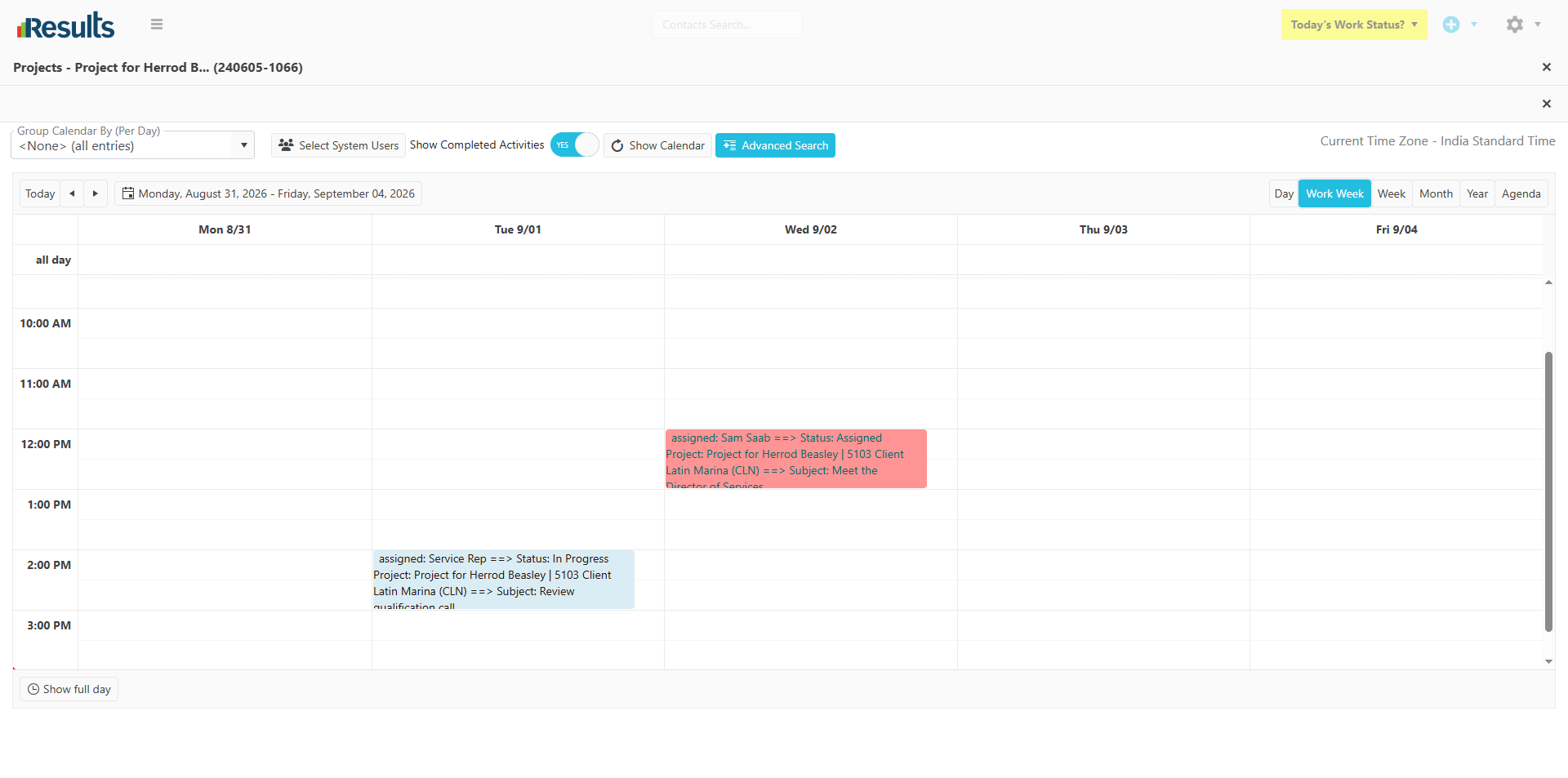
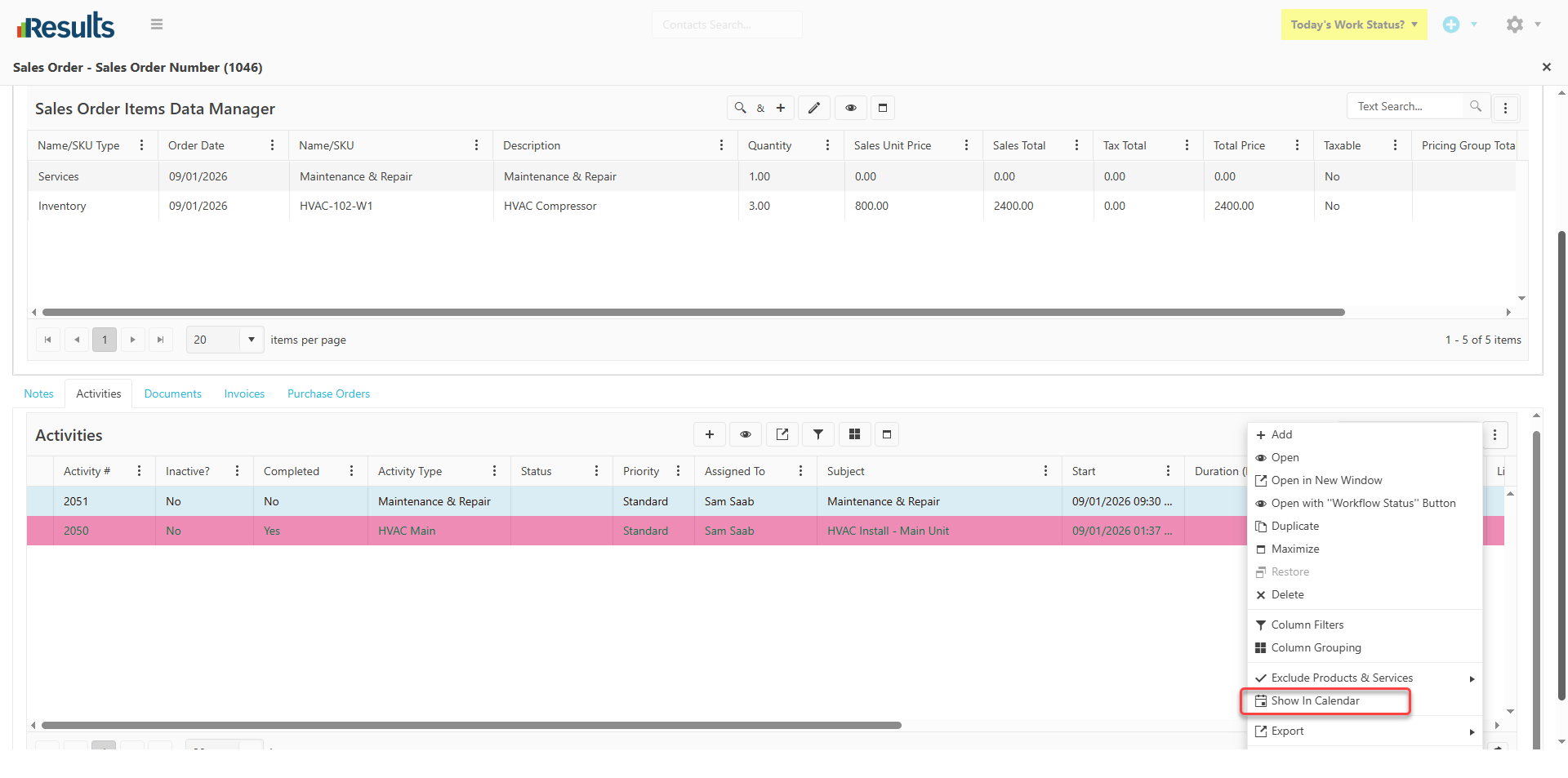
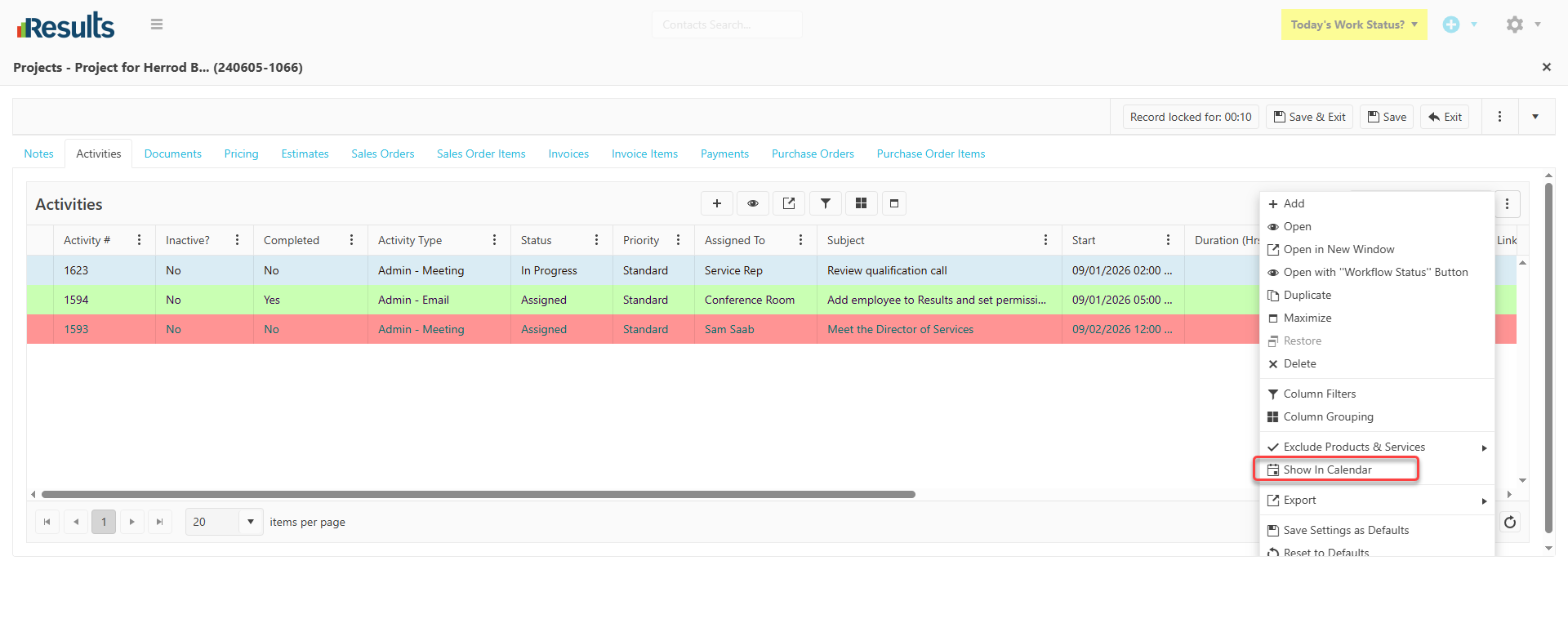
    Users can now visualize scheduled Activities with the new Show in Calendar option in the Projects and Sales Orders Activities Grid, with quick access to the Calendar View to see Activities enabled for calendar display.

    What's New?

    Show in Calendar Option – A new Show in Calendar option is available in the Activities Grid for both Projects and Sales Orders. When selected, Results will:

    • Open the Calendar View displaying the associated Activities from the grid.
    • Show only Activities where the Show in Calendar field is enabled.
    • Automatically carry the relevant Activities from the Project or Sales Order into the Calendar.

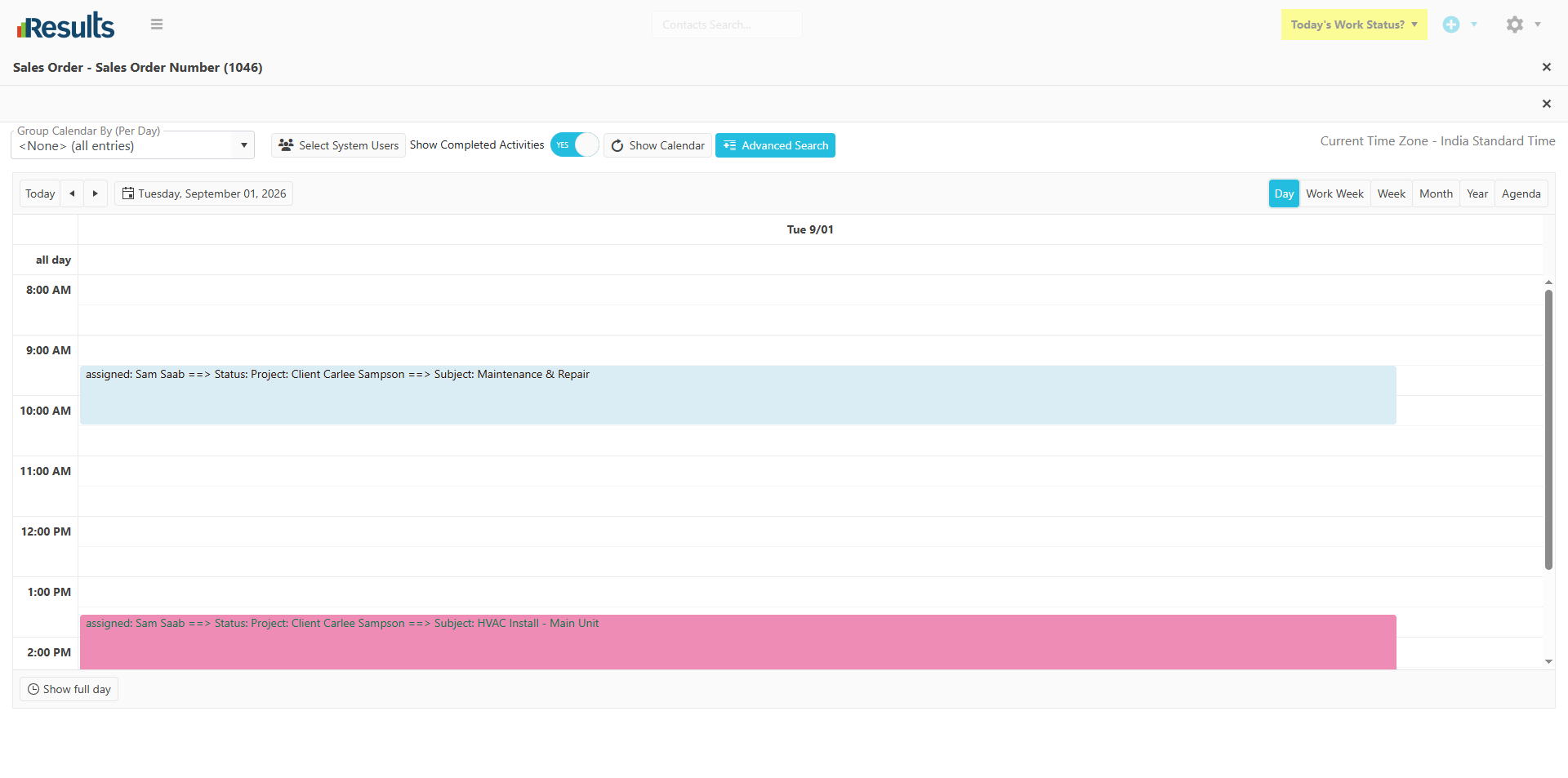
    Pre-Populated Calendar Settings – When the Calendar View opens:

    • The Advanced Search criteria are automatically pre-populated based on the selected Project or Sales Order.
    • Grouping is automatically set to None for a clearer view of the Activities.
    • Show Calendar is automatically selected.

    Why This Matters?

    Quickly Visualize Activities – View relevant Project and Sales Order Activities in a calendar view without manually searching.

    Save Time – Automatically applied search criteria eliminate the need to re-enter filters when moving from the Activities Grid to the Calendar.

    Better Scheduling Visibility – Get a clear, calendar-based view of Activities configured to appear on the calendar.

    Seamless Navigation – Move directly from the Projects or Sales Orders Activities Grid to the Calendar View for a more efficient scheduling workflow.

    Standard Payment Receipt Enhancement

    Results includes a Standard Payment Receipt in the Payments module, giving users a convenient way to generate and access a standardized receipt for payment records. Standard Payment Receipt –...

    FSM Portal Job Card Quick Access Enhancements

    Results now provides improved navigation on the FSM Portal with new Quick Access buttons on the Job Card, allowing users to jump directly to key sections of a job. These shortcuts help field service...

    Create a QB Job Along with an Opportunity or a Project

    Results makes it easier to create QuickBooks (QB) Jobs from Parent Contact records. New menu options let you create a QB Job along with an Opportunity or Project. These enhancements simplify record...

    Unit Price and Cost Decimal Precision Enhancements

    Greater precision and flexibility in managing financial values with a new setting in Admin Settings > Billing Settings. This enhancement lets users configure up to five decimal places for Unit...

    Quantity Decimal Precision Enhancements

    Greater precision and flexibility in managing quantities are available in Admin Settings > Billing Settings. This enhancement allows users to configure the number of decimal places displayed for...

    Split Activity – Simplifying Team Assignments and Scheduling

    The Split Activity feature in Results provides greater flexibility in activity management, allowing users to divide an existing activity into up to three additional activities and assign them to...

    Expanded User Permissions and Key Utilities Access

    Results provides administrators with greater control over user access to key utilities and integration configurations. New permission options have been added to the Users module, making it easier to...

    Streamlined Refund Processing in Results Payments Integration

    Results Payments Integration now provides a more streamlined way to process and track Refunds directly from Results. With the new “Issue Refund” functionality and enhanced transaction tracking,...

    Generate Payment Links for Deposits

    Results Payments Integration now makes it easier to collect Deposit payments directly from Projects. With the new Generate Payment Link for Deposit option, users can generate a secure payment link...

    Who’s Working Module Enhancements

    Results offers greater flexibility and convenience in the Who’s Working module, with enhancements to how Assigned Activity information is displayed and how users manage settings.Default Assigned...

    Submit Deposit Payments to QuickBooks Desktop as Sales Receipts

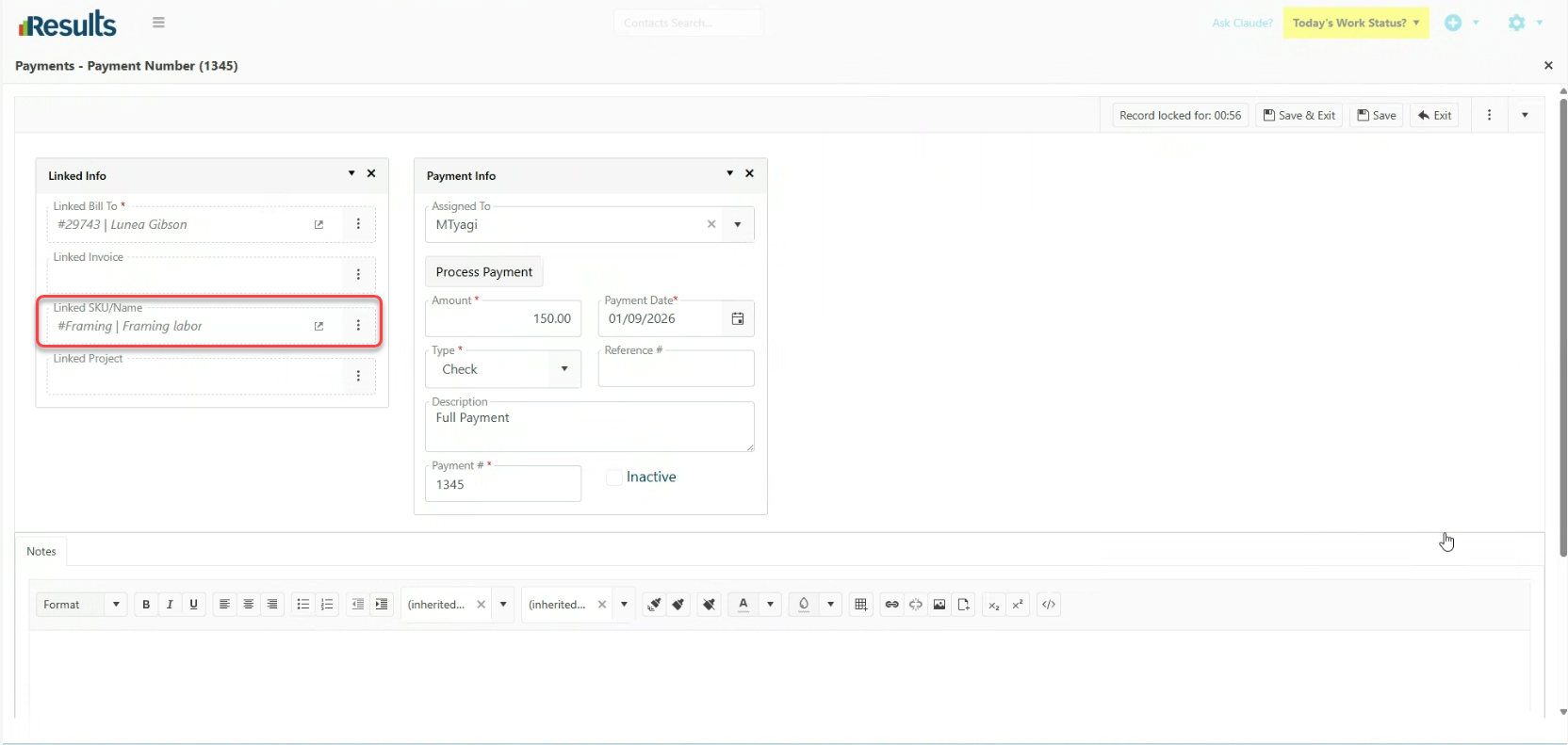
    Results now allows submitting Deposit Payments directly to QuickBooks as Sales Receipts. A new Linked SKU/Name field has been added to the Payments data entry screen, allowing users to specify the SKU that should appear on the Sales Receipt.

    What's New?

    Linked SKU/Name on Payments – A new Linked SKU/Name field appears when entering a Payment. When you select a SKU/Name:

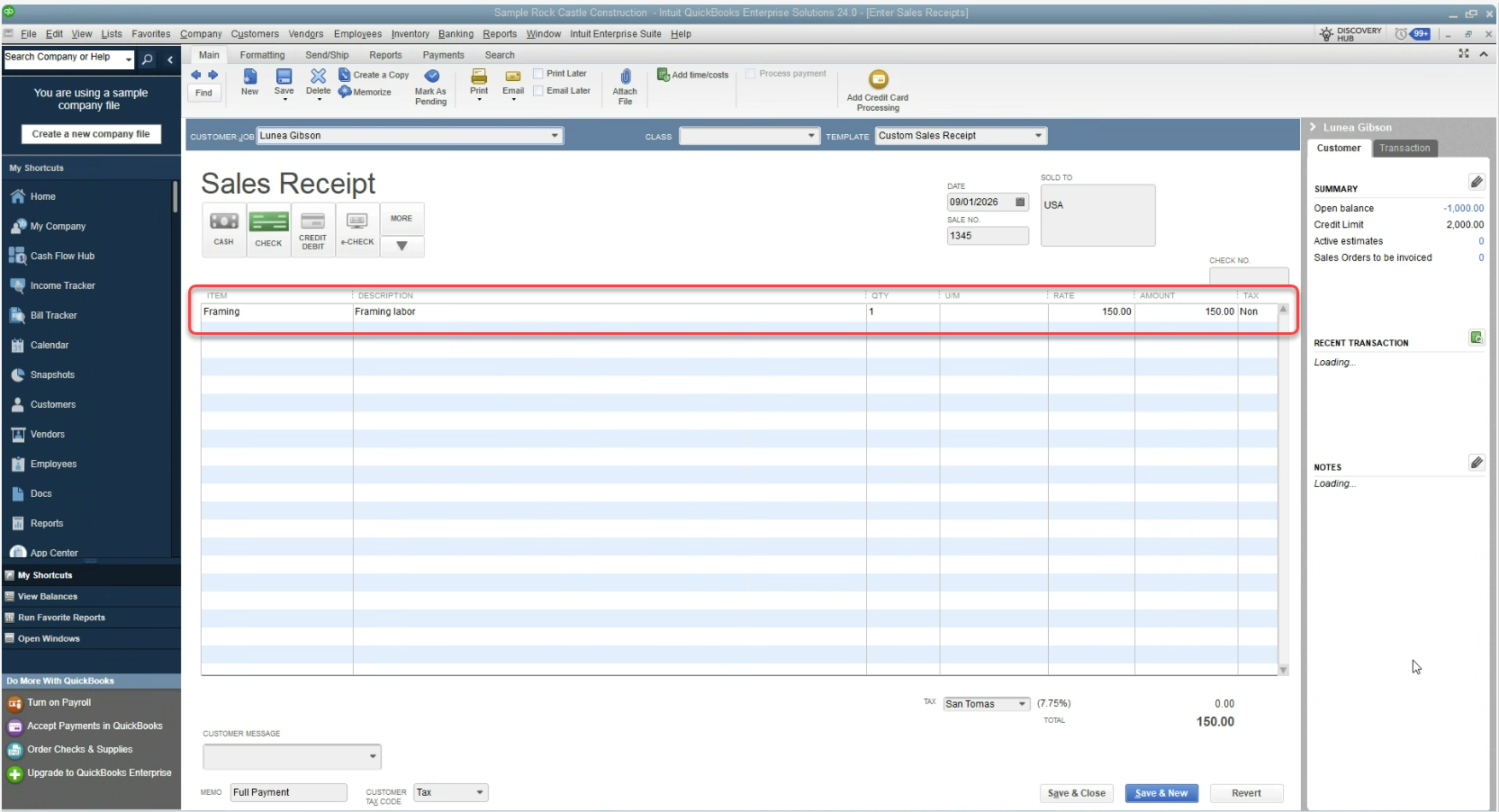
    • Record the payment in QuickBooks as a Sales Receipt rather than a standard Payment/Credit.
    • Generate the Sales Receipt with one Line Item based on the selected Linked SKU/Name.
    • The Sales Receipt amount is based on the Payment amount.
    • Results designed this feature as a one-way send transaction from Results to QuickBooks.

    Update and Resend Option – If the Payment amount needs to be changed after submitting the Sales Receipt, users can select Update/Resend to send the corrected amount to QuickBooks.

    Important: Sales Receipts Are Not Re-Imported – Sales Receipts created through this process will not be re-imported into Results. They are intended as a one-way transfer from Results to QuickBooks.

    Why This Matters?

    • Simplify Deposit Processing – Send Deposit Payments from Results to QBD as Sales Receipts without manually recreating the transaction.
    • Accurate Line-Item Mapping – The selected Linked SKU/Name is used to generate a single, well-defined Line Item on the Sales Receipt.
    • Easy Corrections – The Update/Resend option makes it easy to adjust and resend the Payment if the amount changes.
    • Reduce Duplicate Transactions – Maintaining the Sales Receipt as a one-way transaction prevents the creation of unnecessary or incorrect Invoice records in Results during re-import.

    Standard Payment Receipt Enhancement

    Results includes a Standard Payment Receipt in the Payments module, giving users a convenient way to generate and access a standardized receipt for payment records. Standard Payment Receipt –...

    FSM Portal Job Card Quick Access Enhancements

    Results now provides improved navigation on the FSM Portal with new Quick Access buttons on the Job Card, allowing users to jump directly to key sections of a job. These shortcuts help field service...

    Create a QB Job Along with an Opportunity or a Project

    Results makes it easier to create QuickBooks (QB) Jobs from Parent Contact records. New menu options let you create a QB Job along with an Opportunity or Project. These enhancements simplify record...

    Unit Price and Cost Decimal Precision Enhancements

    Greater precision and flexibility in managing financial values with a new setting in Admin Settings > Billing Settings. This enhancement lets users configure up to five decimal places for Unit...

    Quantity Decimal Precision Enhancements

    Greater precision and flexibility in managing quantities are available in Admin Settings > Billing Settings. This enhancement allows users to configure the number of decimal places displayed for...

    Split Activity – Simplifying Team Assignments and Scheduling

    The Split Activity feature in Results provides greater flexibility in activity management, allowing users to divide an existing activity into up to three additional activities and assign them to...

    Expanded User Permissions and Key Utilities Access

    Results provides administrators with greater control over user access to key utilities and integration configurations. New permission options have been added to the Users module, making it easier to...

    Streamlined Refund Processing in Results Payments Integration

    Results Payments Integration now provides a more streamlined way to process and track Refunds directly from Results. With the new “Issue Refund” functionality and enhanced transaction tracking,...

    Generate Payment Links for Deposits

    Results Payments Integration now makes it easier to collect Deposit payments directly from Projects. With the new Generate Payment Link for Deposit option, users can generate a secure payment link...

    Who’s Working Module Enhancements

    Results offers greater flexibility and convenience in the Who’s Working module, with enhancements to how Assigned Activity information is displayed and how users manage settings.Default Assigned...

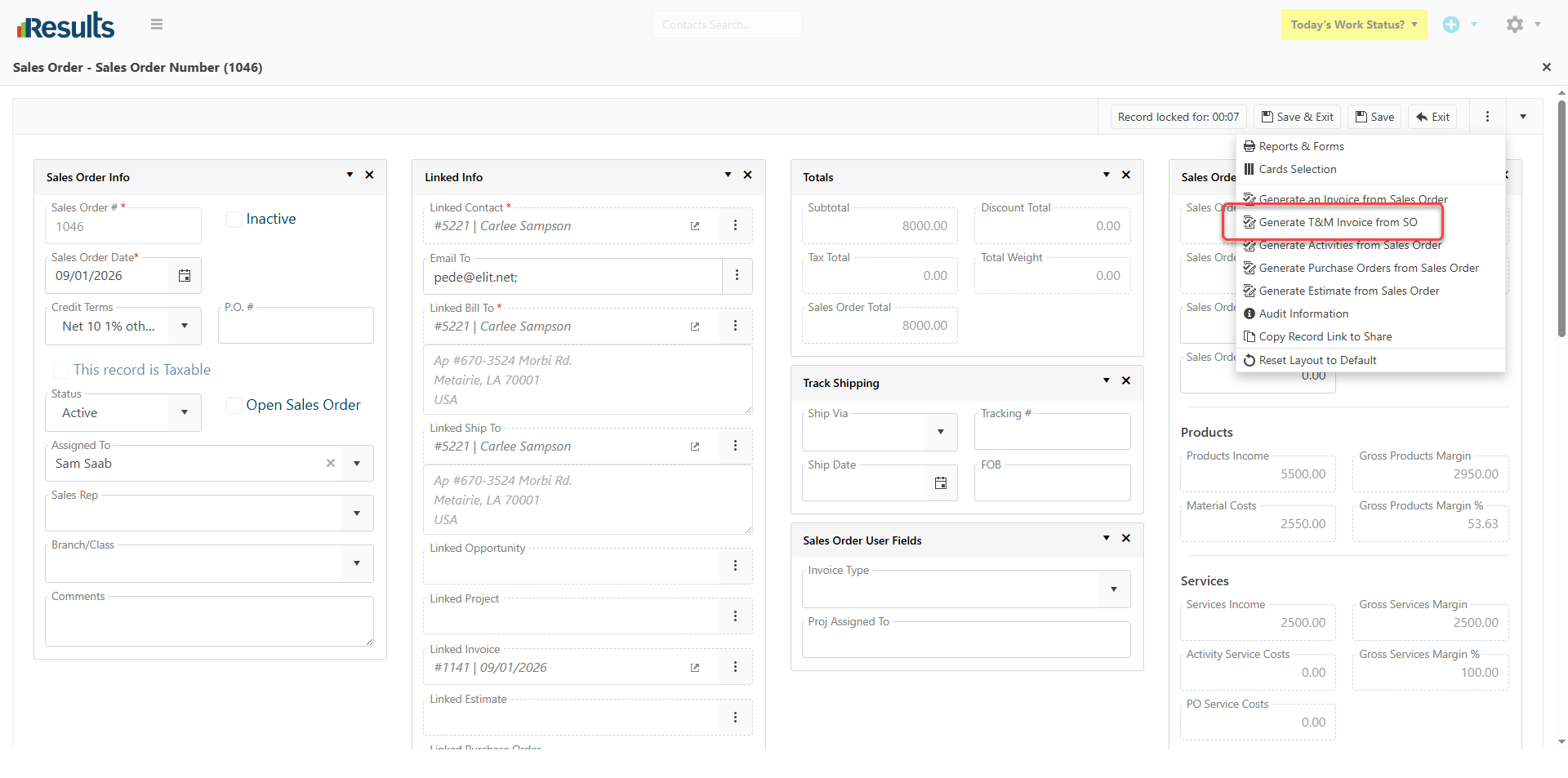
    Generate T&M Invoices Directly from Sales Orders

    Results makes it easier to create Time & Material (T&M) Invoices directly from Sales Orders. With the new Generate T&M Invoice from SO option, users can generate an invoice based on the actual work performed and materials used, rather than relying solely on the original Sales Order quantities.

    What's New?

    Generate T&M Invoice from SO – We added a new “Generate T&M Invoice from SO” option to the 3-dot menu on Sales Orders. When selected, Results reviews the actual activity data and uses it to generate the T&M Invoice. The process will:

    • Use the actual Duration from Activities to determine invoice quantities
    • Identify the SKUs used
    • Include newly added Services and Products in the T&M Invoice, based on Quantity Used.
    • Account for deleted Services and Products marked for no billing in the T&M Invoice.
    • Support both Services and Products on the same Sales Order.

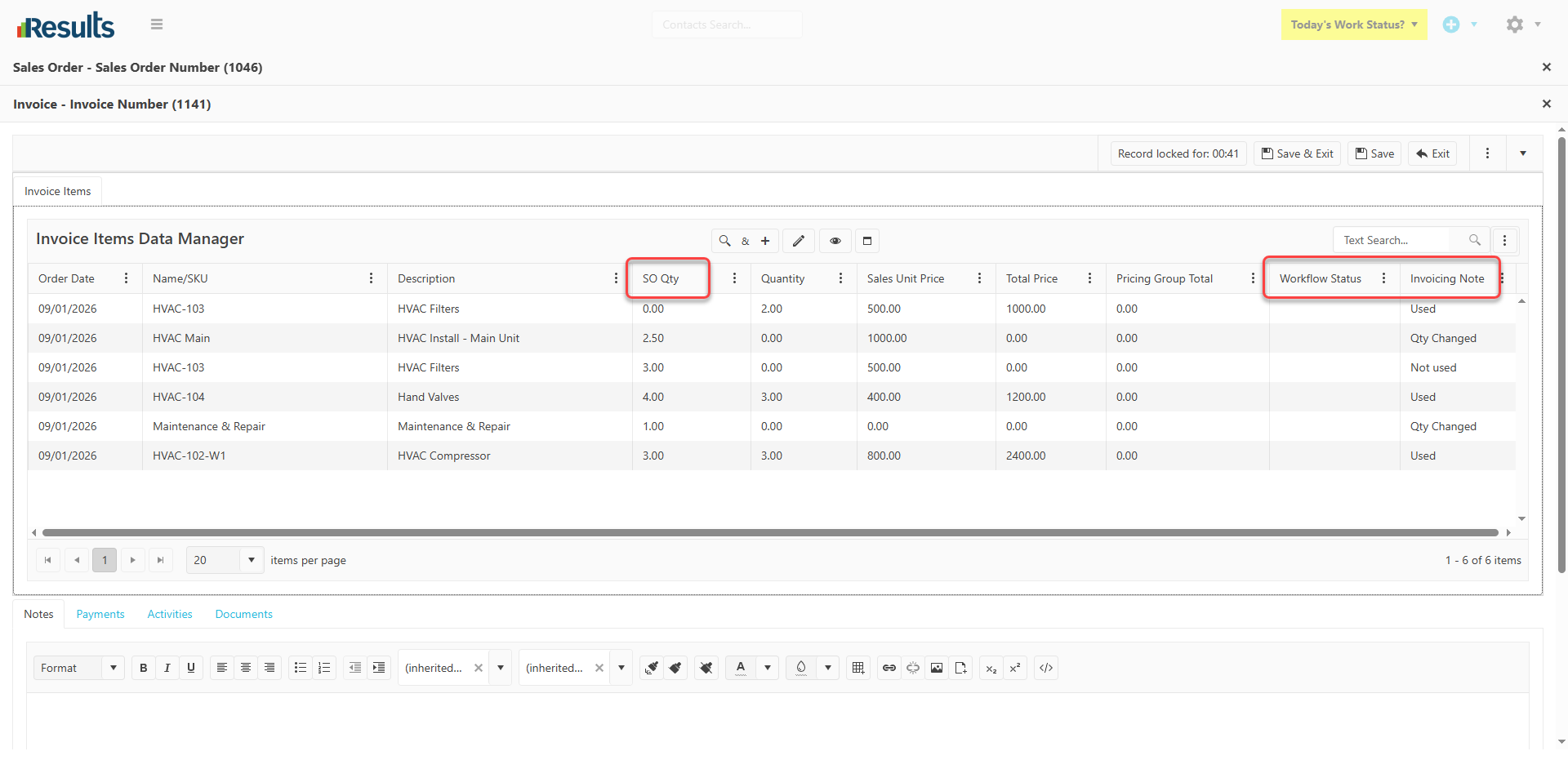
    New Data Tracking Columns – The T&M Invoice generation process also introduces the following columns to provide greater visibility into the source data and how the T&M Invoice was updated:

    • SO_Qty stores the original Sales Order quantity, whereas the actual Duration is loaded as the invoice quantity and applied in the relevant calculations.
    • Workflow_Status: Captures the actual Workflow Status from the corresponding Activity record.
    • Invoice_Notes: Stores messages and details identified during the review of actual activity data.

    Why This Matters?

    • Invoice Based on Actual Work – Generate invoices using the actual time spent and materials used, helping ensure billing more accurately reflects the work performed.
    • Reduce Manual Adjustments – Automatically update for modifications to Services and Products, such as additions or deletions after the initial Sales Order creation.
    • Improve Billing Accuracy – Use actual Activity Duration and SKU usage to calculate invoice quantities, rather than relying solely on the original Sales Order quantities.
    • Greater Visibility – The new Workflow_Status and Invoice_Notes fields provide additional context about the Activities and actual data used during invoice generation.
    • Streamline the Invoicing Process – Generate a T&M Invoice directly from the Sales Order, reducing the need to manually review Activities and update invoice line items.

    Standard Payment Receipt Enhancement

    Results includes a Standard Payment Receipt in the Payments module, giving users a convenient way to generate and access a standardized receipt for payment records. Standard Payment Receipt –...

    FSM Portal Job Card Quick Access Enhancements

    Results now provides improved navigation on the FSM Portal with new Quick Access buttons on the Job Card, allowing users to jump directly to key sections of a job. These shortcuts help field service...

    Create a QB Job Along with an Opportunity or a Project

    Results makes it easier to create QuickBooks (QB) Jobs from Parent Contact records. New menu options let you create a QB Job along with an Opportunity or Project. These enhancements simplify record...

    Unit Price and Cost Decimal Precision Enhancements

    Greater precision and flexibility in managing financial values with a new setting in Admin Settings > Billing Settings. This enhancement lets users configure up to five decimal places for Unit...

    Quantity Decimal Precision Enhancements

    Greater precision and flexibility in managing quantities are available in Admin Settings > Billing Settings. This enhancement allows users to configure the number of decimal places displayed for...

    Split Activity – Simplifying Team Assignments and Scheduling

    The Split Activity feature in Results provides greater flexibility in activity management, allowing users to divide an existing activity into up to three additional activities and assign them to...

    Expanded User Permissions and Key Utilities Access

    Results provides administrators with greater control over user access to key utilities and integration configurations. New permission options have been added to the Users module, making it easier to...

    Streamlined Refund Processing in Results Payments Integration

    Results Payments Integration now provides a more streamlined way to process and track Refunds directly from Results. With the new “Issue Refund” functionality and enhanced transaction tracking,...

    Generate Payment Links for Deposits

    Results Payments Integration now makes it easier to collect Deposit payments directly from Projects. With the new Generate Payment Link for Deposit option, users can generate a secure payment link...

    Who’s Working Module Enhancements

    Results offers greater flexibility and convenience in the Who’s Working module, with enhancements to how Assigned Activity information is displayed and how users manage settings.Default Assigned...

    Who’s Working – See Who’s Working and What They’re Working On

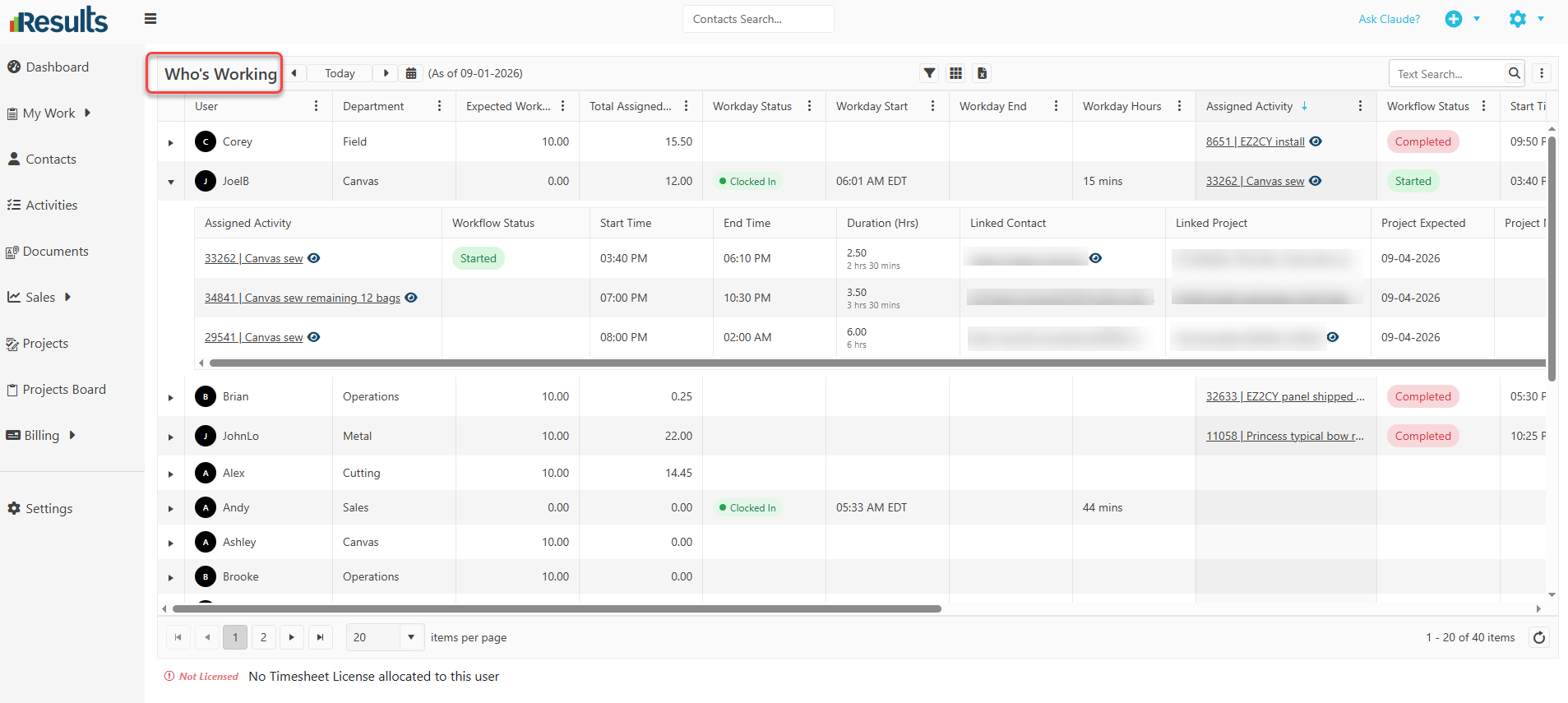
    Results introduces a new Who’s Working module that provides managers and users with a centralized view of Active Users and their current work. Accessible via the Gear Icon (and soon from the main menu above Dashboard), Who’s Working brings together employee availability, assigned Activities, scheduling details, and related Project information in a single, convenient view.

    What's New?

    Active User Overview – The main Who’s Working grid provides key information about each user, including:

    • User
    • Department
    • Expected Work Hours
    • Total Assigned Hours
    • Workday Status
    • Workday Start
    • Workday End
    • Workday Total Hours

    This provides an at-a-glance view of each user’s workday and assigned workload and whether they have already clocked in for the day and when they did that, in their own Time Zone.

    Detailed Activity Information – For each user, the grid also provides visibility into the current activity that they are working on, including:

    • Assigned Activity
    • Workflow Status
    • Start Time
    • End Time
    • Duration
    • Linked Contact
    • Location
    • Linked Project
    • Project Expected Date
    • Project Notes

    In the sub-grid, under each User record, you can see all assigned Activities in Start Time order, making it easy to see the Assigned work associated with that user for the selected date.

    Date-Based Activity View – A date selector is available at the top of the Who’s Working grid. When the user selects a date, the Grid displays the Workday Information & Assigned Activities for that date. You can navigate to previous dates to see who clocked in and out that day and what they worked on, and navigate to future dates to see Time Off requested and Assigned workload.

    Quick Access to Related Records – The Who’s Working module makes it easy to instantly access related information:

    • The Assigned Activity, Linked Contact, Linked Project, and Project Notes fields are clickable, allowing users to open them directly.
    • An Eye icon provides another quick way to view the associated record.
    • Project Notes displays the first 75 characters of the Notes, so you can see the last timestamp for entered notes, with an Eye icon that allows users to view and modify the full Notes field in a pop-up window when needed.

    Search, Filter and Group – Users can easily analyze the information displayed in Who’s Working with:

    • Text Search across the available fields.
    • Filtering to narrow down users or Activities.
    • Grouping to organize the information based on selected fields.

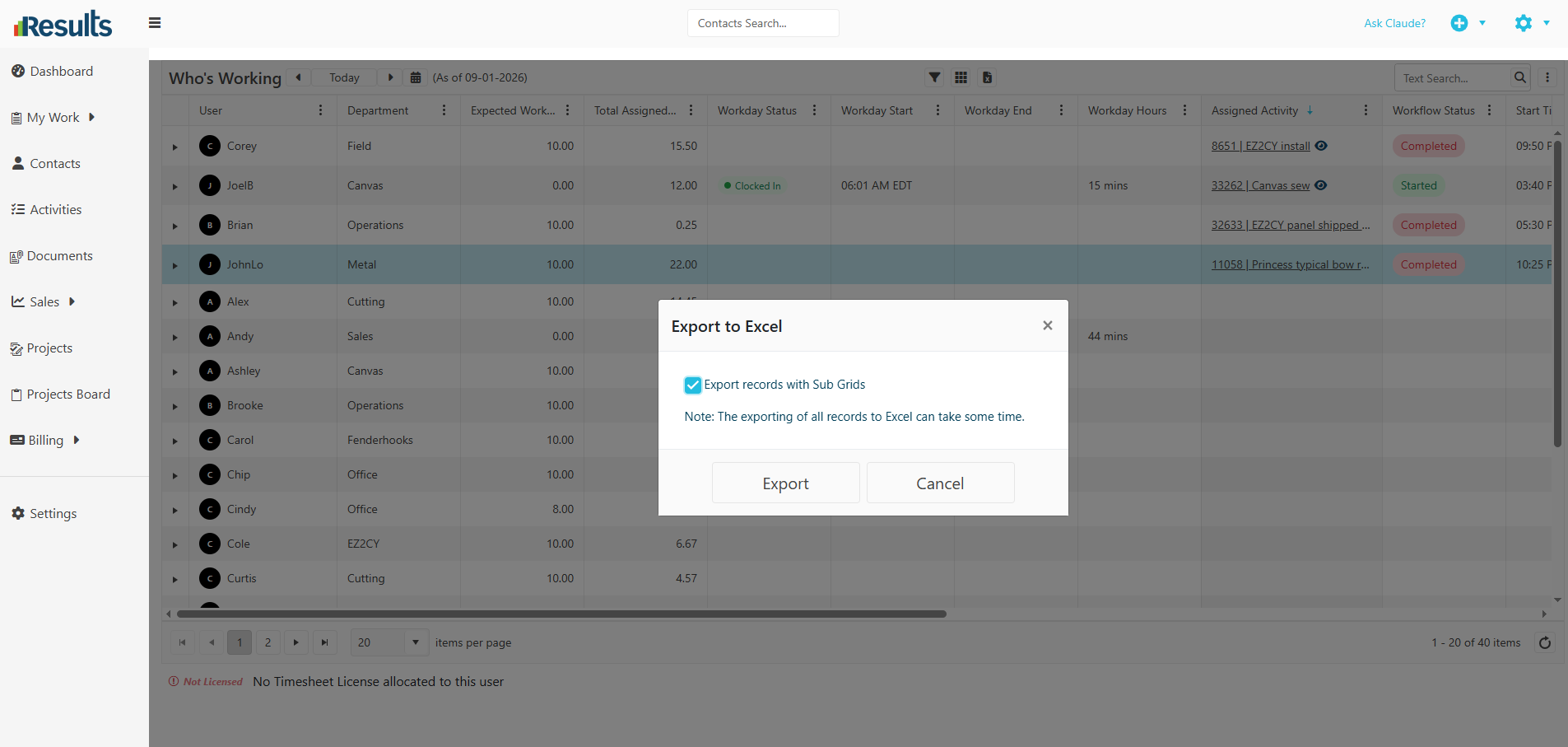
    Export to Excel – Users can export Who’s Working data to Excel, including all Assigned Activity information in each user’s sub-grid, making it easy to share, analyze, or further work with the data outside of Results. The Excel file can be generated for the current, past, or future day you navigate to, providing a unique and consolidated view of your team’s attendance, assigned workload, and what they have completed and by when.

    Why This Matters?

    • Know Who’s Working – Get a centralized view of active users, their workday status, their clock-in and clock-out time, their assigned workload, and their completed work.

    • Improve Workload Visibility – Quickly identify how many hours each user is Assigned, see the Activities contributing to their workload, and view the specific hours they are Expected to Work each day of the week (tracked in the User record), next to their actual Clock-In and Clock-Out times and total hours submitted for payroll. For previous days, you’ll see actually completed work and actual Duration vs. Timesheet/Payroll hours submitted per User.

    • Monitor Daily Activities – Use the date selector to view assigned tasks for a specific day and each user’s scheduled work.

    • Quickly Access Related Information – Open Activities, Contacts, Projects, and Project Notes directly from the Who’s Working grid for any User on any day – past, present, or future.

    • Analyze & Share Data – Use search, filters, grouping, and Excel export to analyze workload and Activity information in a format that works for your team.

    Standard Payment Receipt Enhancement

    Results includes a Standard Payment Receipt in the Payments module, giving users a convenient way to generate and access a standardized receipt for payment records. Standard Payment Receipt –...

    FSM Portal Job Card Quick Access Enhancements

    Results now provides improved navigation on the FSM Portal with new Quick Access buttons on the Job Card, allowing users to jump directly to key sections of a job. These shortcuts help field service...

    Create a QB Job Along with an Opportunity or a Project

    Results makes it easier to create QuickBooks (QB) Jobs from Parent Contact records. New menu options let you create a QB Job along with an Opportunity or Project. These enhancements simplify record...

    Unit Price and Cost Decimal Precision Enhancements

    Greater precision and flexibility in managing financial values with a new setting in Admin Settings > Billing Settings. This enhancement lets users configure up to five decimal places for Unit...

    Quantity Decimal Precision Enhancements

    Greater precision and flexibility in managing quantities are available in Admin Settings > Billing Settings. This enhancement allows users to configure the number of decimal places displayed for...

    Split Activity – Simplifying Team Assignments and Scheduling

    The Split Activity feature in Results provides greater flexibility in activity management, allowing users to divide an existing activity into up to three additional activities and assign them to...

    Expanded User Permissions and Key Utilities Access

    Results provides administrators with greater control over user access to key utilities and integration configurations. New permission options have been added to the Users module, making it easier to...

    Streamlined Refund Processing in Results Payments Integration

    Results Payments Integration now provides a more streamlined way to process and track Refunds directly from Results. With the new “Issue Refund” functionality and enhanced transaction tracking,...

    Generate Payment Links for Deposits

    Results Payments Integration now makes it easier to collect Deposit payments directly from Projects. With the new Generate Payment Link for Deposit option, users can generate a secure payment link...

    Who’s Working Module Enhancements

    Results offers greater flexibility and convenience in the Who’s Working module, with enhancements to how Assigned Activity information is displayed and how users manage settings.Default Assigned...