Split Activity – Simplifying Team Assignments and Scheduling

The Split Activity feature in Results provides greater flexibility in activity management, allowing users to divide an existing activity into up to three additional activities and assign them to different team members. This enhancement helps teams distribute work more efficiently while maintaining a clear link between the original activity and its follow-up assignments.

What's New?

Split Activity Option – The new Split Activity option is available in the following locations:

    • The three-dot menu on the Activity Data Entry screen.
    • The FSM Workflow Status drop-down appears when the Start option is displayed.

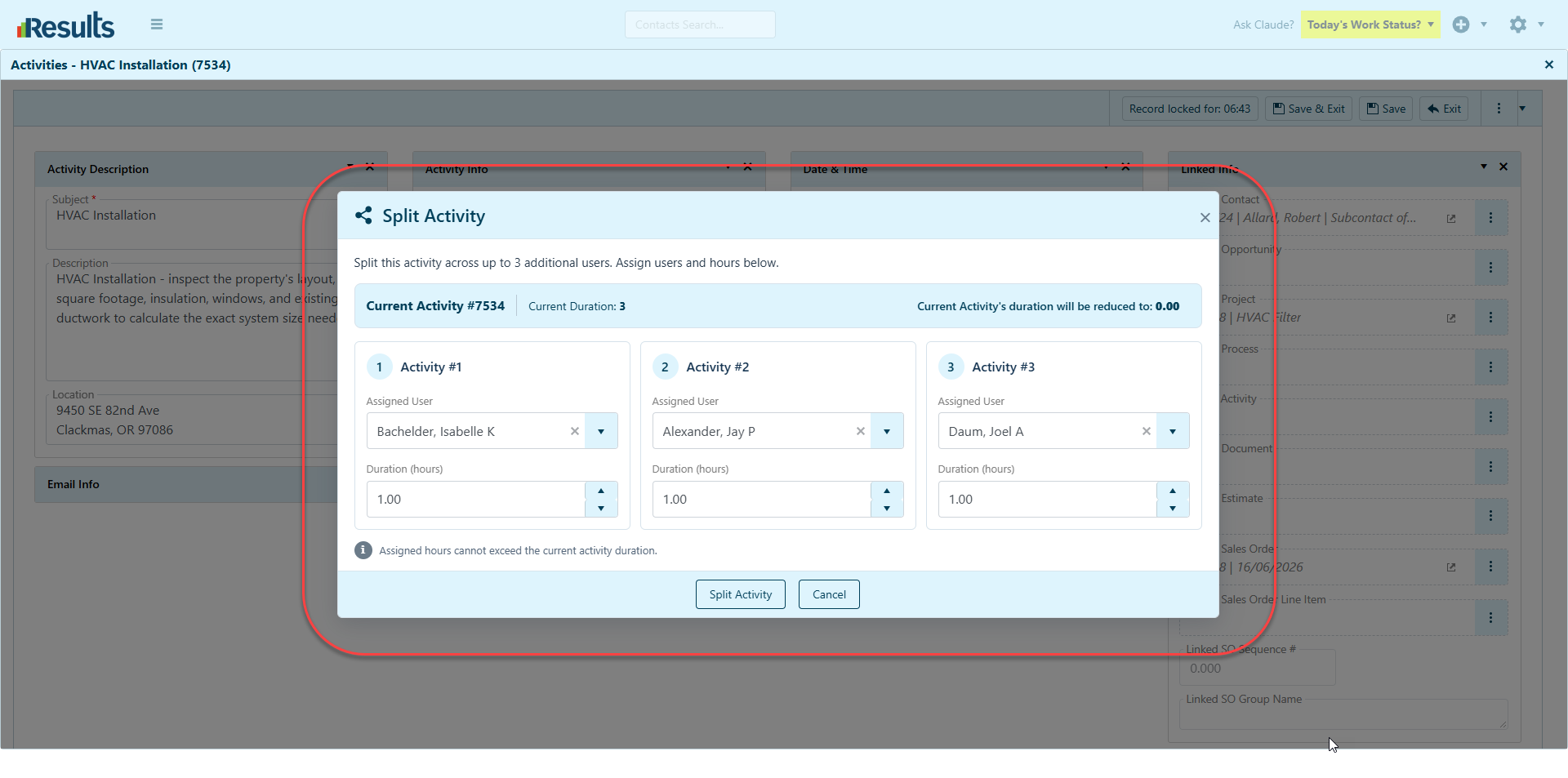
Create Multiple Activities in a Single Operation – Users can create up to three additional activities in one operation by selecting the Assigned To field and specifying the duration for each new activity. This lets users distribute work among multiple team members based on availability and workload.

Automatic Duration Calculation – The end time of each new activity is calculated automatically based on its assigned duration. Results deducts any time allocated to new activities from the original activity’s duration, ensuring the total assigned time never exceeds the original duration.

If the original activity’s duration becomes zero, Results prompts the user to confirm that the change is intentional before proceeding.

Flexible Activity Splitting – Use the Split Activity feature multiple times on the same activity to create additional assignments as needed.

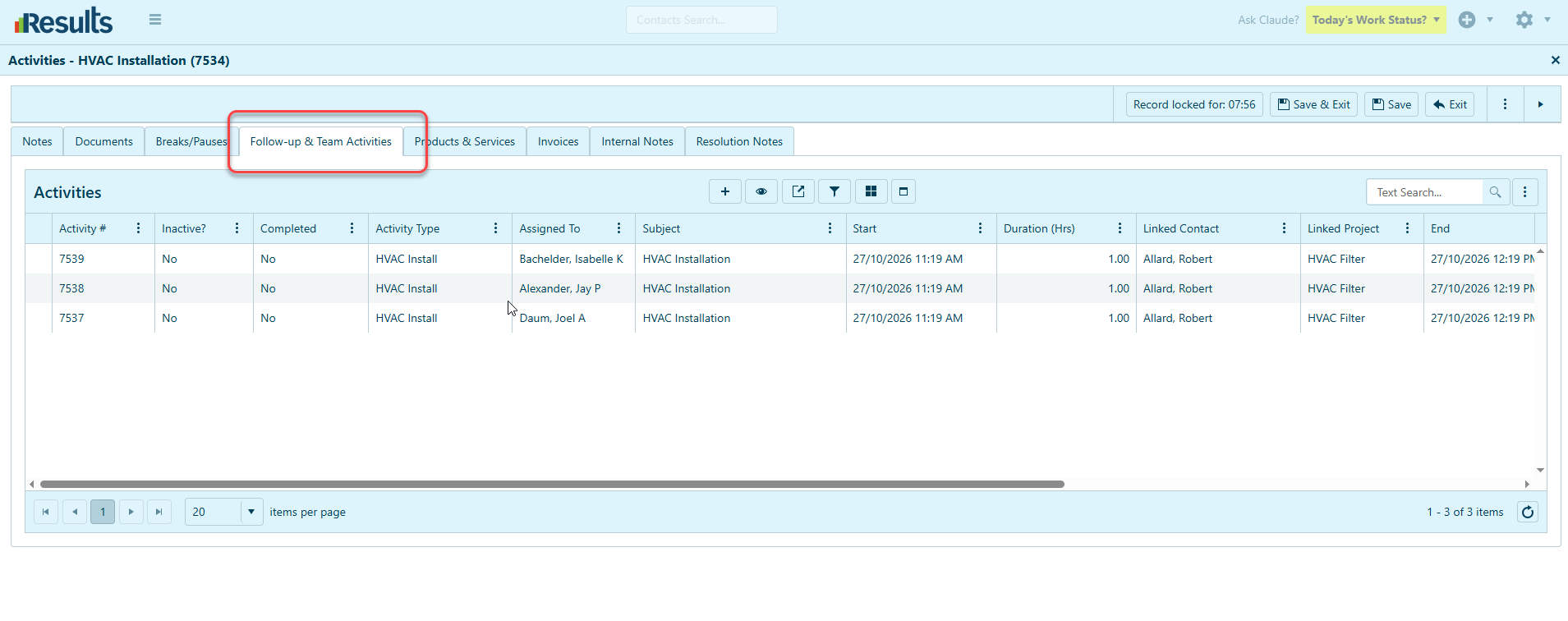
Automatic Follow-Up & Teams Updates – To make the connection between the original activity and its assignments clear, newly created activities are automatically added to the Follow-Up & Teams grid, with the original activity listed as the Parent Activity.

Preservation of Activity Details – Newly created activities inherit the original activity’s start date and time. Results do not duplicate related items, such as Products & Services, attached documents, teams, pauses, breaks, and other associated items. Splitting an activity also does not trigger any processes.

Why This Matters?

Better Workload Distribution – Teams can divide an activity among multiple team members, making it easier to distribute responsibilities and manage workloads.

Improved Scheduling Accuracy – Automatic end-time calculation and duration adjustments help ensure that assigned work stays within the original activity’s allocated time.

Flexible Team Assignments – Splitting an activity more than once gives users more flexibility when they need additional assignments.

Clear Activity Relationships – Automatically linking newly created activities to the original Parent Activity improves visibility and helps users track related assignments.
Controlled and Consistent Workflow – Duration validation and confirmation prompts help prevent accidental allocation beyond the original activity’s duration, while avoiding unintended duplication of associated records or triggering additional processes.

Standard Payment Receipt Enhancement

Results includes a Standard Payment Receipt in the Payments module, giving users a convenient way to generate and access a standardized receipt for payment records. Standard Payment Receipt –...

FSM Portal Job Card Quick Access Enhancements

Results now provides improved navigation on the FSM Portal with new Quick Access buttons on the Job Card, allowing users to jump directly to key sections of a job. These shortcuts help field service...

Create a QB Job Along with an Opportunity or a Project

Results makes it easier to create QuickBooks (QB) Jobs from Parent Contact records. New menu options let you create a QB Job along with an Opportunity or Project. These enhancements simplify record...

Unit Price and Cost Decimal Precision Enhancements

Greater precision and flexibility in managing financial values with a new setting in Admin Settings > Billing Settings. This enhancement lets users configure up to five decimal places for Unit...

Quantity Decimal Precision Enhancements

Greater precision and flexibility in managing quantities are available in Admin Settings > Billing Settings. This enhancement allows users to configure the number of decimal places displayed for...

Expanded User Permissions and Key Utilities Access

Results provides administrators with greater control over user access to key utilities and integration configurations. New permission options have been added to the Users module, making it easier to...

Streamlined Refund Processing in Results Payments Integration

Results Payments Integration now provides a more streamlined way to process and track Refunds directly from Results. With the new “Issue Refund” functionality and enhanced transaction tracking,...

Generate Payment Links for Deposits

Results Payments Integration now makes it easier to collect Deposit payments directly from Projects. With the new Generate Payment Link for Deposit option, users can generate a secure payment link...

Who’s Working Module Enhancements

Results offers greater flexibility and convenience in the Who’s Working module, with enhancements to how Assigned Activity information is displayed and how users manage settings.Default Assigned...

Pricing Group Items Data Manager

Results introduces enhanced tools for handling Pricing Groups through the new Pricing Group Items Data Manager. Users can efficiently view, edit, and manage items within a Pricing Group directly via...