Generate Payment Links for Deposits

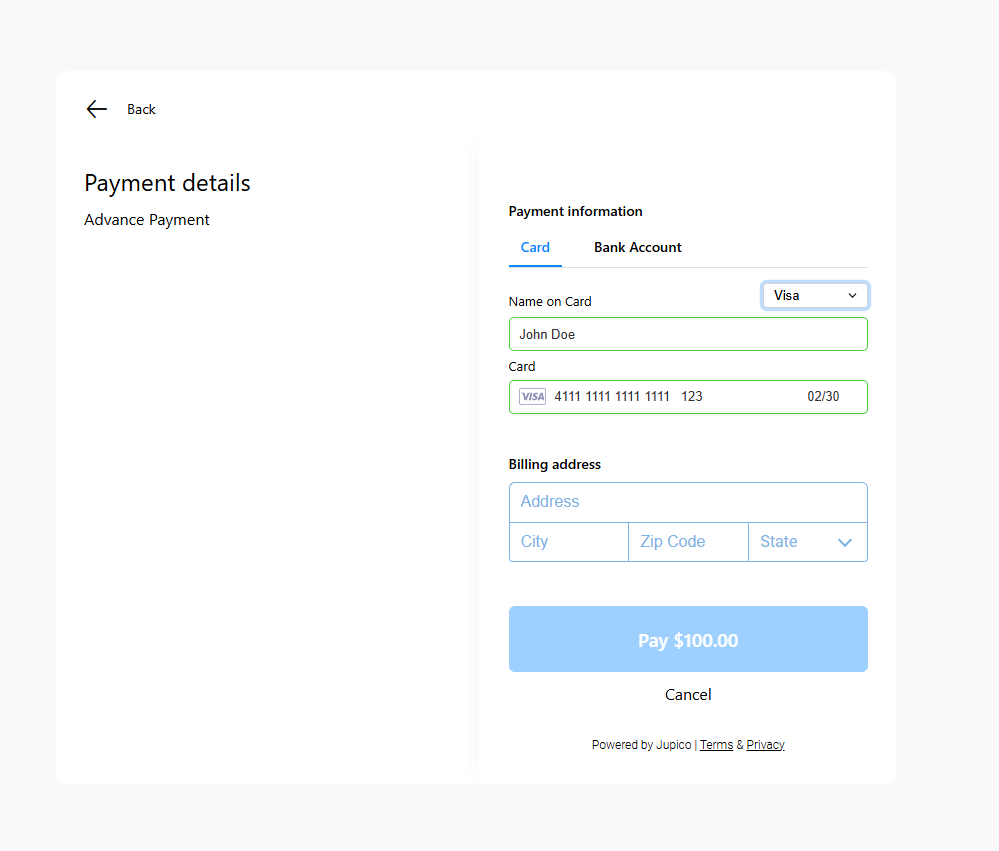
Results Payments Integration now makes it easier to collect Deposit payments directly from Projects. With the new Generate Payment Link for Deposit option, users can generate a secure payment link for a specified deposit amount without first creating an Invoice.

What's New?

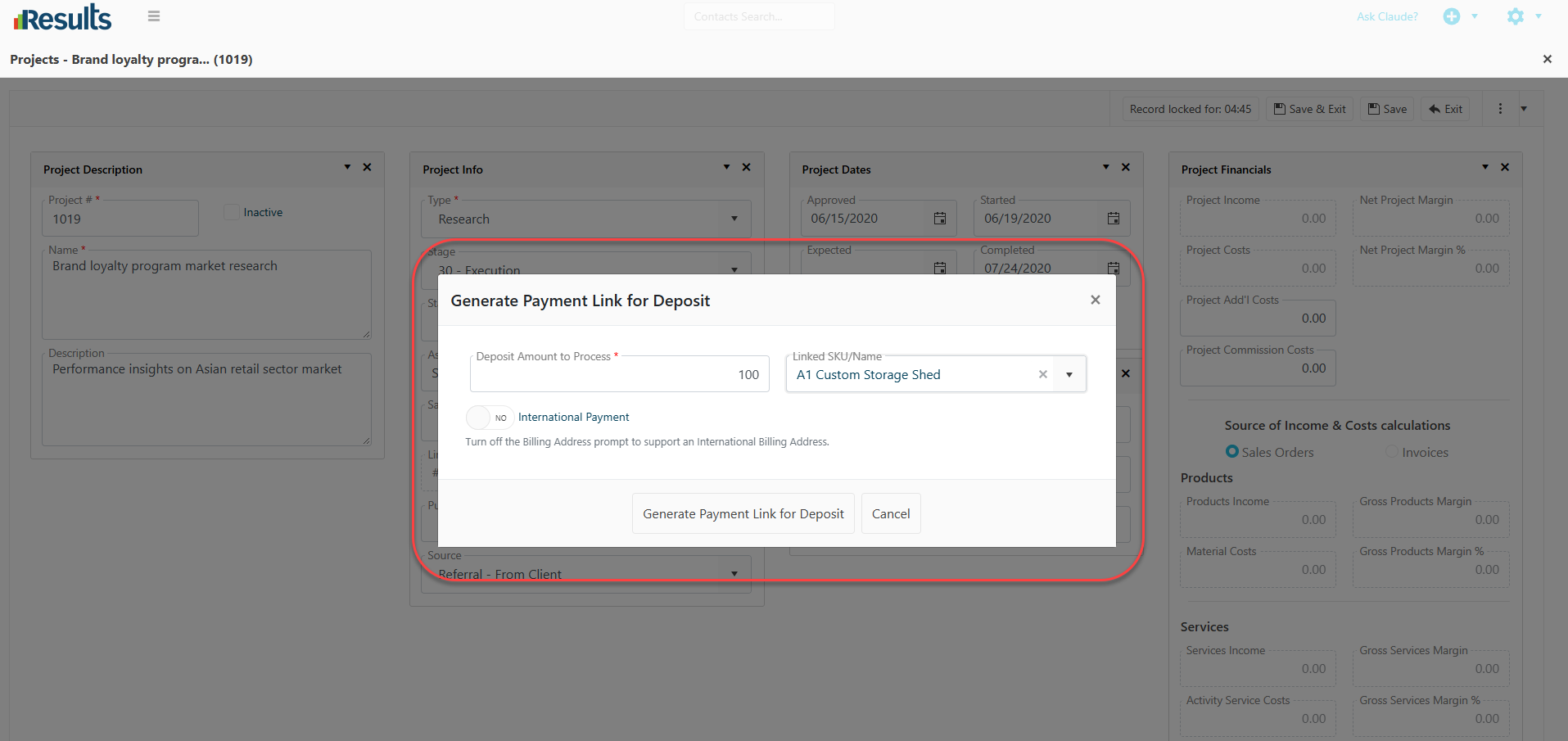
Generate Payment Link for Deposit – A new Generate Payment Link for Deposit option is available to the Project. When selected, users can generate a payment link for the required deposit amount. A pop-up will display the following fields:

    • Linked SKU – Optional field to associate a specific SKU with the deposit.
    • Deposit Amount to Process – Required field to specify the deposit amount to be collected.
    • International Billing Address – A new toggle is available to support international billing addresses.

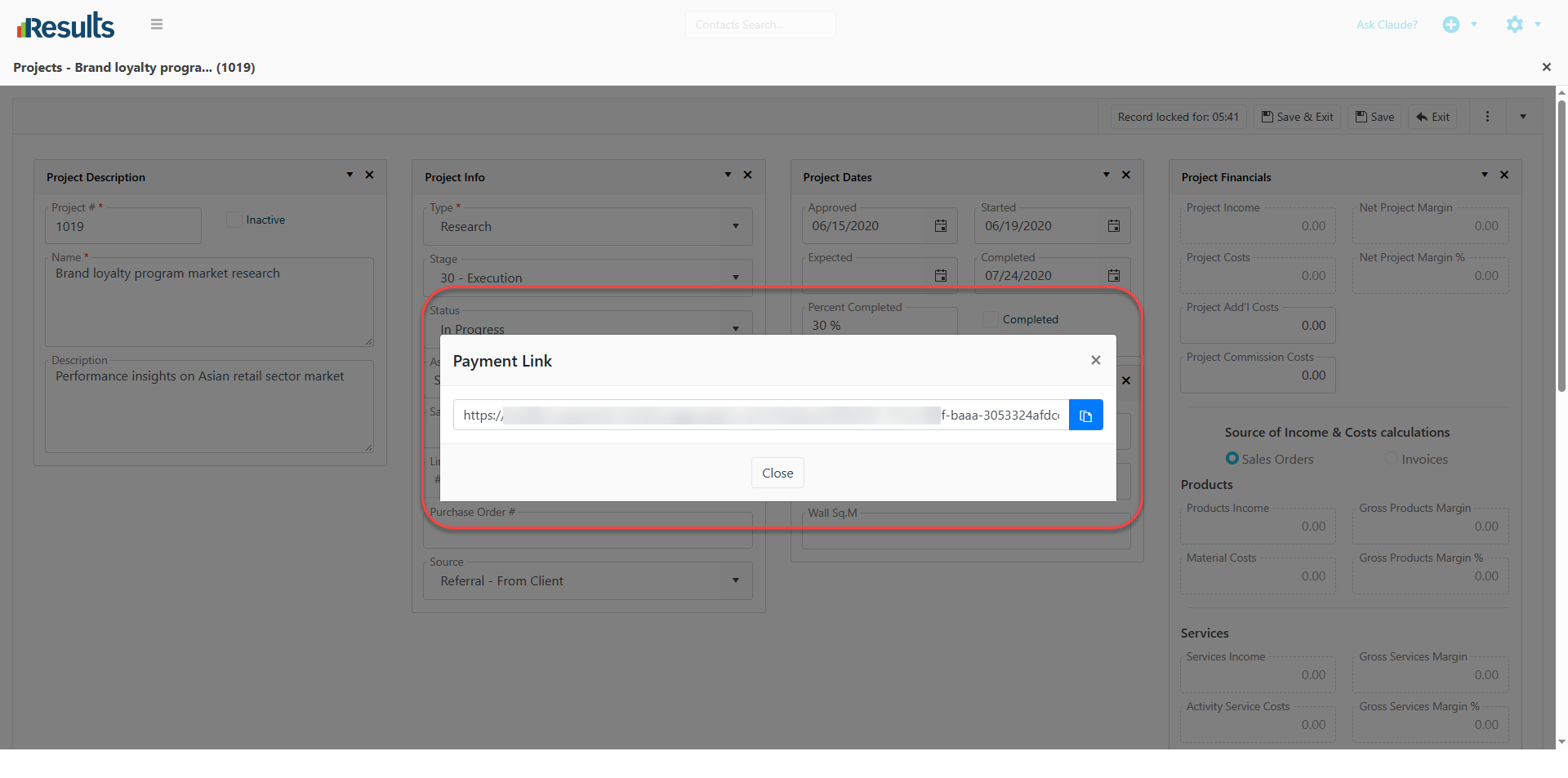
Once confirmed, Results generates a payment link for the specified deposit amount.


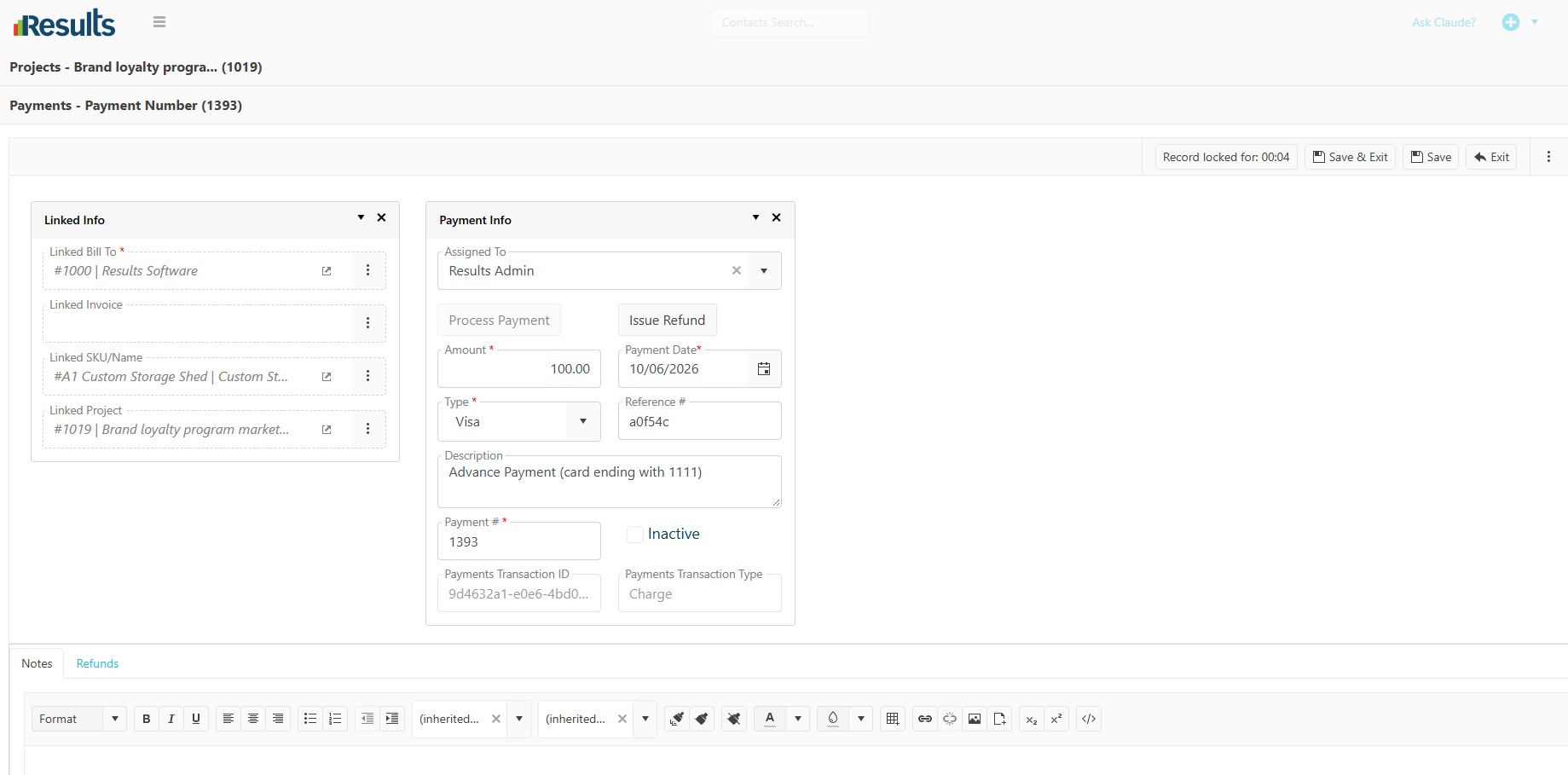
Automatic Payment Record Creation – When a customer completes the payment using the generated link, Results will automatically create a Payment record for the deposit. The Payment record will automatically include:
    • Linked Bill To
    • Linked Project
    • Lined SKU (when provided)
    • Payment Amount
    • Other relevant payment details
The Linked Bill To and Linked Project will automatically populate from the Project, providing the same streamlined experience currently available when a payment is made through the payment links generated from Invoices.

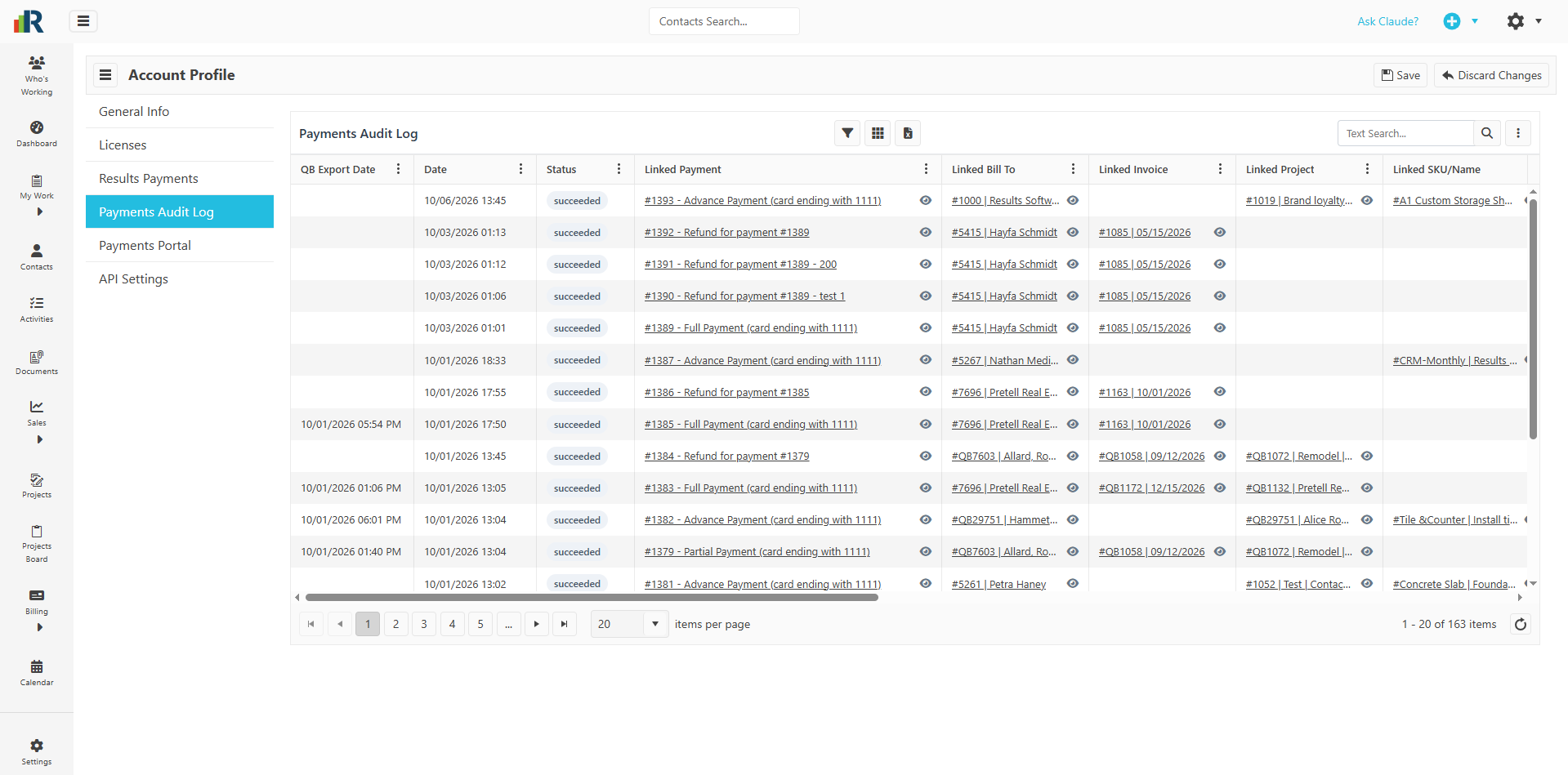
Payment Audit Tracking  –
A corresponding payment entry will also be created in the Audit Log, providing a clear record of the deposit payment and supporting improved payment tracking and visibility.
Why This Matters?

  • Simplify Deposit Collection – Generate a payment link directly from a Project, making it easier to collect deposits without additional manual steps.

  • Reduce Manual Data Entry – Project and billing information are automatically carried into the Payment record, reducing the need to manually enter or associate payment details.

  • Support Flexible Billing – The optional Linked SKU and International Billing Address toggle provide additional flexibility for different payment scenarios.

  • Improve Payment Tracking – Automatically created Payment records and Audit Log entries provide greater visibility into deposits collected through payment links.

  • Streamline the Payment Process – From generating the payment link to automatically recording the completed deposit, the enhanced workflow helps make payment collection faster and more efficient.

  • Proper Transfer of Deposit Information to QuickBooks – When the Deposit is received, it will be automatically sent to QuickBooks as a Sales Receipt with the Linked SKU for the line item, so it is captured properly in QuickBooks as a Deposit.
Standard Payment Receipt Enhancement

Results includes a Standard Payment Receipt in the Payments module, giving users a convenient way to generate and access a standardized receipt for payment records. Standard Payment Receipt –...

FSM Portal Job Card Quick Access Enhancements

Results now provides improved navigation on the FSM Portal with new Quick Access buttons on the Job Card, allowing users to jump directly to key sections of a job. These shortcuts help field service...

Create a QB Job Along with an Opportunity or a Project

Results makes it easier to create QuickBooks (QB) Jobs from Parent Contact records. New menu options let you create a QB Job along with an Opportunity or Project. These enhancements simplify record...

Unit Price and Cost Decimal Precision Enhancements

Greater precision and flexibility in managing financial values with a new setting in Admin Settings > Billing Settings. This enhancement lets users configure up to five decimal places for Unit...

Quantity Decimal Precision Enhancements

Greater precision and flexibility in managing quantities are available in Admin Settings > Billing Settings. This enhancement allows users to configure the number of decimal places displayed for...

Split Activity – Simplifying Team Assignments and Scheduling

The Split Activity feature in Results provides greater flexibility in activity management, allowing users to divide an existing activity into up to three additional activities and assign them to...

Expanded User Permissions and Key Utilities Access

Results provides administrators with greater control over user access to key utilities and integration configurations. New permission options have been added to the Users module, making it easier to...

Streamlined Refund Processing in Results Payments Integration

Results Payments Integration now provides a more streamlined way to process and track Refunds directly from Results. With the new “Issue Refund” functionality and enhanced transaction tracking,...

Generate Payment Links for Deposits

Results Payments Integration now makes it easier to collect Deposit payments directly from Projects. With the new Generate Payment Link for Deposit option, users can generate a secure payment link...

Who’s Working Module Enhancements

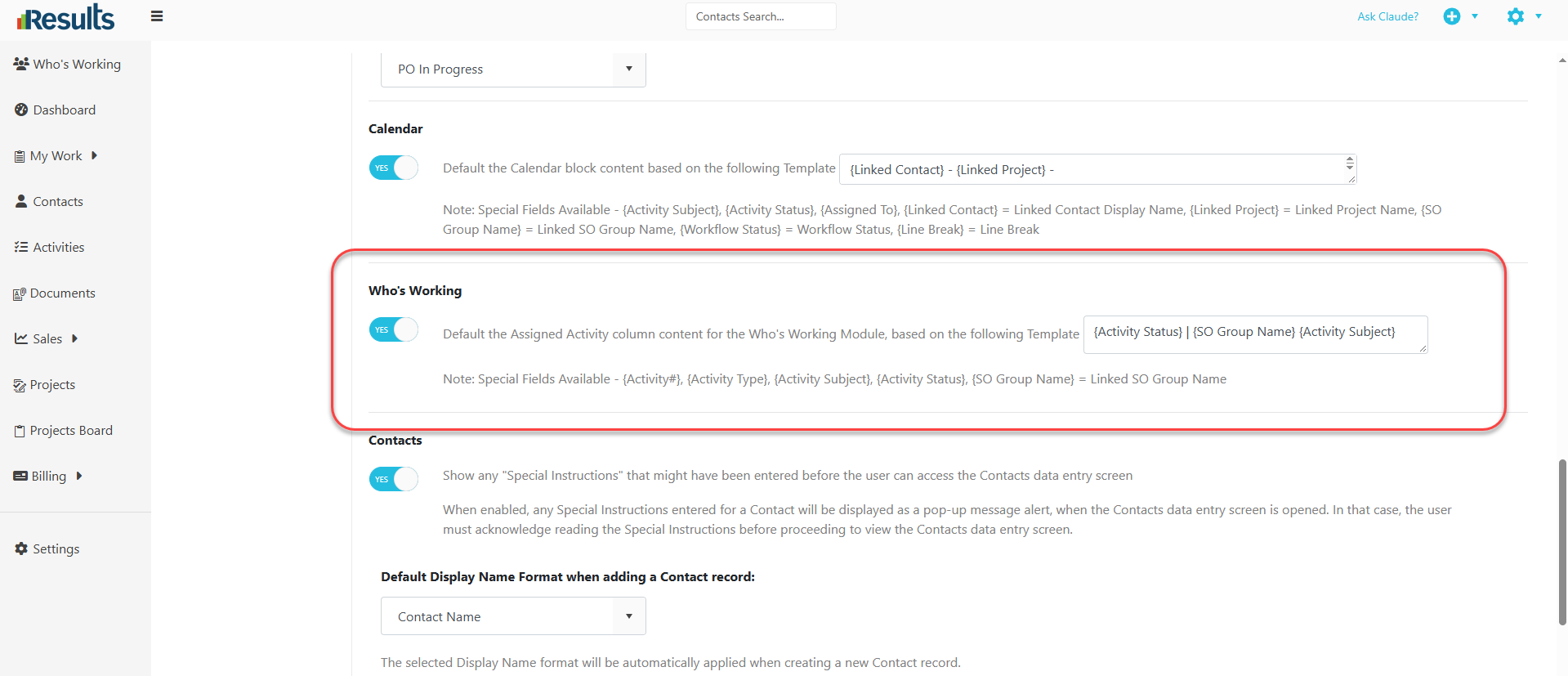
Results offers greater flexibility and convenience in the Who’s Working module, with enhancements to how Assigned Activity information is displayed and how users manage settings.Default Assigned...

Who’s Working Module Enhancements

Results offers greater flexibility and convenience in the Who’s Working module, with enhancements to how Assigned Activity information is displayed and how users manage settings.

What's New?

Default Assigned Activity Display – We added a new Admin setting toggle to the Who’s Working module, mirroring the existing setting in the Calendar module. This setting lets administrators control the information displayed for the Assigned Activity. The toggle is off by default and supports the following fields:

  • Activity #
  • Activity Type
  • Activity Subject
  • Activity Status
  • Sales Order Group Name— Displays the Linked SO Group Name

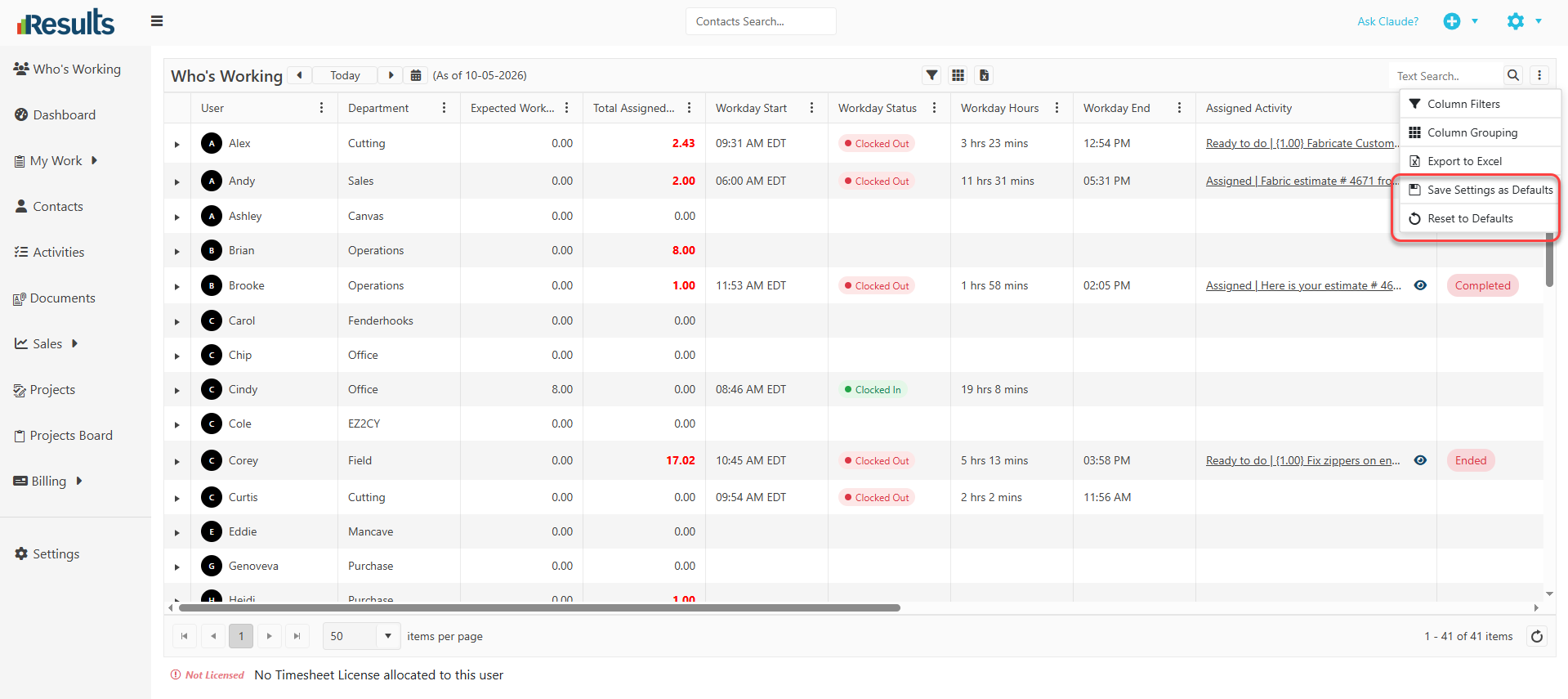
Save Settings as Default – The Who’s Working module now includes the ability to Save Settings as Default. This lets users save their preferred column settings and filters, so they apply automatically, reducing the need to reconfigure the module each time.

Why This Matters?

  • More Control Over Activity Display – Administrators can customize the information shown for Assigned Activities based on the needs of their team.

  • Improved Visibility – With options such as Activity Type, Subject, Status, and Linked SO Group Name, users can quickly identify relevant activity details directly from the Who’s Working module.

  • Personalized User Experience – The Save Settings as Default option allows users to maintain their preferred configuration for a more consistent experience.

  • Reduced Reconfiguration – Users no longer need to repeatedly adjust their Who’s Working settings, helping streamline daily workflows.

Standard Payment Receipt Enhancement

Results includes a Standard Payment Receipt in the Payments module, giving users a convenient way to generate and access a standardized receipt for payment records. Standard Payment Receipt –...

FSM Portal Job Card Quick Access Enhancements

Results now provides improved navigation on the FSM Portal with new Quick Access buttons on the Job Card, allowing users to jump directly to key sections of a job. These shortcuts help field service...

Create a QB Job Along with an Opportunity or a Project

Results makes it easier to create QuickBooks (QB) Jobs from Parent Contact records. New menu options let you create a QB Job along with an Opportunity or Project. These enhancements simplify record...

Unit Price and Cost Decimal Precision Enhancements

Greater precision and flexibility in managing financial values with a new setting in Admin Settings > Billing Settings. This enhancement lets users configure up to five decimal places for Unit...

Quantity Decimal Precision Enhancements

Greater precision and flexibility in managing quantities are available in Admin Settings > Billing Settings. This enhancement allows users to configure the number of decimal places displayed for...

Split Activity – Simplifying Team Assignments and Scheduling

The Split Activity feature in Results provides greater flexibility in activity management, allowing users to divide an existing activity into up to three additional activities and assign them to...

Expanded User Permissions and Key Utilities Access

Results provides administrators with greater control over user access to key utilities and integration configurations. New permission options have been added to the Users module, making it easier to...

Streamlined Refund Processing in Results Payments Integration

Results Payments Integration now provides a more streamlined way to process and track Refunds directly from Results. With the new “Issue Refund” functionality and enhanced transaction tracking,...

Generate Payment Links for Deposits

Results Payments Integration now makes it easier to collect Deposit payments directly from Projects. With the new Generate Payment Link for Deposit option, users can generate a secure payment link...

Who’s Working Module Enhancements

Results offers greater flexibility and convenience in the Who’s Working module, with enhancements to how Assigned Activity information is displayed and how users manage settings.Default Assigned...
Results August 2026 Newsletter

Results August 2026 Newsletter

The August newsletter introduces several updates to enhance workload visibility, streamline invoicing, and improve scheduling and communication across Results. Notable changes include a new Who’s Working module that provides managers with a centralized overview of active users and their assigned Activities; a Generate T&M Invoice from SO feature that creates invoices based on actual Activity Duration and SKU usage; the ability to submit Deposit Payments to QuickBooks Desktop (QBD) as Sales Receipts via a new Linked SKU/Name field; a Show in Calendar option for viewing Project and Sales Order Activities directly within the Calendar View; a Complete Job & Schedule Remainder feature that automatically schedules remaining tasks as follow-up Activities; configurable Communication Templates for Activity Assignment notifications; and a new Pricing Group Items Data Manager for easier management of Pricing Group items. These updates aim to reduce manual work, improve billing accuracy, and help organizations manage workload, invoicing, scheduling, and pricing data more effectively.

Pricing Group Items Data Manager

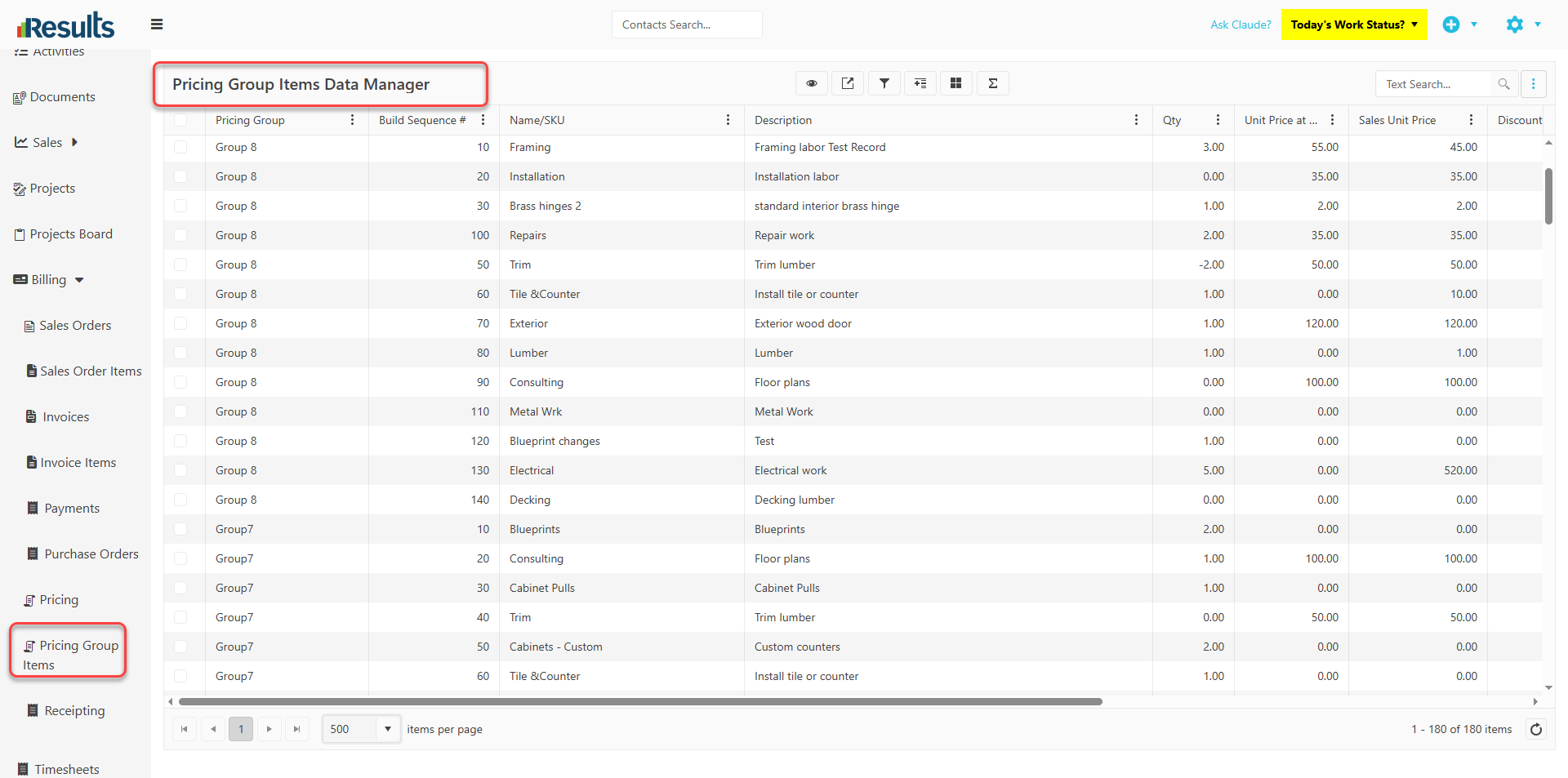
Results introduces enhanced tools for handling Pricing Groups through the new Pricing Group Items Data Manager. Users can efficiently view, edit, and manage items within a Pricing Group directly via the new Data Manager.

What's New?

Pricing Group Items Data Manager – A new Pricing Group Items Data Manager has been added to simplify the management and maintenance of items associated with Pricing Groups. Users can now:

  • View Pricing Group Items in the Data Manager.
  • Open and edit individual Group Items directly.
  • Open Group Items in a new window for easier access and multitasking.
  • More efficiently manage Group Item information without having to navigate through multiple screens.

Why This Matters?

  • Simplify Pricing Group Management – Manage Pricing Group Items from a dedicated Data Manager for a more streamlined workflow.

  • Quickly Edit Items – Open and update Group Items directly as needed.

  • Find SKUs used across Groups – Search for an SKU or Sort by SKUs to see how they are used across Groups, and look for consistent pricing or large discounts across the Groups they are used in.

  • Improve Navigation – The Open in New Window option makes it easier to work with Group Items while keeping the main Data Manager accessible.

  • Save Time – Reduce navigation and clicks when reviewing and maintaining Pricing Group Items.

Standard Payment Receipt Enhancement

Results includes a Standard Payment Receipt in the Payments module, giving users a convenient way to generate and access a standardized receipt for payment records. Standard Payment Receipt –...

FSM Portal Job Card Quick Access Enhancements

Results now provides improved navigation on the FSM Portal with new Quick Access buttons on the Job Card, allowing users to jump directly to key sections of a job. These shortcuts help field service...

Create a QB Job Along with an Opportunity or a Project

Results makes it easier to create QuickBooks (QB) Jobs from Parent Contact records. New menu options let you create a QB Job along with an Opportunity or Project. These enhancements simplify record...

Unit Price and Cost Decimal Precision Enhancements

Greater precision and flexibility in managing financial values with a new setting in Admin Settings > Billing Settings. This enhancement lets users configure up to five decimal places for Unit...

Quantity Decimal Precision Enhancements

Greater precision and flexibility in managing quantities are available in Admin Settings > Billing Settings. This enhancement allows users to configure the number of decimal places displayed for...

Split Activity – Simplifying Team Assignments and Scheduling

The Split Activity feature in Results provides greater flexibility in activity management, allowing users to divide an existing activity into up to three additional activities and assign them to...

Expanded User Permissions and Key Utilities Access

Results provides administrators with greater control over user access to key utilities and integration configurations. New permission options have been added to the Users module, making it easier to...

Streamlined Refund Processing in Results Payments Integration

Results Payments Integration now provides a more streamlined way to process and track Refunds directly from Results. With the new “Issue Refund” functionality and enhanced transaction tracking,...

Generate Payment Links for Deposits

Results Payments Integration now makes it easier to collect Deposit payments directly from Projects. With the new Generate Payment Link for Deposit option, users can generate a secure payment link...

Who’s Working Module Enhancements

Results offers greater flexibility and convenience in the Who’s Working module, with enhancements to how Assigned Activity information is displayed and how users manage settings.Default Assigned...

Activity Assignment Notifications

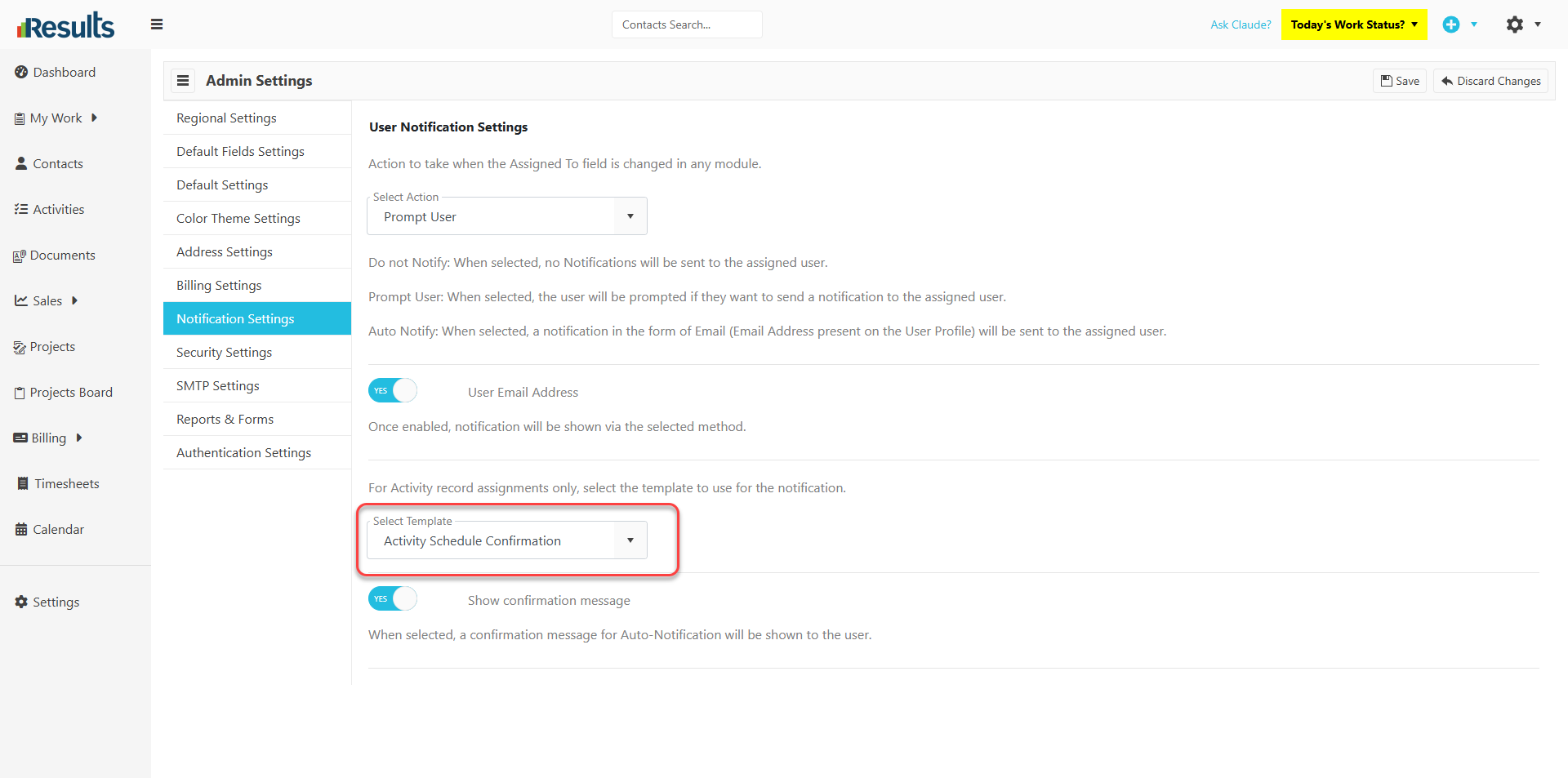
Results provides more flexibility in how users are notified when an Activity is assigned or reassigned. Administrators can select a Communication Template to use when sending assignment notifications to the Assigned User.

What's New?

Activity Assignment Notification Template – A new option has been introduced in Admin Settings > Notification Settings, allowing administrators to choose a Communication Template for Activity Assignment Notifications. When the Assigned To user changes for an Activity:

  • Results automatically sends an email notification to the newly Assigned User.
  • The email is created based on the Communication Template chosen in Admin Settings.
  • Organizations can customize the notification content to align with their communication and workflow requirements.

Why This Matters?

  • Consistent Communication – Use a standardized Communication Template for Activity Assignment Notifications across the organization.

  • Keep Users Informed – Ensure Assigned Users are automatically notified when an Activity is assigned to or reassigned to them.

  • Customize Notifications – Administrators can select the template that best fits their organization’s notification and communication needs.

  • Reduce Manual Follow-Up – Automated email notifications help keep users informed without requiring manual communication whenever an Activity assignment changes.

Standard Payment Receipt Enhancement

Results includes a Standard Payment Receipt in the Payments module, giving users a convenient way to generate and access a standardized receipt for payment records. Standard Payment Receipt –...

FSM Portal Job Card Quick Access Enhancements

Results now provides improved navigation on the FSM Portal with new Quick Access buttons on the Job Card, allowing users to jump directly to key sections of a job. These shortcuts help field service...

Create a QB Job Along with an Opportunity or a Project

Results makes it easier to create QuickBooks (QB) Jobs from Parent Contact records. New menu options let you create a QB Job along with an Opportunity or Project. These enhancements simplify record...

Unit Price and Cost Decimal Precision Enhancements

Greater precision and flexibility in managing financial values with a new setting in Admin Settings > Billing Settings. This enhancement lets users configure up to five decimal places for Unit...

Quantity Decimal Precision Enhancements

Greater precision and flexibility in managing quantities are available in Admin Settings > Billing Settings. This enhancement allows users to configure the number of decimal places displayed for...

Split Activity – Simplifying Team Assignments and Scheduling

The Split Activity feature in Results provides greater flexibility in activity management, allowing users to divide an existing activity into up to three additional activities and assign them to...

Expanded User Permissions and Key Utilities Access

Results provides administrators with greater control over user access to key utilities and integration configurations. New permission options have been added to the Users module, making it easier to...

Streamlined Refund Processing in Results Payments Integration

Results Payments Integration now provides a more streamlined way to process and track Refunds directly from Results. With the new “Issue Refund” functionality and enhanced transaction tracking,...

Generate Payment Links for Deposits

Results Payments Integration now makes it easier to collect Deposit payments directly from Projects. With the new Generate Payment Link for Deposit option, users can generate a secure payment link...

Who’s Working Module Enhancements

Results offers greater flexibility and convenience in the Who’s Working module, with enhancements to how Assigned Activity information is displayed and how users manage settings.Default Assigned...