Generate T&M Invoices Directly from Sales Orders

Results makes it easier to create Time & Material (T&M) Invoices directly from Sales Orders. With the new Generate T&M Invoice from SO option, users can generate an invoice based on the actual work performed and materials used, rather than relying solely on the original Sales Order quantities.

What's New?

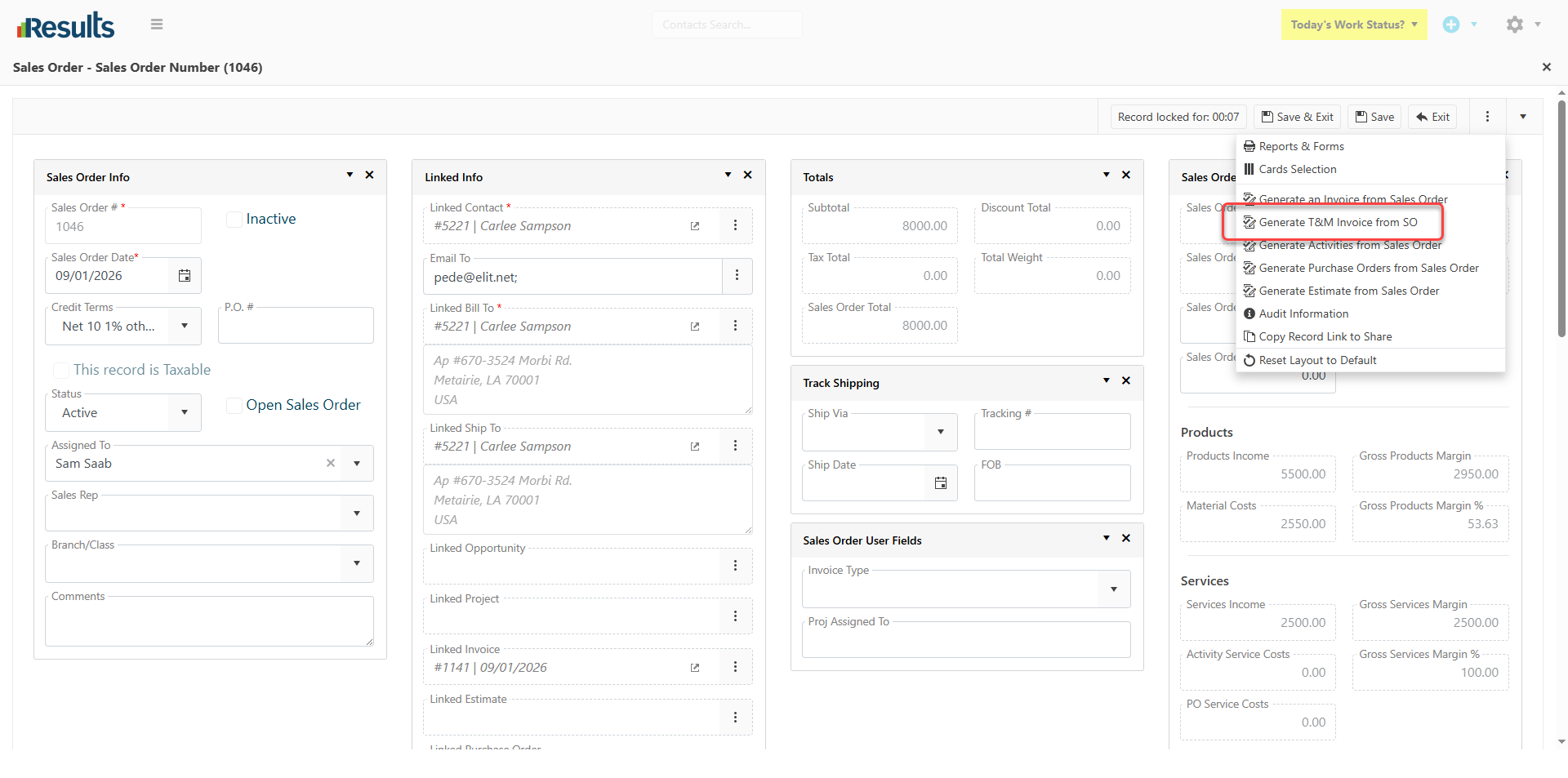
Generate T&M Invoice from SO – We added a new “Generate T&M Invoice from SO” option to the 3-dot menu on Sales Orders. When selected, Results reviews the actual activity data and uses it to generate the T&M Invoice. The process will:

  • Use the actual Duration from Activities to determine invoice quantities
  • Identify the SKUs used
  • Include newly added Services and Products in the T&M Invoice, based on Quantity Used.
  • Account for deleted Services and Products marked for no billing in the T&M Invoice.
  • Support both Services and Products on the same Sales Order.

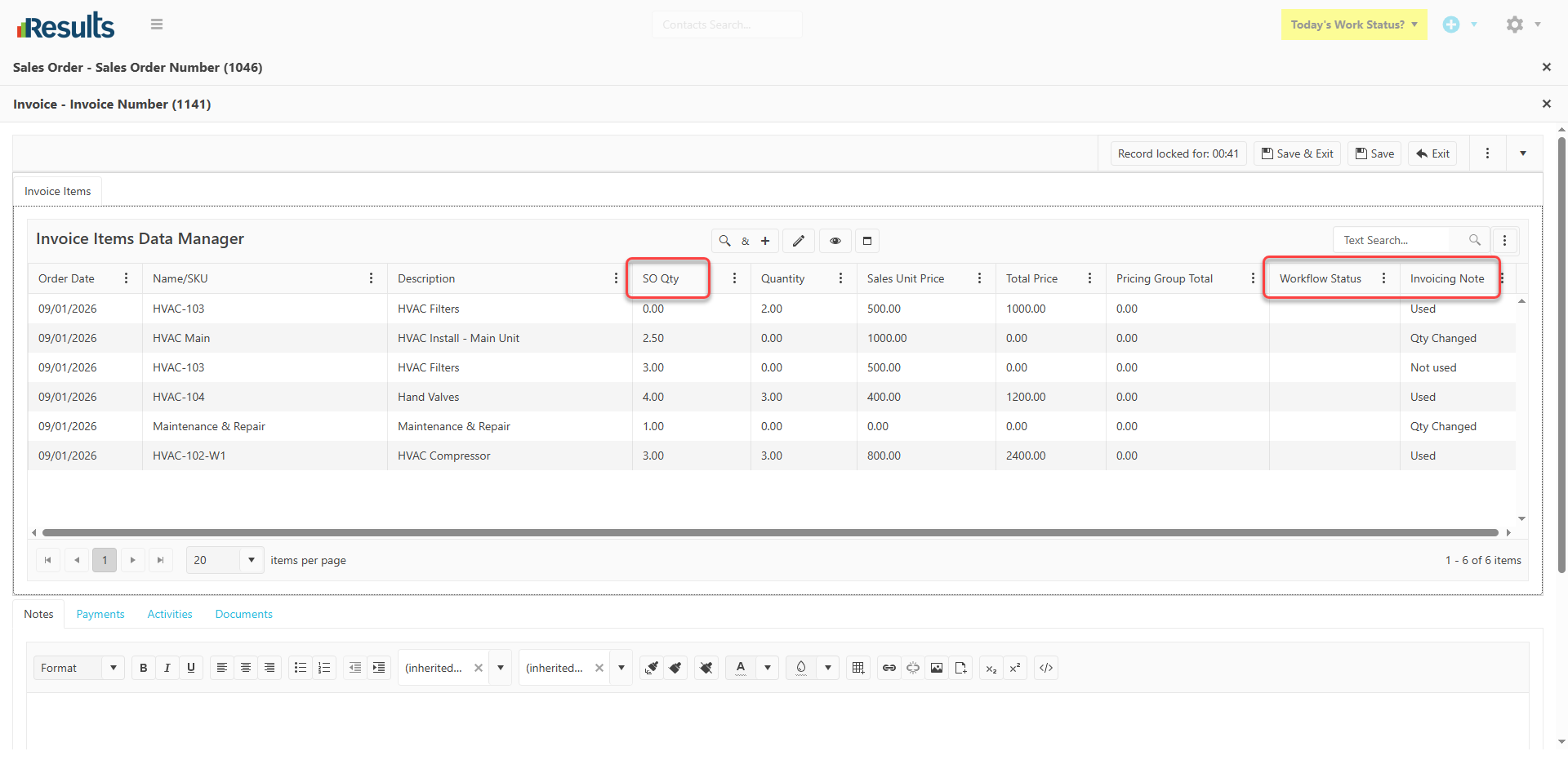
New Data Tracking Columns – The T&M Invoice generation process also introduces the following columns to provide greater visibility into the source data and how the T&M Invoice was updated:

  • SO_Qty stores the original Sales Order quantity, whereas the actual Duration is loaded as the invoice quantity and applied in the relevant calculations.
  • Workflow_Status: Captures the actual Workflow Status from the corresponding Activity record.
  • Invoice_Notes: Stores messages and details identified during the review of actual activity data.
Why This Matters?

  • Invoice Based on Actual Work – Generate invoices using the actual time spent and materials used, helping ensure billing more accurately reflects the work performed.
  • Reduce Manual Adjustments – Automatically update for modifications to Services and Products, such as additions or deletions after the initial Sales Order creation.
  • Improve Billing Accuracy – Use actual Activity Duration and SKU usage to calculate invoice quantities, rather than relying solely on the original Sales Order quantities.
  • Greater Visibility – The new Workflow_Status and Invoice_Notes fields provide additional context about the Activities and actual data used during invoice generation.
  • Streamline the Invoicing Process – Generate a T&M Invoice directly from the Sales Order, reducing the need to manually review Activities and update invoice line items.
Expanded User Permissions and Key Utilities Access

Results provides administrators with greater control over user access to key utilities and integration configurations. New permission options have been added to the Users module, making it easier to...

Streamlined Refund Processing in Results Payments Integration

Results Payments Integration now provides a more streamlined way to process and track Refunds directly from Results. With the new “Issue Refund” functionality and enhanced transaction tracking,...

Generate Payment Links for Deposits

Results Payments Integration now makes it easier to collect Deposit payments directly from Projects. With the new Generate Payment Link for Deposit option, users can generate a secure payment link...

Who’s Working Module Enhancements

Results offers greater flexibility and convenience in the Who’s Working module, with enhancements to how Assigned Activity information is displayed and how users manage settings.Default Assigned...

Pricing Group Items Data Manager

Results introduces enhanced tools for handling Pricing Groups through the new Pricing Group Items Data Manager. Users can efficiently view, edit, and manage items within a Pricing Group directly via...

Activity Assignment Notifications

Results provides more flexibility in how users are notified when an Activity is assigned or reassigned. Administrators can select a Communication Template to use when sending assignment...

Complete Job & Schedule Remaining Work

The new Complete Job & Schedule Remainder option allows users to manage Activities after job completion and before all planned work is performed by completing the current Activity and automatically...

View Project & Sales Order Activities Directly in the Calendar

Users can now visualize scheduled Activities with the new Show in Calendar option in the Projects and Sales Orders Activities Grid, with quick access to the Calendar View to see Activities enabled...

Submit Deposit Payments to QuickBooks Desktop as Sales Receipts

Results now allows submitting Deposit Payments directly to QuickBooks as Sales Receipts. A new Linked SKU/Name field has been added to the Payments data entry screen, allowing users to specify the...

Who’s Working – See Who’s Working and What They’re Working On

Results introduces a new Who’s Working module that provides managers and users with a centralized view of Active Users and their current work. Accessible via the Gear Icon (and soon from the main...