Select & Add Multiple SKUs Across Financial Modules

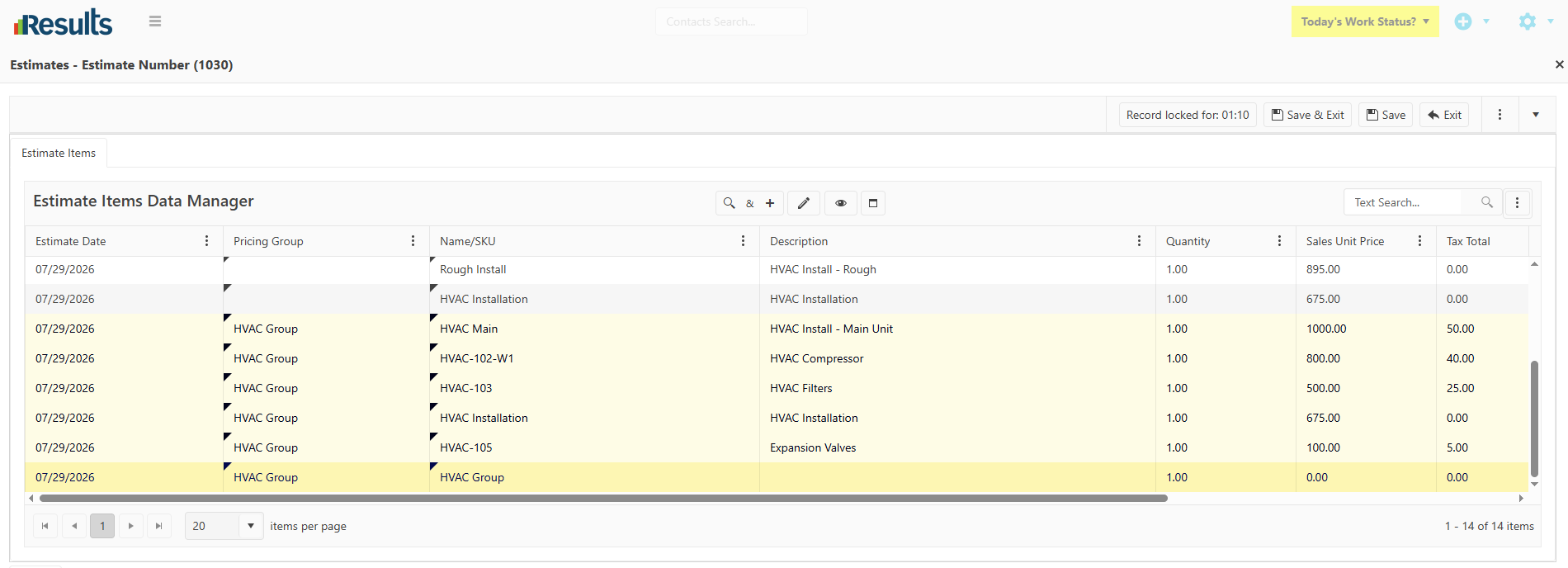
With Results, users can build financial transactions by selecting and adding multiple SKUs at the same time. Instead of adding products one by one, users can select multiple SKUs in a single step when creating Estimates, Sales Orders, Invoices, and Purchase Orders, streamlining line-item entry and improving efficiency.

What's New?

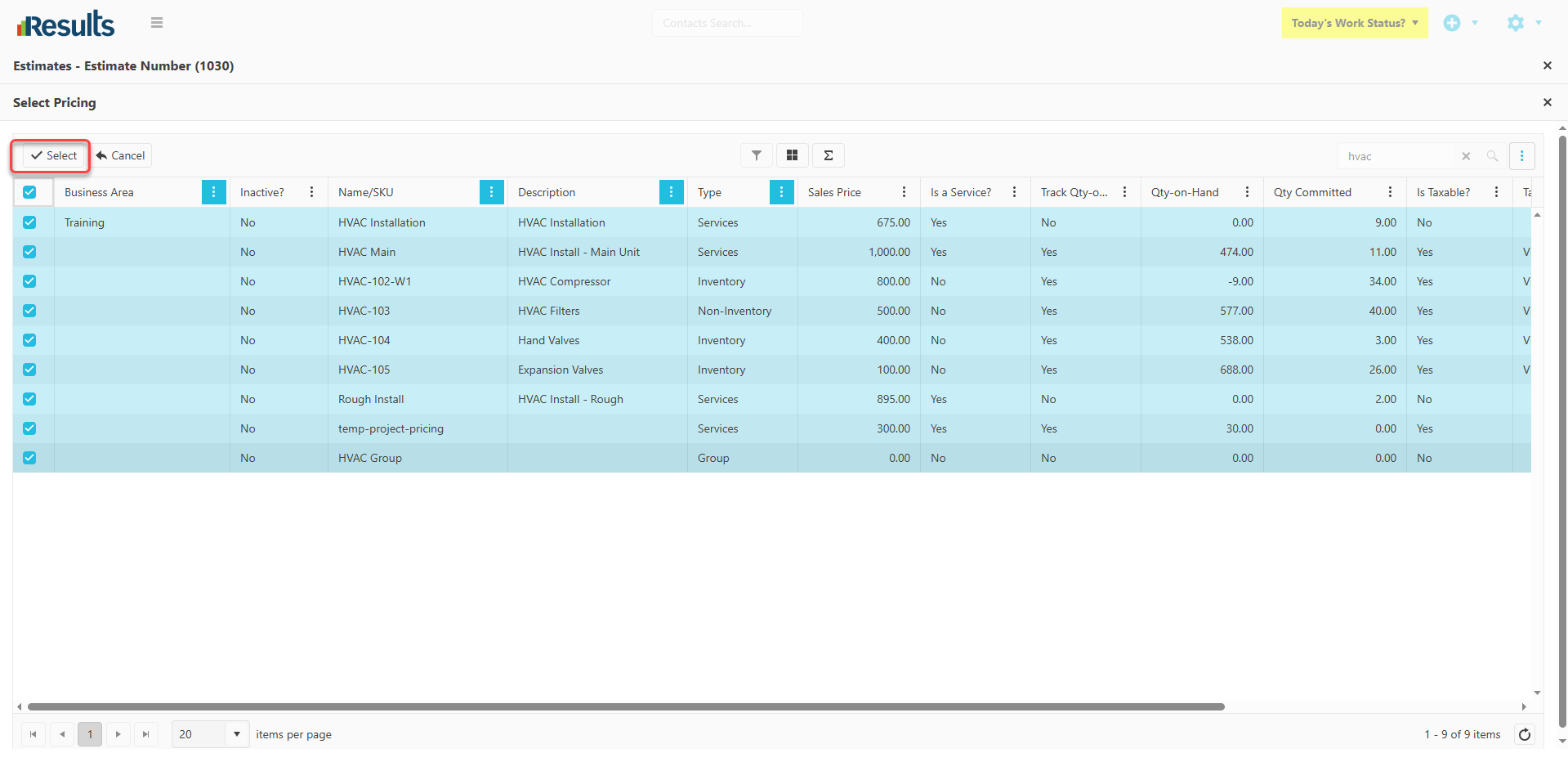
    • Multi-Select SKU Support – When users click the Search & Select button at the top-of-the-Line Items grid, the SKU selection window now includes:
      • A new checkbox column for selecting multiple SKUs.
      • The ability to select one or more SKUs at the same time.
      • A Select & Add option that inserts all of the selected SKUs into
        the transaction in a single step.
    • Available Across Financial Modules – This enhancement is now available when adding line items to:
      • Estimates
      • Sales Orders
      • Invoices
      • Purchase Orders

Why This Matters?

  • Create Transactions Faster – Add multiple products in one action instead of selecting and adding each SKU individually.

  • Reduce Repetitive Data Entry – Minimize clicks and streamline the process of creating transactions with multiple line items.

  • Consistent Experience Across Modules – The same multi-select functionality is available across Estimates, Sales Orders, Invoices, and Purchase Orders, providing a familiar workflow throughout Results.

  • Improve Productivity – Spend less time adding products and more time completing transactions, especially when working with larger Estimates, Sales Orders, Invoices, or Purchase Orders.

Standard Payment Receipt Enhancement

Results includes a Standard Payment Receipt in the Payments module, giving users a convenient way to generate and access a standardized receipt for payment records. Standard Payment Receipt –...

FSM Portal Job Card Quick Access Enhancements

Results now provides improved navigation on the FSM Portal with new Quick Access buttons on the Job Card, allowing users to jump directly to key sections of a job. These shortcuts help field service...

Create a QB Job Along with an Opportunity or a Project

Results makes it easier to create QuickBooks (QB) Jobs from Parent Contact records. New menu options let you create a QB Job along with an Opportunity or Project. These enhancements simplify record...

Unit Price and Cost Decimal Precision Enhancements

Greater precision and flexibility in managing financial values with a new setting in Admin Settings > Billing Settings. This enhancement lets users configure up to five decimal places for Unit...

Quantity Decimal Precision Enhancements

Greater precision and flexibility in managing quantities are available in Admin Settings > Billing Settings. This enhancement allows users to configure the number of decimal places displayed for...

Split Activity – Simplifying Team Assignments and Scheduling

The Split Activity feature in Results provides greater flexibility in activity management, allowing users to divide an existing activity into up to three additional activities and assign them to...

Expanded User Permissions and Key Utilities Access

Results provides administrators with greater control over user access to key utilities and integration configurations. New permission options have been added to the Users module, making it easier to...

Streamlined Refund Processing in Results Payments Integration

Results Payments Integration now provides a more streamlined way to process and track Refunds directly from Results. With the new “Issue Refund” functionality and enhanced transaction tracking,...

Generate Payment Links for Deposits

Results Payments Integration now makes it easier to collect Deposit payments directly from Projects. With the new Generate Payment Link for Deposit option, users can generate a secure payment link...

Who’s Working Module Enhancements

Results offers greater flexibility and convenience in the Who’s Working module, with enhancements to how Assigned Activity information is displayed and how users manage settings.Default Assigned...

Results June 2026 Newsletter

Results June 2026 Newsletter

This month’s newsletter introduces enhancements that expand system flexibility, improve financial synchronization, simplify data management, and streamline everyday workflows across Results. Highlights include expanded Project and Sales Opportunity User Fields for greater customization; configurable QuickBooks Desktop re-export options that keep Invoices and Estimates synchronized after updates; a new nested Products & Services grid within the Activities Data Manager for improved visibility and reporting; Maximize/Restore functionality with sticky headers for more efficient data management; configurable Timesheet display formats that support both decimal and hours-and-minutes views; and enhanced Product & Service selection in the FSM Portal with a new searchable selection grid. Together, these enhancements improve usability, reduce manual effort, and give organizations greater flexibility in managing projects, financial data, field service operations, and daily business processes.

Enhanced Product & Service Selection in the FSM Portal

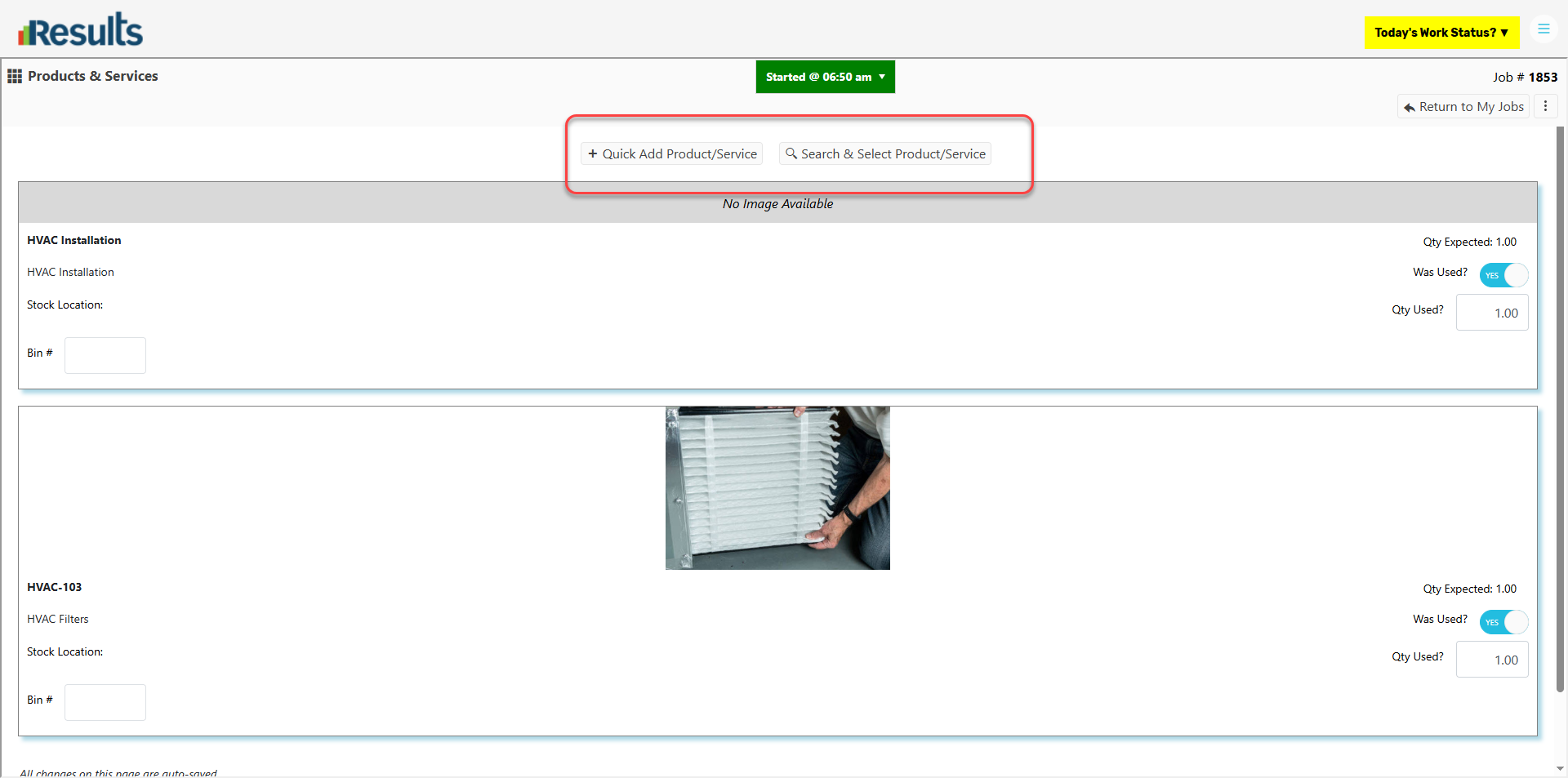
The Products & Services tab in the FSM and Team Portal provides users with more flexible options for adding Products and Services to a Job. In addition to the existing quick entry method, users can now search and select Products and Services from a dedicated selection grid, making the process faster and more efficient.

What's New?

  • Renamed Quick Add Option – The ‘Add Product/Service’ button is now the ‘Quick Add Product/Service’ to better indicate its function. This feature enables users to swiftly add a new Product or Service to the Job via a dropdown menu that automatically searches the SKU/Name and Description fields for the keyword entered.

  • New Search & Select Button – The Search & Select Product/Service button in the Products & Services tab opens the Products & Services Select Grid, enabling users to search for, based on any column in the Pricing module, and choose the needed Product and Service to include in the Job.

  • Two Flexible Ways to Add Products & Services – Users can now select between the Quick Add Product/Service to swiftly insert a Product or Service via the dropdown or the Search & Select Product/Service to find and add existing Products and Services from the selection grid.

Why This Matters?

  • Greater Flexibility – Users can choose the method that best fits their workflow, whether they want to quickly add a Product or Service or search for existing records by any field in the Pricing module.

  • Comprehensive Search Options – The new Search & Select option makes it easier to find the needed Product or Service by allowing searches across any field in the Pricing module.
  • Improved Accuracy – Selecting Products and Services directly from the grid helps users quickly find the right items, resulting in more consistent and efficient searches.

Standard Payment Receipt Enhancement

Results includes a Standard Payment Receipt in the Payments module, giving users a convenient way to generate and access a standardized receipt for payment records. Standard Payment Receipt –...

FSM Portal Job Card Quick Access Enhancements

Results now provides improved navigation on the FSM Portal with new Quick Access buttons on the Job Card, allowing users to jump directly to key sections of a job. These shortcuts help field service...

Create a QB Job Along with an Opportunity or a Project

Results makes it easier to create QuickBooks (QB) Jobs from Parent Contact records. New menu options let you create a QB Job along with an Opportunity or Project. These enhancements simplify record...

Unit Price and Cost Decimal Precision Enhancements

Greater precision and flexibility in managing financial values with a new setting in Admin Settings > Billing Settings. This enhancement lets users configure up to five decimal places for Unit...

Quantity Decimal Precision Enhancements

Greater precision and flexibility in managing quantities are available in Admin Settings > Billing Settings. This enhancement allows users to configure the number of decimal places displayed for...

Split Activity – Simplifying Team Assignments and Scheduling

The Split Activity feature in Results provides greater flexibility in activity management, allowing users to divide an existing activity into up to three additional activities and assign them to...

Expanded User Permissions and Key Utilities Access

Results provides administrators with greater control over user access to key utilities and integration configurations. New permission options have been added to the Users module, making it easier to...

Streamlined Refund Processing in Results Payments Integration

Results Payments Integration now provides a more streamlined way to process and track Refunds directly from Results. With the new “Issue Refund” functionality and enhanced transaction tracking,...

Generate Payment Links for Deposits

Results Payments Integration now makes it easier to collect Deposit payments directly from Projects. With the new Generate Payment Link for Deposit option, users can generate a secure payment link...

Who’s Working Module Enhancements

Results offers greater flexibility and convenience in the Who’s Working module, with enhancements to how Assigned Activity information is displayed and how users manage settings.Default Assigned...

Configurable Time Display Format for Timesheets

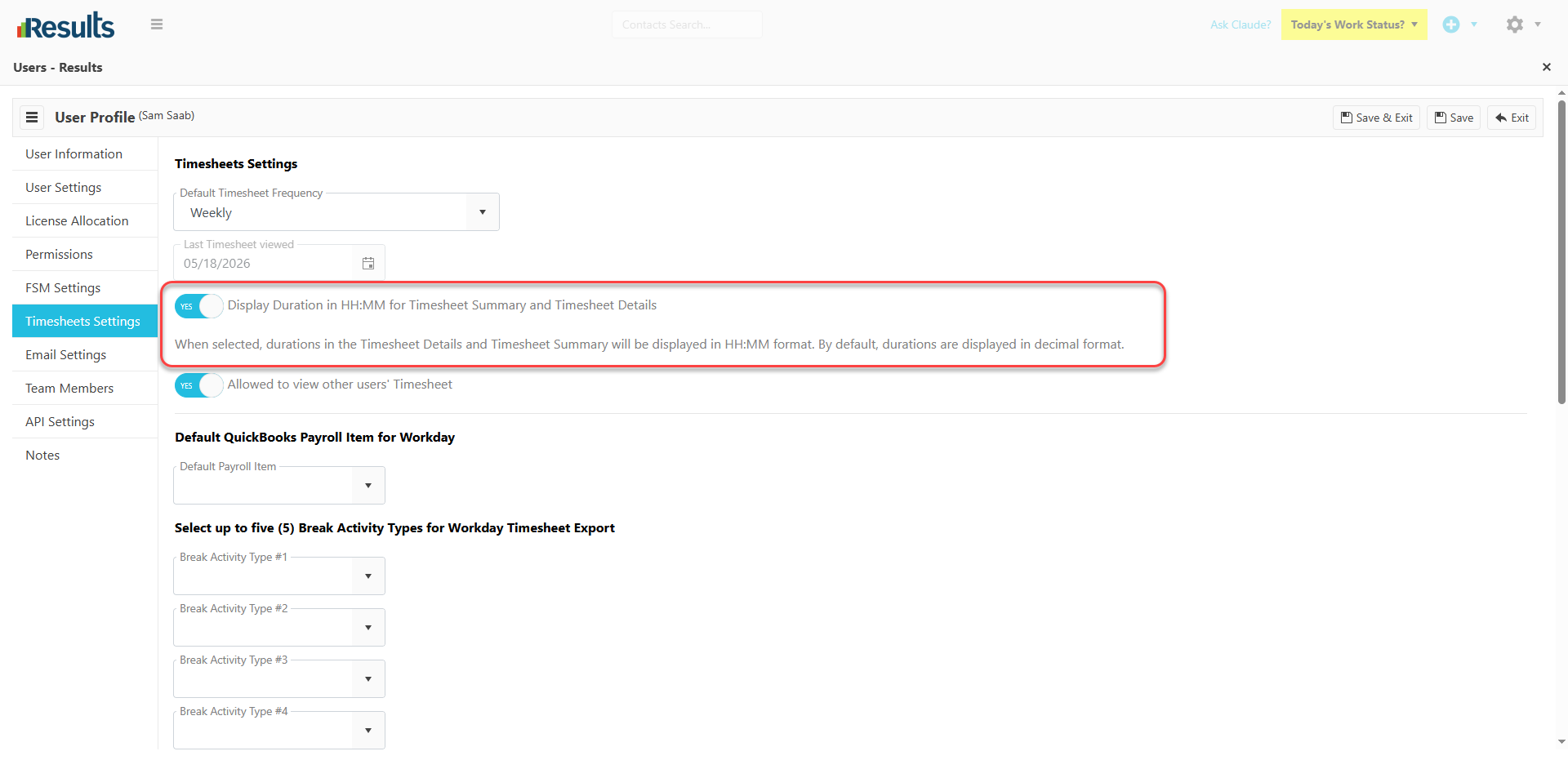
Timesheet Settings offer greater flexibility by allowing organizations to choose how time is displayed, enabling users to view it either in the traditional decimal format or in a more user-friendly hours-and-minutes format.

What's New?

  • Time Display Format Setting – Users can toggle the Timesheet Settings to configure their preferred time display format.

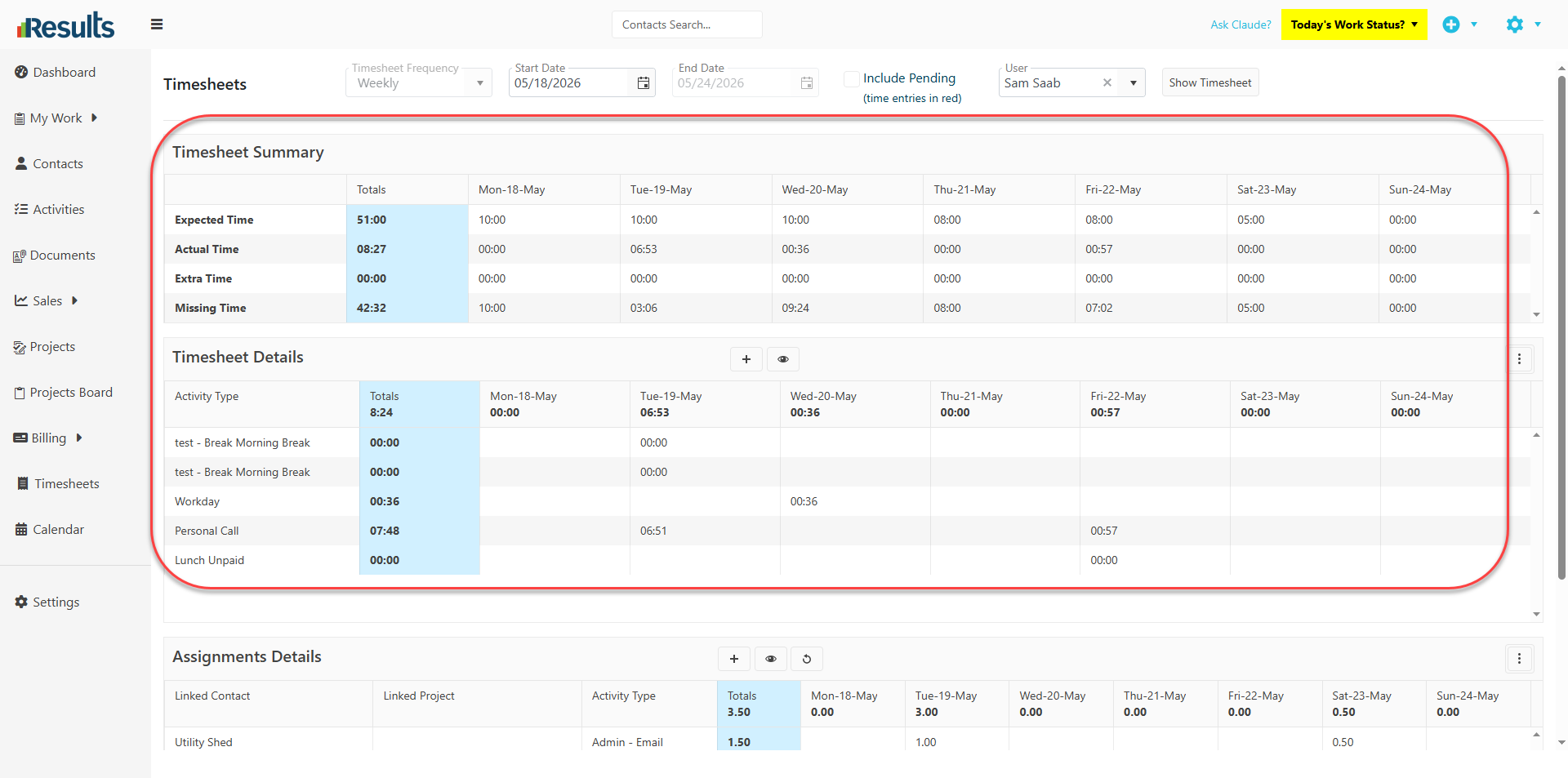
  • Sticky Two Display Options – Users can now choose between two time formats: the default Decimal Hours (e.g., 1.50) or Hours and Minutes (HH:MM) (e.g., 1:30). The default display format remains Decimal Hours, ensuring existing workflows continue without interruption.

  • Applies to Timesheet Screens – The selected format appears on the Timesheet Summary and the Timesheet Details sections of the Timesheets module..

  • Calculation-Based Screens Unchanged – To maintain consistency in calculations and data aggregation, the following areas will continue to display Decimal Hours regardless of the selected format, whether in Assignment Details or Activities Data Manager.

Why This Matters?

  • Improved Readability – Users who prefer a traditional time format can now view hours in HH:MM format, making timesheet entries easier to interpret.

  • Flexible User Experience – Organizations can configure the display format to better match user preferences and business practices while preserving the default decimal format where preferred.
  • Maintains Calculation Accuracy – Calculation-driven screens continue to use decimal hours to ensure that reporting, aggregations, and system calculations remain accurate and consistent.
  • Seamless Adoption – Because Decimal Hours remains the default format, existing users can continue working as usual while organizations adopt the new display option at their own pace.

Standard Payment Receipt Enhancement

Results includes a Standard Payment Receipt in the Payments module, giving users a convenient way to generate and access a standardized receipt for payment records. Standard Payment Receipt –...

FSM Portal Job Card Quick Access Enhancements

Results now provides improved navigation on the FSM Portal with new Quick Access buttons on the Job Card, allowing users to jump directly to key sections of a job. These shortcuts help field service...

Create a QB Job Along with an Opportunity or a Project

Results makes it easier to create QuickBooks (QB) Jobs from Parent Contact records. New menu options let you create a QB Job along with an Opportunity or Project. These enhancements simplify record...

Unit Price and Cost Decimal Precision Enhancements

Greater precision and flexibility in managing financial values with a new setting in Admin Settings > Billing Settings. This enhancement lets users configure up to five decimal places for Unit...

Quantity Decimal Precision Enhancements

Greater precision and flexibility in managing quantities are available in Admin Settings > Billing Settings. This enhancement allows users to configure the number of decimal places displayed for...

Split Activity – Simplifying Team Assignments and Scheduling

The Split Activity feature in Results provides greater flexibility in activity management, allowing users to divide an existing activity into up to three additional activities and assign them to...

Expanded User Permissions and Key Utilities Access

Results provides administrators with greater control over user access to key utilities and integration configurations. New permission options have been added to the Users module, making it easier to...

Streamlined Refund Processing in Results Payments Integration

Results Payments Integration now provides a more streamlined way to process and track Refunds directly from Results. With the new “Issue Refund” functionality and enhanced transaction tracking,...

Generate Payment Links for Deposits

Results Payments Integration now makes it easier to collect Deposit payments directly from Projects. With the new Generate Payment Link for Deposit option, users can generate a secure payment link...

Who’s Working Module Enhancements

Results offers greater flexibility and convenience in the Who’s Working module, with enhancements to how Assigned Activity information is displayed and how users manage settings.Default Assigned...

Maximize & Restore View for Tab Data Managers & Line-Item Grids

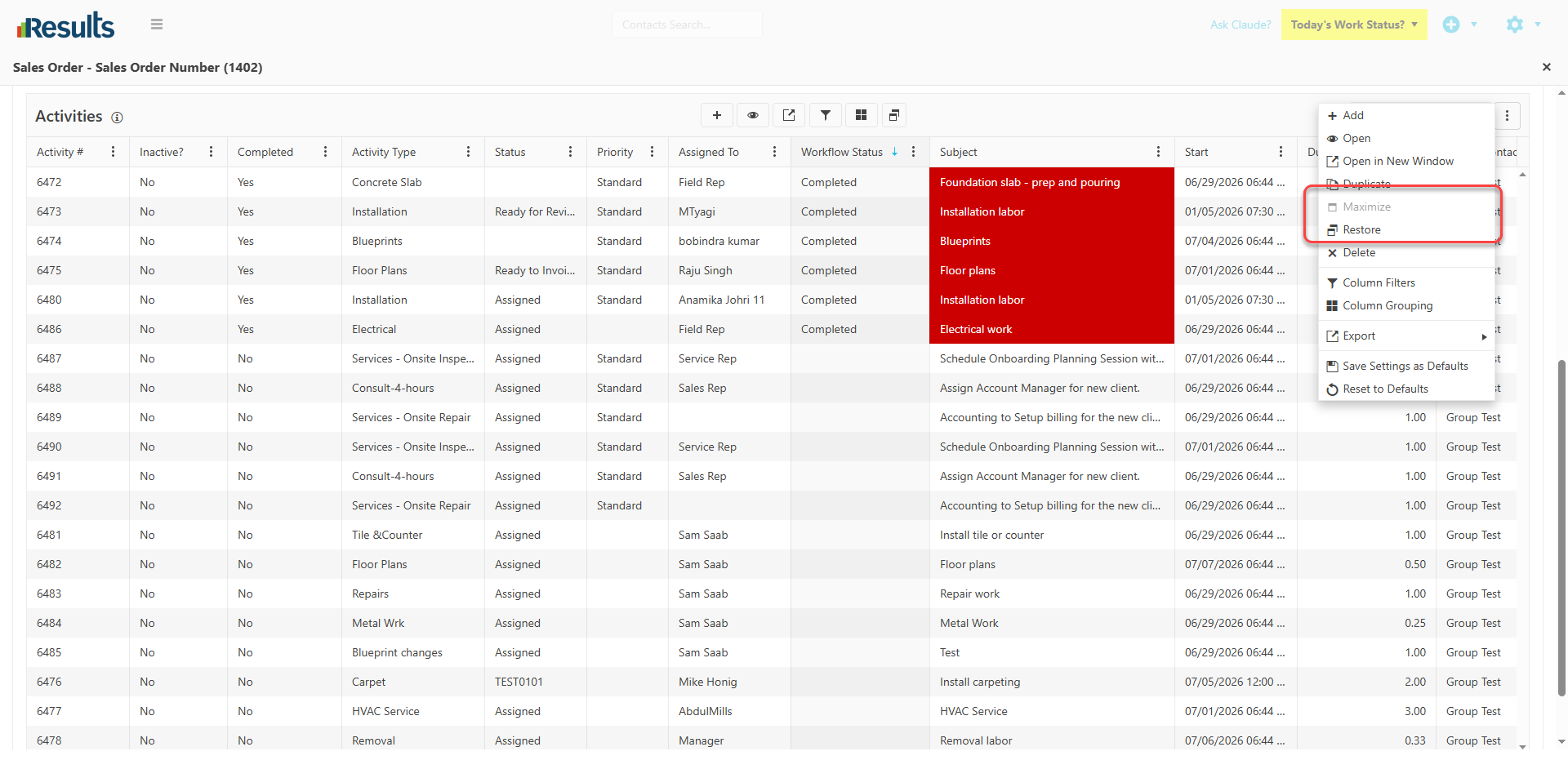
The Maximize/Restore option across Tab Data Managers and Financial Line-Item Grids makes it easier to work with large datasets by expanding the grid to display more records at once. In addition, the header section of expanded grids now remains fixed, ensuring important actions and menus are always accessible while scrolling through these lists.

What's New?

  • Maximize/Restore Grid Option – A new Maximize/Restore button is available to all Tab Data Managers in every module and to Financial Line-Item Grids. Selecting Maximize expands the grid to show the maximum number of rows, while Restore returns the grid to its original size.

  • Sticky Grid Header in Expanded View – When the grid is maximized, the upper part of the Data Manager remains fixed as users scroll through records. This design allows quick access to the column headers, the grid action buttons, the 3-dot menu, and other controls at the top of the Tab or Grid.

Why This Matters?

  • More Workspace, Less Scrolling – Maximizing the grid allows users to view and work with more records at once, improving productivity when managing large datasets.

  • Always-Accessible Actions – With the Tab/Grid header visible, users can access common actions and menu options without scrolling back to the top of the grid.
  • Improved Navigation – Keeping key controls within reach creates a smoother, more efficient experience when reviewing or updating records.
  • Enhanced Usability – The combination of an expanded viewing area and a sticky header makes working in Data Managers and Line-Item Grids faster, more convenient, and more user-friendly.

Standard Payment Receipt Enhancement

Results includes a Standard Payment Receipt in the Payments module, giving users a convenient way to generate and access a standardized receipt for payment records. Standard Payment Receipt –...

FSM Portal Job Card Quick Access Enhancements

Results now provides improved navigation on the FSM Portal with new Quick Access buttons on the Job Card, allowing users to jump directly to key sections of a job. These shortcuts help field service...

Create a QB Job Along with an Opportunity or a Project

Results makes it easier to create QuickBooks (QB) Jobs from Parent Contact records. New menu options let you create a QB Job along with an Opportunity or Project. These enhancements simplify record...

Unit Price and Cost Decimal Precision Enhancements

Greater precision and flexibility in managing financial values with a new setting in Admin Settings > Billing Settings. This enhancement lets users configure up to five decimal places for Unit...

Quantity Decimal Precision Enhancements

Greater precision and flexibility in managing quantities are available in Admin Settings > Billing Settings. This enhancement allows users to configure the number of decimal places displayed for...

Split Activity – Simplifying Team Assignments and Scheduling

The Split Activity feature in Results provides greater flexibility in activity management, allowing users to divide an existing activity into up to three additional activities and assign them to...

Expanded User Permissions and Key Utilities Access

Results provides administrators with greater control over user access to key utilities and integration configurations. New permission options have been added to the Users module, making it easier to...

Streamlined Refund Processing in Results Payments Integration

Results Payments Integration now provides a more streamlined way to process and track Refunds directly from Results. With the new “Issue Refund” functionality and enhanced transaction tracking,...

Generate Payment Links for Deposits

Results Payments Integration now makes it easier to collect Deposit payments directly from Projects. With the new Generate Payment Link for Deposit option, users can generate a secure payment link...

Who’s Working Module Enhancements

Results offers greater flexibility and convenience in the Who’s Working module, with enhancements to how Assigned Activity information is displayed and how users manage settings.Default Assigned...