Select & Add Multiple SKUs Across Financial Modules

With Results, users can build financial transactions by selecting and adding multiple SKUs at the same time. Instead of adding products one by one, users can select multiple SKUs in a single step when creating Estimates, Sales Orders, Invoices, and Purchase Orders, streamlining line-item entry and improving efficiency.

What's New?

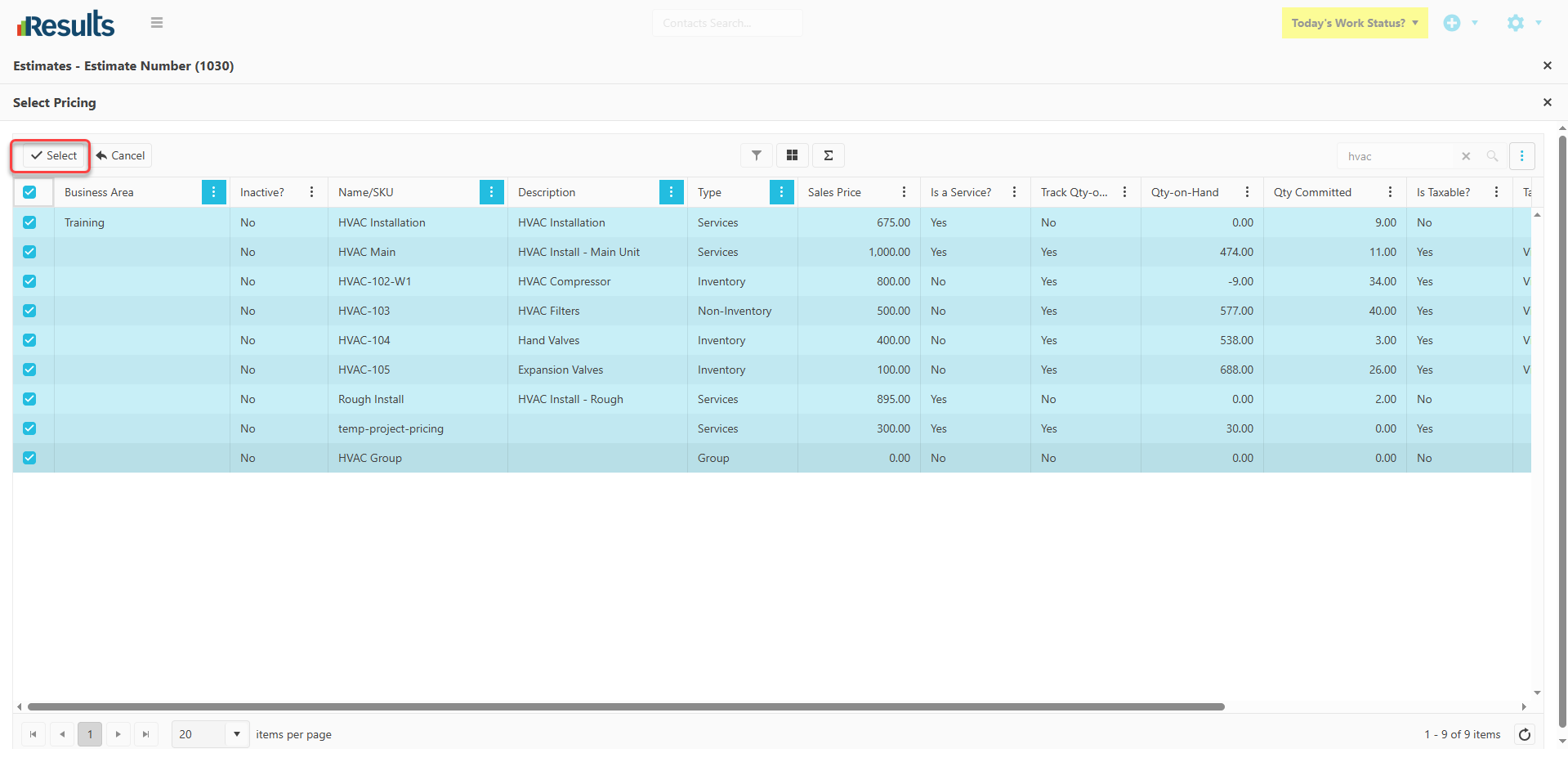
    • Multi-Select SKU Support – When users click the Search & Select button at the top-of-the-Line Items grid, the SKU selection window now includes:
      • A new checkbox column for selecting multiple SKUs.
      • The ability to select one or more SKUs at the same time.
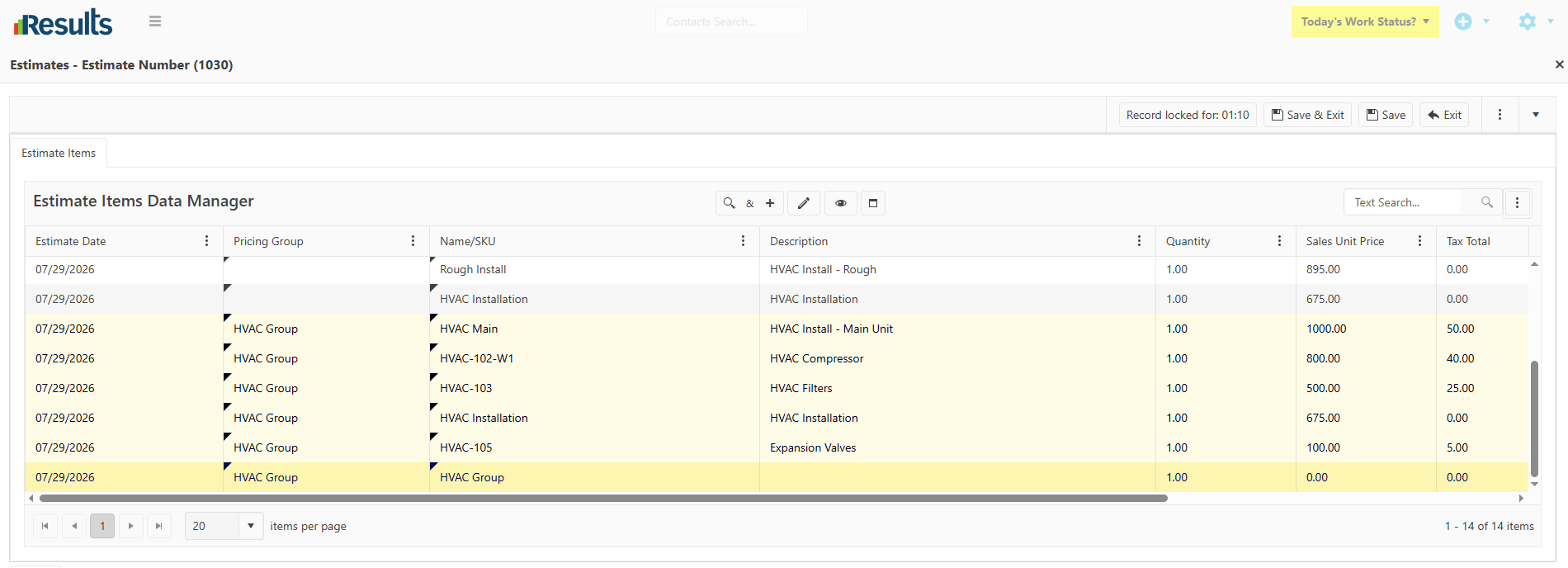
      • A Select & Add option that inserts all of the selected SKUs into
        the transaction in a single step.
    • Available Across Financial Modules – This enhancement is now available when adding line items to:
      • Estimates
      • Sales Orders
      • Invoices
      • Purchase Orders

Why This Matters?

  • Create Transactions Faster – Add multiple products in one action instead of selecting and adding each SKU individually.

  • Reduce Repetitive Data Entry – Minimize clicks and streamline the process of creating transactions with multiple line items.

  • Consistent Experience Across Modules – The same multi-select functionality is available across Estimates, Sales Orders, Invoices, and Purchase Orders, providing a familiar workflow throughout Results.

  • Improve Productivity – Spend less time adding products and more time completing transactions, especially when working with larger Estimates, Sales Orders, Invoices, or Purchase Orders.

QuickBooks® Desktop Payments Sync Redesign

The QuickBooks® Desktop Payments Sync process has been redesigned to provide greater flexibility and accuracy when synchronizing customer payments between Results and QuickBooks Desktop. Redesigned...

New Timesheets Portal for Stand-Alone Timesheet Users

With the dedicated Timesheets Portal for organizations, employees can record and manage timesheets without requiring a BackOffice or an FSM Results license. Accessible through a simple web address,...

JotForm Integration with Multi-Form Support

An enhanced JotForm Integration allows organizations to connect up to six separate JotForm forms and automatically create Contact records as soon as a form is submitted. Each form can be...

Documents Tab Now Available on Pricing Records

Easily manage pricing-related documentation with a dedicated Documents tab on any Pricing record. In addition, documents can now be directly linked back to their associated Pricing record from the...

Enhanced Product & Service Selection in the FSM Portal

The Products & Services tab in the FSM and Team Portal provides users with more flexible options for adding Products and Services to a Job. In addition to the existing quick entry method, users...

Configurable Time Display Format for Timesheets

Timesheet Settings offer greater flexibility by allowing organizations to choose how time is displayed, enabling users to view it either in the traditional decimal format or in a more user-friendly...

Maximize & Restore View for Tab Data Managers & Line-Item Grids

The Maximize/Restore option across Tab Data Managers and Financial Line-Item Grids makes it easier to work with large datasets by expanding the grid to display more records at once. In addition, the...

Nested Products & Services Grid for Activities

Results has a new nested grid layout within the Activities Data Manager, allowing users to view Products & Services directly beneath each Activity record that they belong to. This enhancement...

Enhanced QuickBooks Desktop Re-Export for Invoices & Estimates

Results provides greater flexibility when working with QuickBooks Desktop by allowing modified Invoices and Estimates to be re-exported after their initial synchronization. New integration settings...

Expanded Project & Sales Opportunity User Fields

Results offers greater flexibility for Project and Sales Opportunity customization by expanding the available User Fields and introducing a new formatting option for Proposal/Opportunity User...