Quantity Decimal Precision Enhancements

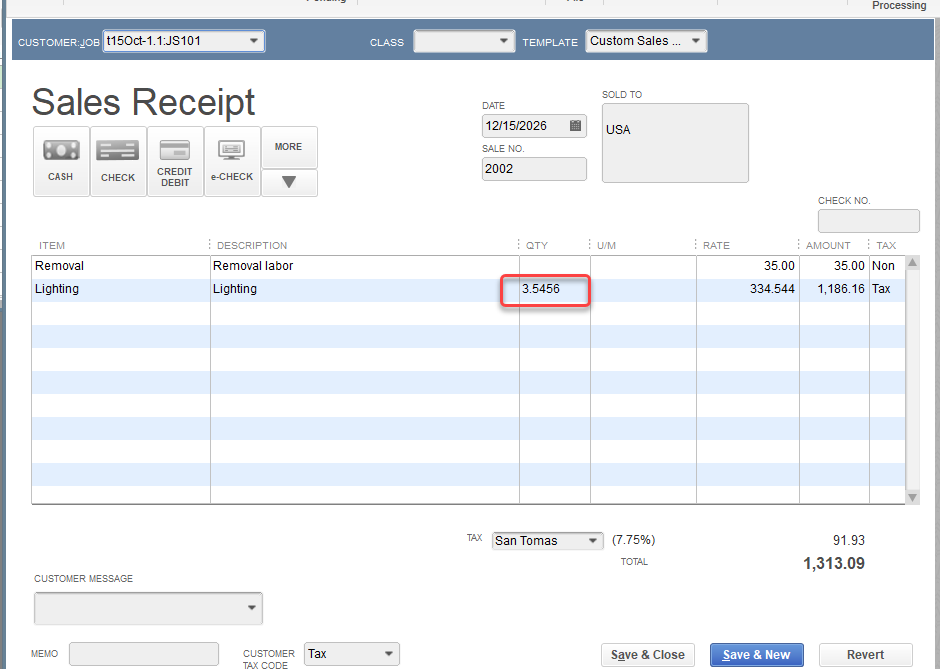
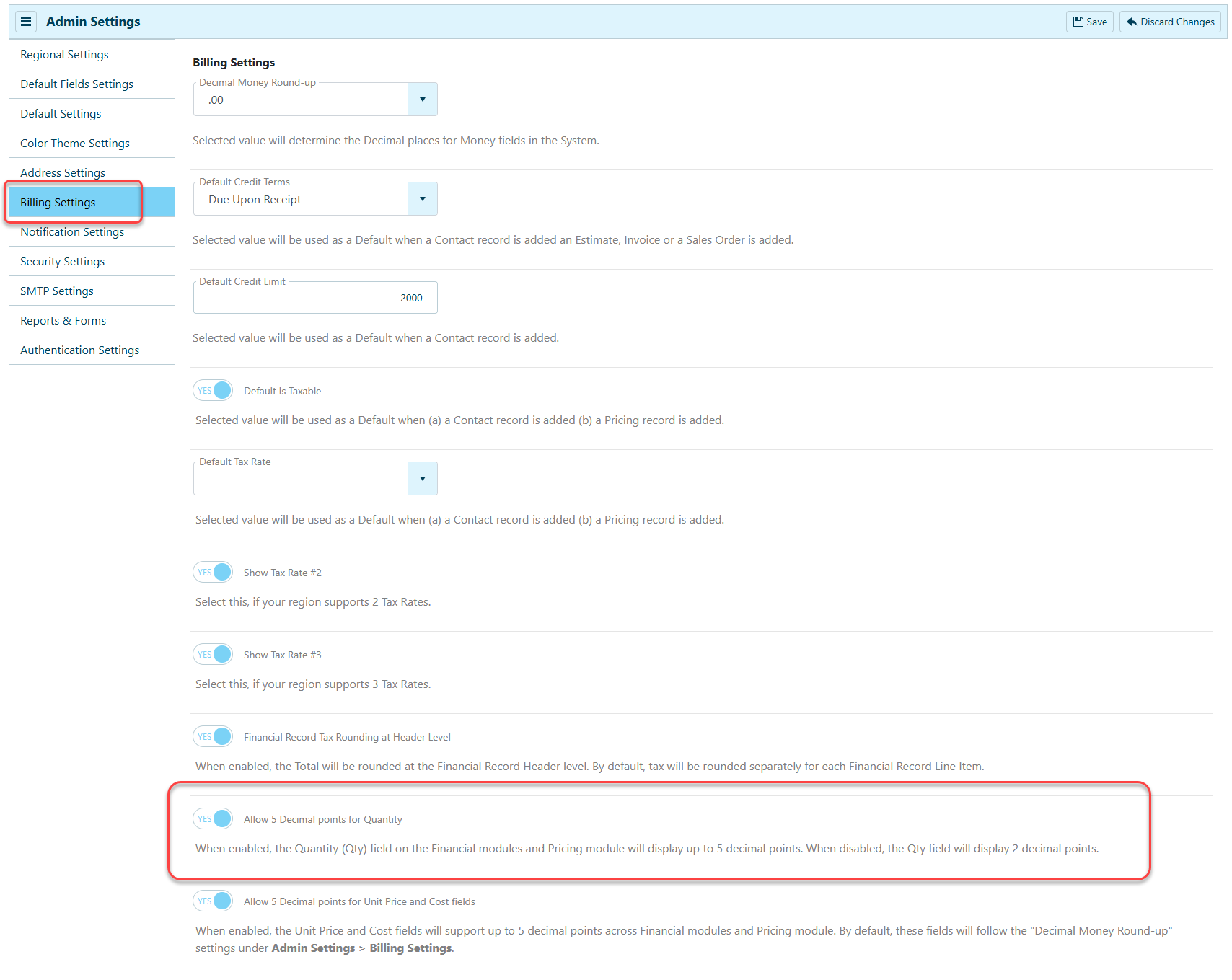
Greater precision and flexibility in managing quantities are available in Admin Settings > Billing Settings. This enhancement allows users to configure the number of decimal places displayed for Quantity (Qty) fields across the Financial and Pricing modules. The financial record import process for QuickBooks Desktop (QBD) and QuickBooks Online (QBO) now supports up to five decimal places for Quantity.

What's New?

Configurable Quantity Decimal Precision – The new toggle in Admin Settings > Billing Settings allows administrators to enable or disable five-decimal precision for Quantity fields.
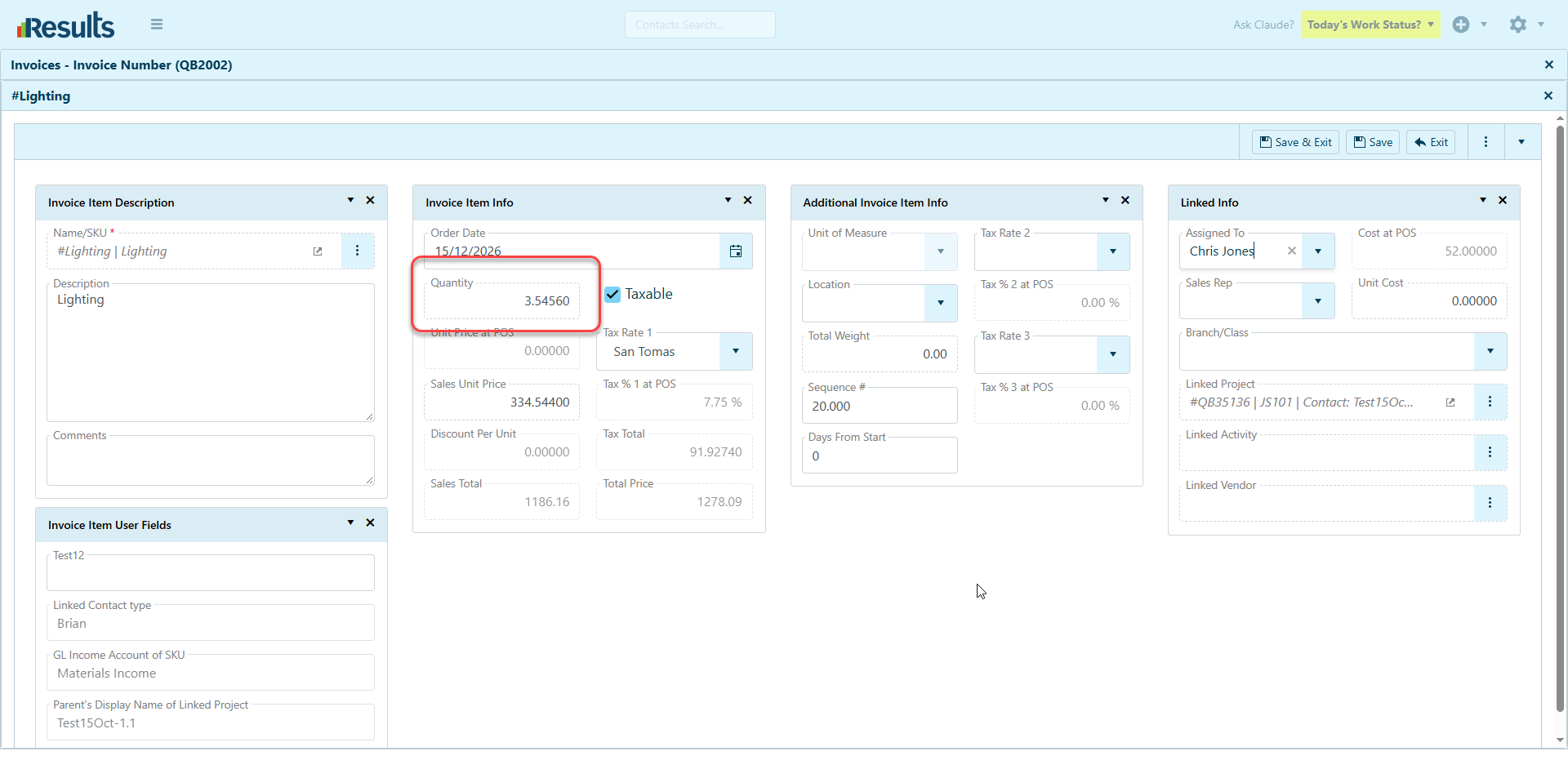
  • When enabled: Quantity (Qty) fields in the Financial and Pricing modules display up to 5 decimal places.
  • When disabled: Quantity (Qty) fields display 2 decimal places, maintaining the existing behavior.

This setting gives administrators greater control over quantity precision based on their business requirements.

QBD/QBO Import Enhancements – The financial record import process for QuickBooks Desktop (QBD) and QuickBooks Online (QBO) now supports up to 5 decimal places for Quantity. This enhancement lets you import quantities with greater precision into Results when using supported decimal settings.
Why This Matters?

Greater Accuracy – Support for up to five decimal places helps businesses manage fractional quantities more precisely and reduces rounding differences when greater precision is needed.

Flexible Configuration – Administrators can choose between two- and five-decimal quantity display options based on their business needs.

Improved QuickBooks Integration – Enhanced QBD and QBO import processes support greater quantity precision, helping maintain consistency when importing financial records from QuickBooks into Results.

Consistent Quantity Handling – With configurable decimal precision across the Financial and Pricing modules, users can work with quantities at the level of detail their workflows require.

Standard Payment Receipt Enhancement

Results includes a Standard Payment Receipt in the Payments module, giving users a convenient way to generate and access a standardized receipt for payment records. Standard Payment Receipt –...

FSM Portal Job Card Quick Access Enhancements

Results now provides improved navigation on the FSM Portal with new Quick Access buttons on the Job Card, allowing users to jump directly to key sections of a job. These shortcuts help field service...

Create a QB Job Along with an Opportunity or a Project

Results makes it easier to create QuickBooks (QB) Jobs from Parent Contact records. New menu options let you create a QB Job along with an Opportunity or Project. These enhancements simplify record...

Unit Price and Cost Decimal Precision Enhancements

Greater precision and flexibility in managing financial values with a new setting in Admin Settings > Billing Settings. This enhancement lets users configure up to five decimal places for Unit...

Quantity Decimal Precision Enhancements

Greater precision and flexibility in managing quantities are available in Admin Settings > Billing Settings. This enhancement allows users to configure the number of decimal places displayed for...

Split Activity – Simplifying Team Assignments and Scheduling

The Split Activity feature in Results provides greater flexibility in activity management, allowing users to divide an existing activity into up to three additional activities and assign them to...

Expanded User Permissions and Key Utilities Access

Results provides administrators with greater control over user access to key utilities and integration configurations. New permission options have been added to the Users module, making it easier to...

Streamlined Refund Processing in Results Payments Integration

Results Payments Integration now provides a more streamlined way to process and track Refunds directly from Results. With the new “Issue Refund” functionality and enhanced transaction tracking,...

Generate Payment Links for Deposits

Results Payments Integration now makes it easier to collect Deposit payments directly from Projects. With the new Generate Payment Link for Deposit option, users can generate a secure payment link...

Who’s Working Module Enhancements

Results offers greater flexibility and convenience in the Who’s Working module, with enhancements to how Assigned Activity information is displayed and how users manage settings.Default Assigned...

Split Activity – Simplifying Team Assignments and Scheduling

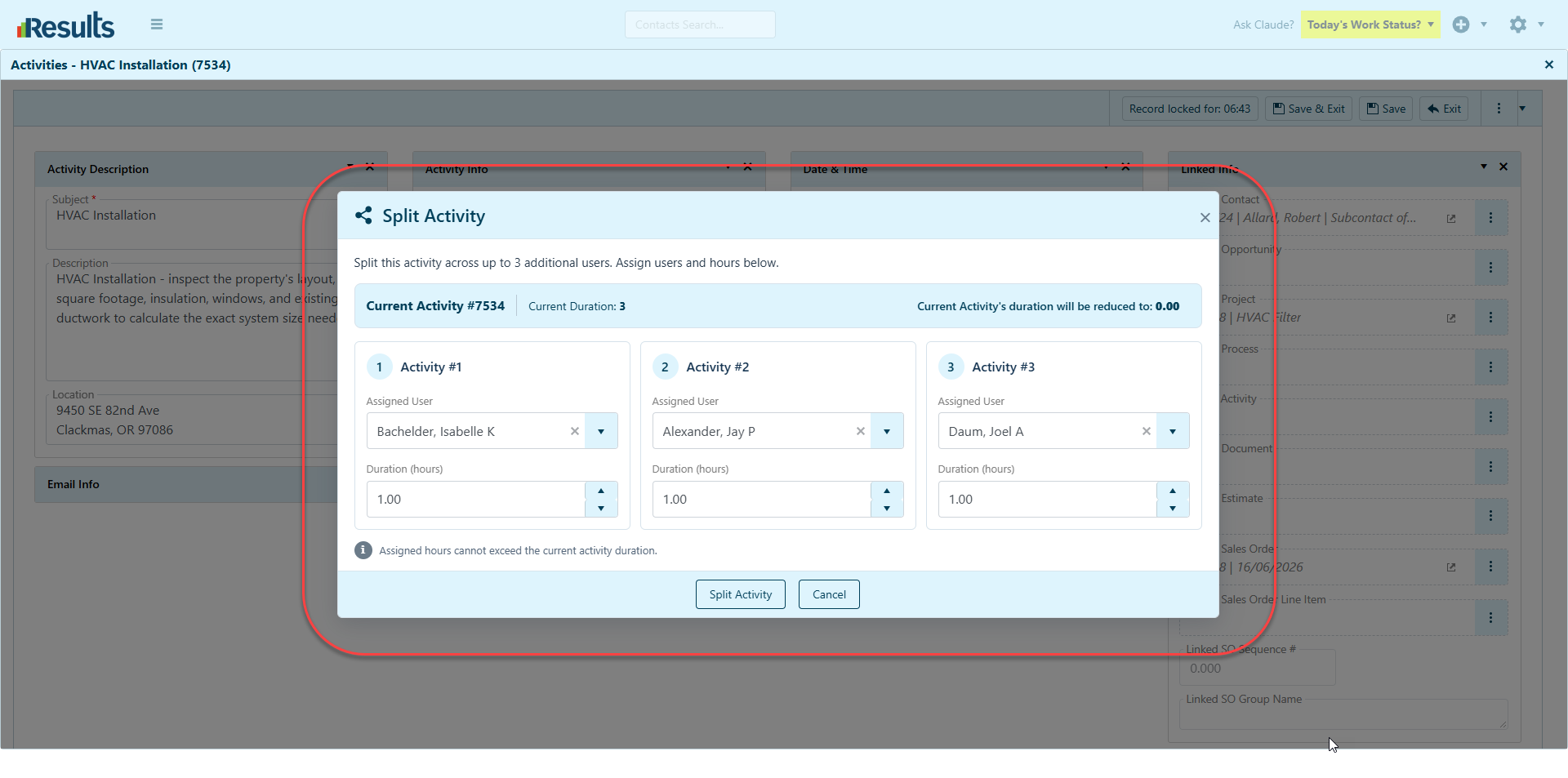
The Split Activity feature in Results provides greater flexibility in activity management, allowing users to divide an existing activity into up to three additional activities and assign them to different team members. This enhancement helps teams distribute work more efficiently while maintaining a clear link between the original activity and its follow-up assignments.

What's New?

Split Activity Option – The new Split Activity option is available in the following locations:

    • The three-dot menu on the Activity Data Entry screen.
    • The FSM Workflow Status drop-down appears when the Start option is displayed.

Create Multiple Activities in a Single Operation – Users can create up to three additional activities in one operation by selecting the Assigned To field and specifying the duration for each new activity. This lets users distribute work among multiple team members based on availability and workload.

Automatic Duration Calculation – The end time of each new activity is calculated automatically based on its assigned duration. Results deducts any time allocated to new activities from the original activity’s duration, ensuring the total assigned time never exceeds the original duration.

If the original activity’s duration becomes zero, Results prompts the user to confirm that the change is intentional before proceeding.

Flexible Activity Splitting – Use the Split Activity feature multiple times on the same activity to create additional assignments as needed.

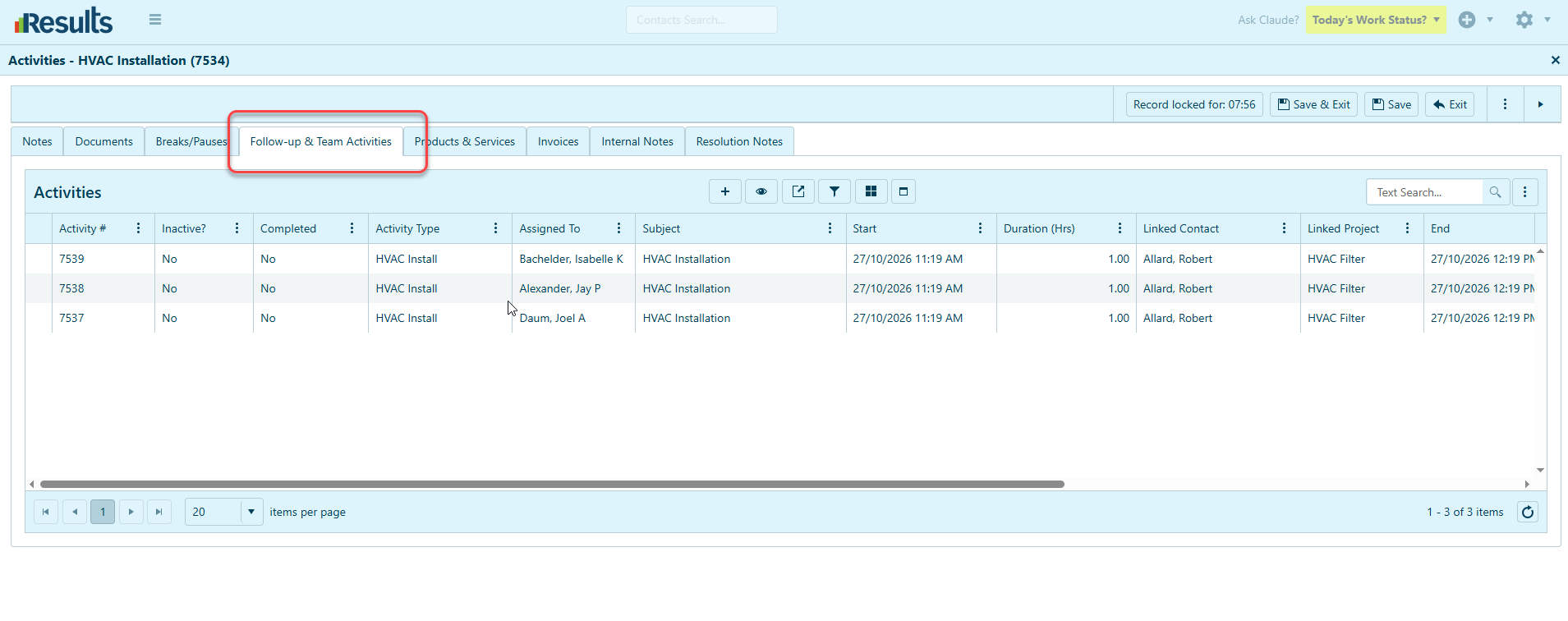
Automatic Follow-Up & Teams Updates – To make the connection between the original activity and its assignments clear, newly created activities are automatically added to the Follow-Up & Teams grid, with the original activity listed as the Parent Activity.

Preservation of Activity Details – Newly created activities inherit the original activity’s start date and time. Results do not duplicate related items, such as Products & Services, attached documents, teams, pauses, breaks, and other associated items. Splitting an activity also does not trigger any processes.

Why This Matters?

Better Workload Distribution – Teams can divide an activity among multiple team members, making it easier to distribute responsibilities and manage workloads.

Improved Scheduling Accuracy – Automatic end-time calculation and duration adjustments help ensure that assigned work stays within the original activity’s allocated time.

Flexible Team Assignments – Splitting an activity more than once gives users more flexibility when they need additional assignments.

Clear Activity Relationships – Automatically linking newly created activities to the original Parent Activity improves visibility and helps users track related assignments.

Controlled and Consistent Workflow – Duration validation and confirmation prompts help prevent accidental allocation beyond the original activity’s duration, while avoiding unintended duplication of associated records or triggering additional processes.

Standard Payment Receipt Enhancement

Results includes a Standard Payment Receipt in the Payments module, giving users a convenient way to generate and access a standardized receipt for payment records. Standard Payment Receipt –...

FSM Portal Job Card Quick Access Enhancements

Results now provides improved navigation on the FSM Portal with new Quick Access buttons on the Job Card, allowing users to jump directly to key sections of a job. These shortcuts help field service...

Create a QB Job Along with an Opportunity or a Project

Results makes it easier to create QuickBooks (QB) Jobs from Parent Contact records. New menu options let you create a QB Job along with an Opportunity or Project. These enhancements simplify record...

Unit Price and Cost Decimal Precision Enhancements

Greater precision and flexibility in managing financial values with a new setting in Admin Settings > Billing Settings. This enhancement lets users configure up to five decimal places for Unit...

Quantity Decimal Precision Enhancements

Greater precision and flexibility in managing quantities are available in Admin Settings > Billing Settings. This enhancement allows users to configure the number of decimal places displayed for...

Split Activity – Simplifying Team Assignments and Scheduling

The Split Activity feature in Results provides greater flexibility in activity management, allowing users to divide an existing activity into up to three additional activities and assign them to...

Expanded User Permissions and Key Utilities Access

Results provides administrators with greater control over user access to key utilities and integration configurations. New permission options have been added to the Users module, making it easier to...

Streamlined Refund Processing in Results Payments Integration

Results Payments Integration now provides a more streamlined way to process and track Refunds directly from Results. With the new “Issue Refund” functionality and enhanced transaction tracking,...

Generate Payment Links for Deposits

Results Payments Integration now makes it easier to collect Deposit payments directly from Projects. With the new Generate Payment Link for Deposit option, users can generate a secure payment link...

Who’s Working Module Enhancements

Results offers greater flexibility and convenience in the Who’s Working module, with enhancements to how Assigned Activity information is displayed and how users manage settings.Default Assigned...
Results September 2026 Newsletter

Results September 2026 Newsletter

The September newsletter introduces updates that give administrators more control, simplify deposit collection, and make refunds easier to manage in Results. Notable changes include:

    • A new Admin setting in the Who’s Working module that controls which Assigned Activity details display, along with a Save Settings as Default option for columns and filters
    • A Generate Payment Link for Deposit option that lets users collect deposits directly from a Project without first creating an Invoice, with Results creating the Payment record automatically
    • An Issue Refund button in the Payments module that processes refunds inside Results and ties each refund to its Parent Payment through a new Refunds tab
    • Enhanced transaction tracking that captures the JUPICO Transaction ID and Transaction Type for every charge and refund
    • A new Permissions: Key Utilities section in the Users module that lets administrators control access to bulk actions, invoicing, and import tools
    • A dedicated Permissions: Integrations tab for Integration Configuration access

Expanded User Permissions and Key Utilities Access

Results provides administrators with greater control over user access to key utilities and integration configurations. New permission options have been added to the Users module, making it easier to manage access based on each user’s role and responsibilities.

What's New?

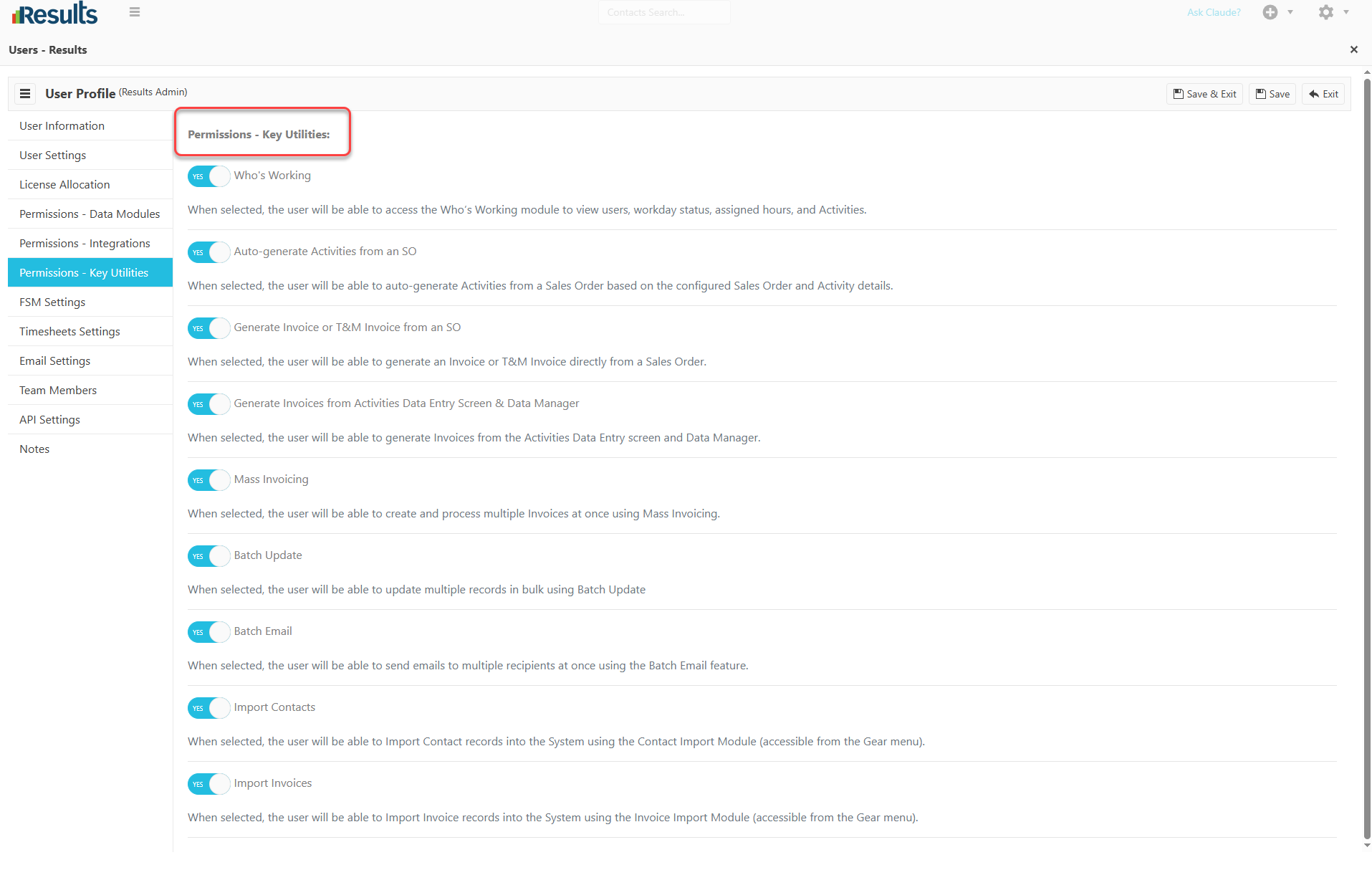
Permissions: Key Utilities – A new Permissions: Key Utilities section has been added to the Users module. Administrators can now control which User has access to the following features:

    • Who’s Working
    • Auto-generate Activities from a Sales Order
    • Generate Invoice or T&M Invoice from an SO
    • Generate Invoices from the Activities Data Entry screen and Data Manager
    • Mass Invoicing
    • Batch Update
    • Batch Email
    • Import Contacts
    • Import Invoices

These permissions give administrators more granular control over access to tools that perform bulk actions, generate records, or import data.

Integration Permissions Moved – All Integration Configuration access has been consolidated under a dedicated “Permissions – Integrations” section/tab. This provides a centralized location for administrators to manage users’ access to integration configuration settings.

Why This Matters?

  • Greater Access Control – Administrators can determine exactly which users have access to key utilities and actions within Results.

  • Improved Security – Restricting access to bulk operations, imports, invoicing, and other powerful utilities helps ensure only authorized users can use these functions.

  • Simplified Permission Management – Key utility permissions are now grouped together, making it easier for administrators to review and manage user access.

  • Centralized Integration Access – Moving Integration Configuration permissions to the Permissions – Integrations tab creates a clearer and more organized permission structure.

  • Better Role-Based Administration – The enhanced permission structure allows organizations to align Results access more closely with each user’s responsibilities.

Standard Payment Receipt Enhancement

Results includes a Standard Payment Receipt in the Payments module, giving users a convenient way to generate and access a standardized receipt for payment records. Standard Payment Receipt –...

FSM Portal Job Card Quick Access Enhancements

Results now provides improved navigation on the FSM Portal with new Quick Access buttons on the Job Card, allowing users to jump directly to key sections of a job. These shortcuts help field service...

Create a QB Job Along with an Opportunity or a Project

Results makes it easier to create QuickBooks (QB) Jobs from Parent Contact records. New menu options let you create a QB Job along with an Opportunity or Project. These enhancements simplify record...

Unit Price and Cost Decimal Precision Enhancements

Greater precision and flexibility in managing financial values with a new setting in Admin Settings > Billing Settings. This enhancement lets users configure up to five decimal places for Unit...

Quantity Decimal Precision Enhancements

Greater precision and flexibility in managing quantities are available in Admin Settings > Billing Settings. This enhancement allows users to configure the number of decimal places displayed for...

Split Activity – Simplifying Team Assignments and Scheduling

The Split Activity feature in Results provides greater flexibility in activity management, allowing users to divide an existing activity into up to three additional activities and assign them to...

Expanded User Permissions and Key Utilities Access

Results provides administrators with greater control over user access to key utilities and integration configurations. New permission options have been added to the Users module, making it easier to...

Streamlined Refund Processing in Results Payments Integration

Results Payments Integration now provides a more streamlined way to process and track Refunds directly from Results. With the new “Issue Refund” functionality and enhanced transaction tracking,...

Generate Payment Links for Deposits

Results Payments Integration now makes it easier to collect Deposit payments directly from Projects. With the new Generate Payment Link for Deposit option, users can generate a secure payment link...

Who’s Working Module Enhancements

Results offers greater flexibility and convenience in the Who’s Working module, with enhancements to how Assigned Activity information is displayed and how users manage settings.Default Assigned...

Streamlined Refund Processing in Results Payments Integration

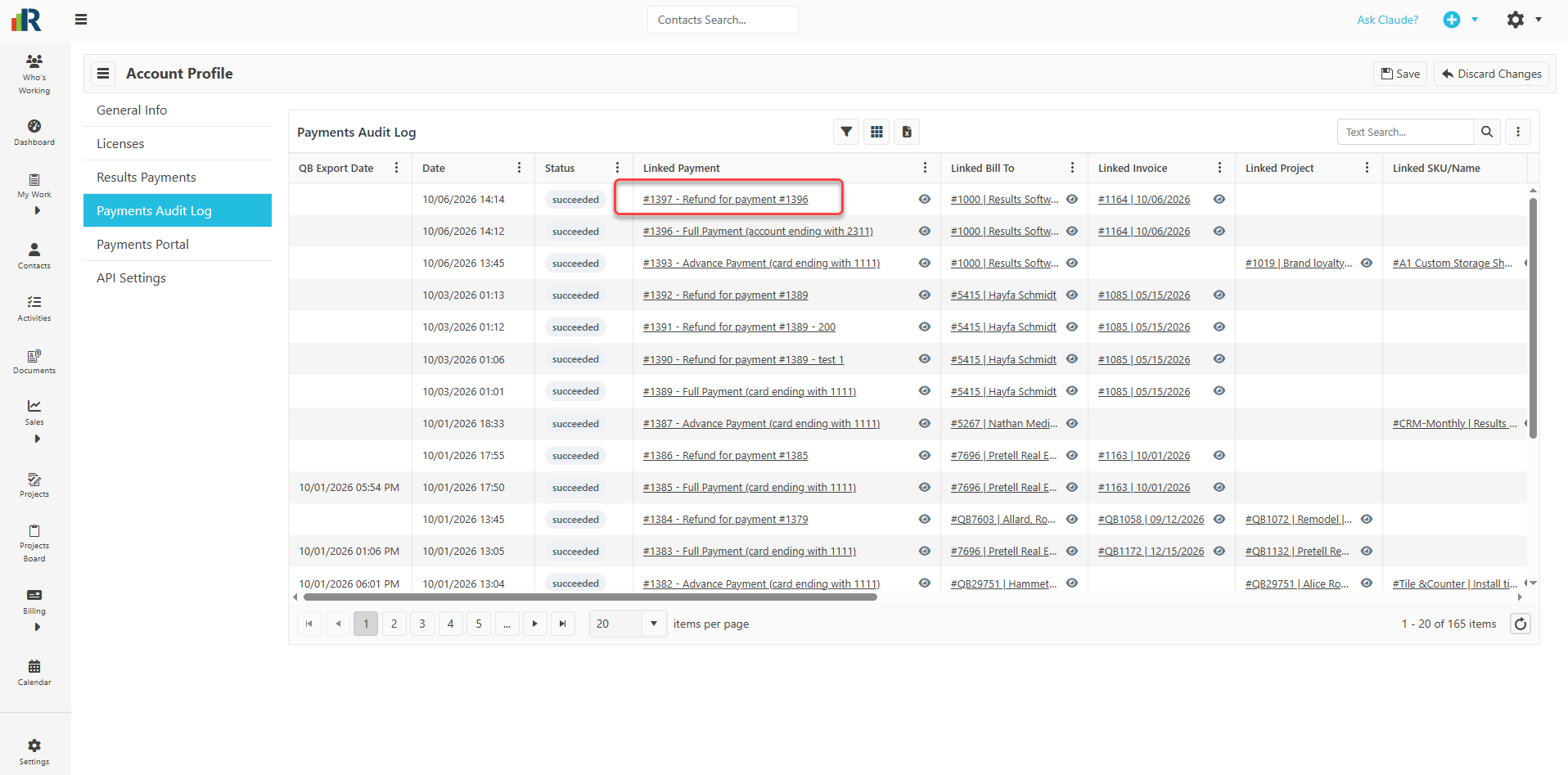
Results Payments Integration now provides a more streamlined way to process and track Refunds directly from Results. With the new “Issue Refund” functionality and enhanced transaction tracking, users have greater visibility and control over payment and Refund activity.

What's New?

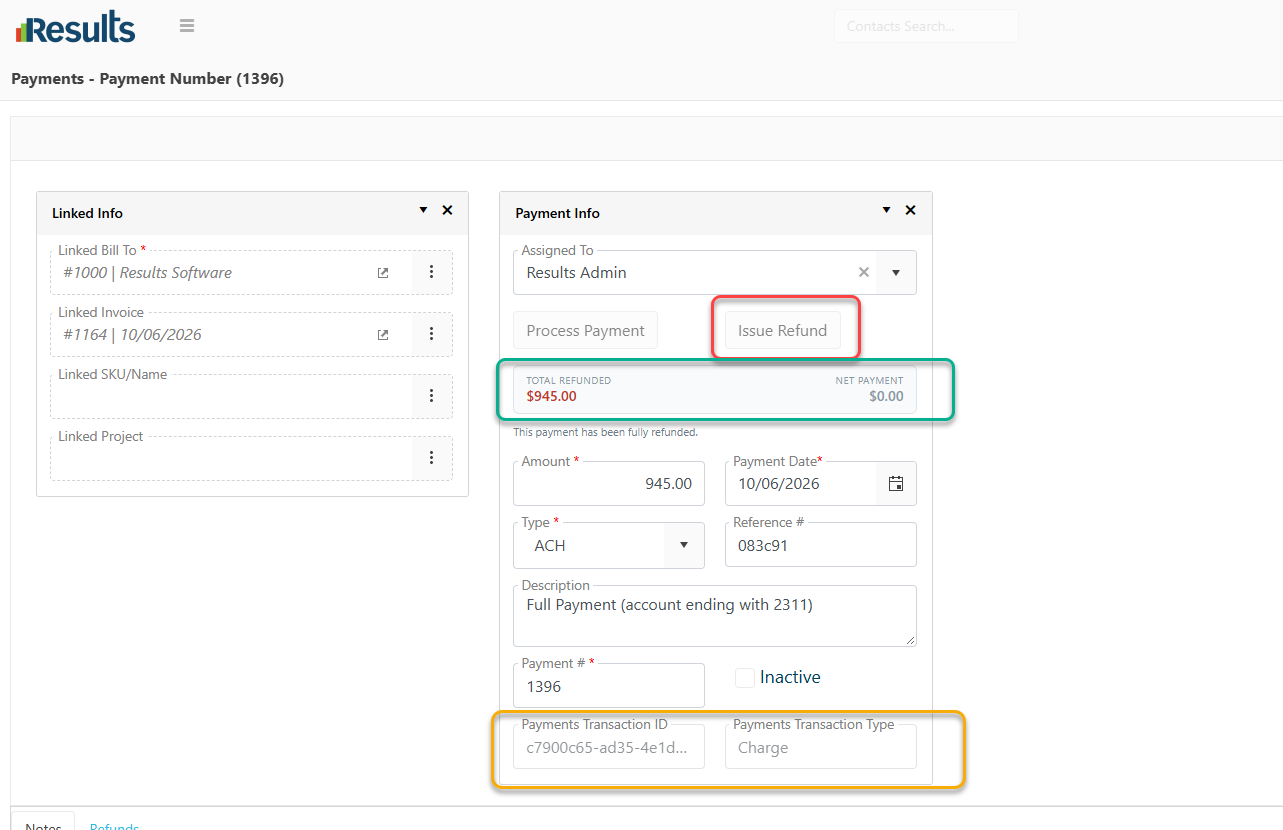
Issue Refund Directly from Payments – A new “Issue Refund” button has been added to the Payments module, allowing users to process Refunds directly from Results. Note: This is only available when the Payment record that is displayed has been received via the new Results Payments module and captured as a Credit Card Payment or an ACH Payment. On the main Payment record, below the Issue “Refund button” users can also view:

    • Total Refunded Amount
    • Net Payment

This provides immediate visibility into the Refund being processed and the resulting net payment amount.

Enhanced Payment Transaction Tracking – Results now captures additional transaction information from the Results Payments (Merchant Services) powered by JUPICO, including:

      • Payments Transaction ID – Captures the transaction ID from JUPICO and displays it on the Payments DM.
      • Payments Transaction Type – Identifies whether the transaction is a Charge or Refund and displays this information on the Payments DM.

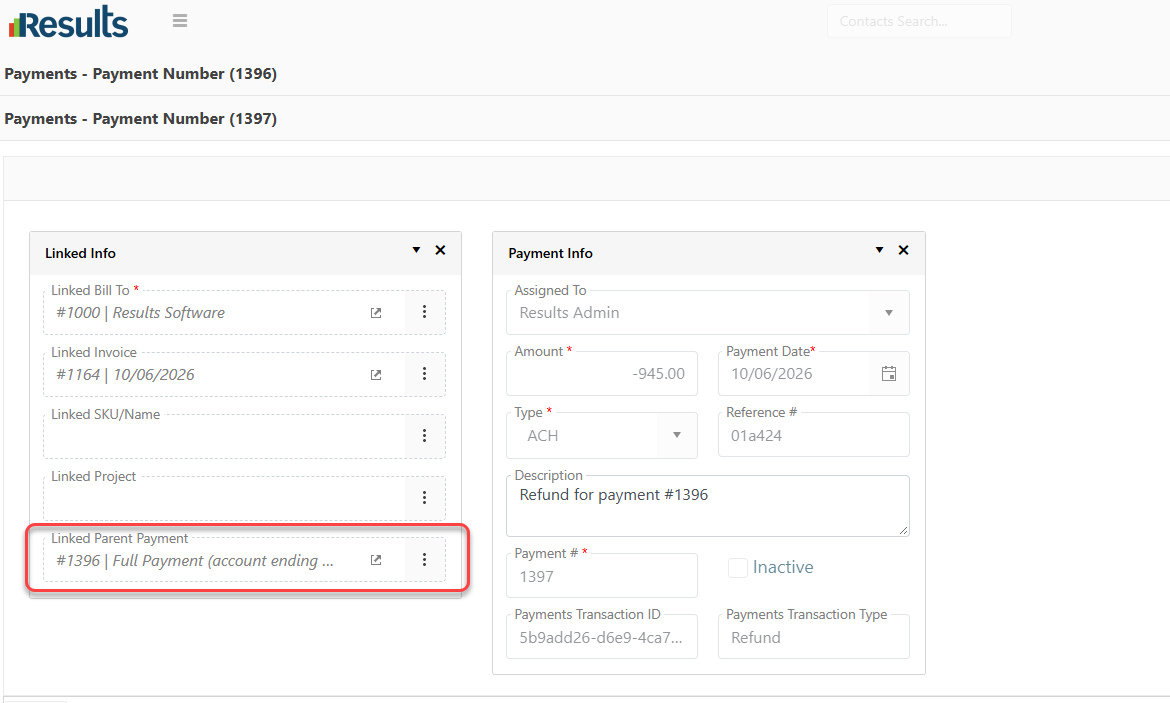
Refund Payment Linking – Refund Payments now include a Linked Parent Payment at the bottom of the Linked Info Card, making it easier to identify the original payment associated with the Refund.

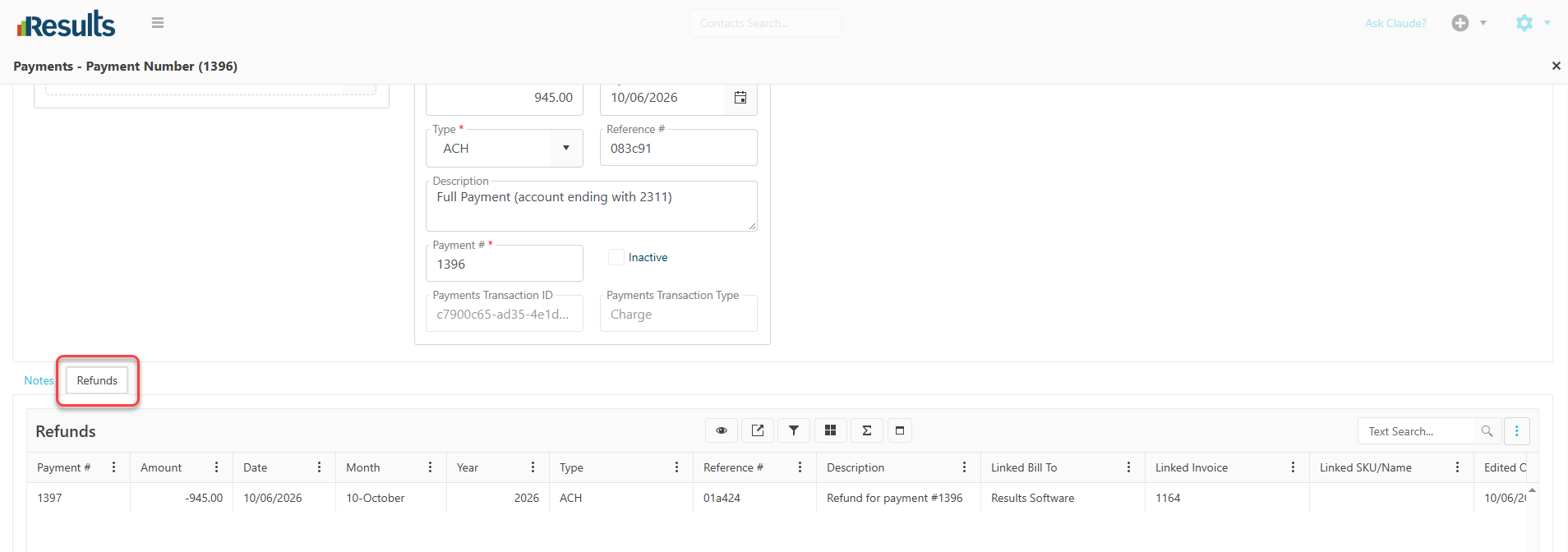
Refunds Tab on Parent Payments – The original Parent Payment now includes a dedicated Refunds tab, providing a centralized view of Refunds associated with that payment.

Why This Matters?

  • Process Refunds Directly in Results – Results Payment (merchant Services) Users can now initiate Refunds without leaving the Payments module, simplifying the Refund workflow.

  • Improve Transaction Visibility – Payments Transaction IDs and Transaction Types provide additional context for both Charges and Refunds.

  • Easily Trace Refunds – The Linked Parent Payment makes it easy to identify the original payment associated with a Refund.

  • Centralize Refund Information – The new Refunds tab on the Parent Payment provides a clear view of related Refund activity in one place.

  • Greater Financial Transparency – With Refund Amount, Net Amount, transaction details, and parent-payment relationships all available in Results, users have improved visibility throughout the payment and Refund lifecycle.

Standard Payment Receipt Enhancement

Results includes a Standard Payment Receipt in the Payments module, giving users a convenient way to generate and access a standardized receipt for payment records. Standard Payment Receipt –...

FSM Portal Job Card Quick Access Enhancements

Results now provides improved navigation on the FSM Portal with new Quick Access buttons on the Job Card, allowing users to jump directly to key sections of a job. These shortcuts help field service...

Create a QB Job Along with an Opportunity or a Project

Results makes it easier to create QuickBooks (QB) Jobs from Parent Contact records. New menu options let you create a QB Job along with an Opportunity or Project. These enhancements simplify record...

Unit Price and Cost Decimal Precision Enhancements

Greater precision and flexibility in managing financial values with a new setting in Admin Settings > Billing Settings. This enhancement lets users configure up to five decimal places for Unit...

Quantity Decimal Precision Enhancements

Greater precision and flexibility in managing quantities are available in Admin Settings > Billing Settings. This enhancement allows users to configure the number of decimal places displayed for...

Split Activity – Simplifying Team Assignments and Scheduling

The Split Activity feature in Results provides greater flexibility in activity management, allowing users to divide an existing activity into up to three additional activities and assign them to...

Expanded User Permissions and Key Utilities Access

Results provides administrators with greater control over user access to key utilities and integration configurations. New permission options have been added to the Users module, making it easier to...

Streamlined Refund Processing in Results Payments Integration

Results Payments Integration now provides a more streamlined way to process and track Refunds directly from Results. With the new “Issue Refund” functionality and enhanced transaction tracking,...

Generate Payment Links for Deposits

Results Payments Integration now makes it easier to collect Deposit payments directly from Projects. With the new Generate Payment Link for Deposit option, users can generate a secure payment link...

Who’s Working Module Enhancements

Results offers greater flexibility and convenience in the Who’s Working module, with enhancements to how Assigned Activity information is displayed and how users manage settings.Default Assigned...