Results October 2026 Newsletter

Results October 2026 Newsletter

The October newsletter brings updates that make it easier to share work across a team, track financial values more precisely, and keep QuickBooks records clean. Notable changes include a new Split Activity option that divides an Activity into as many as three new Activities for different team members, with Results adjusting durations automatically; new Billing Settings toggles that extend Quantity, Unit Price, and Cost fields to as many as 5 decimal places, with matching support in QBD and QBO imports; two new Parent Contact menu options that create a QB Job along with an Opportunity or Project in a single step; Quick Access buttons on the FSM Portal Job Card that take field service users straight to the section they need; and a Standard Payment Receipt in the Payments module for consistent payment records.

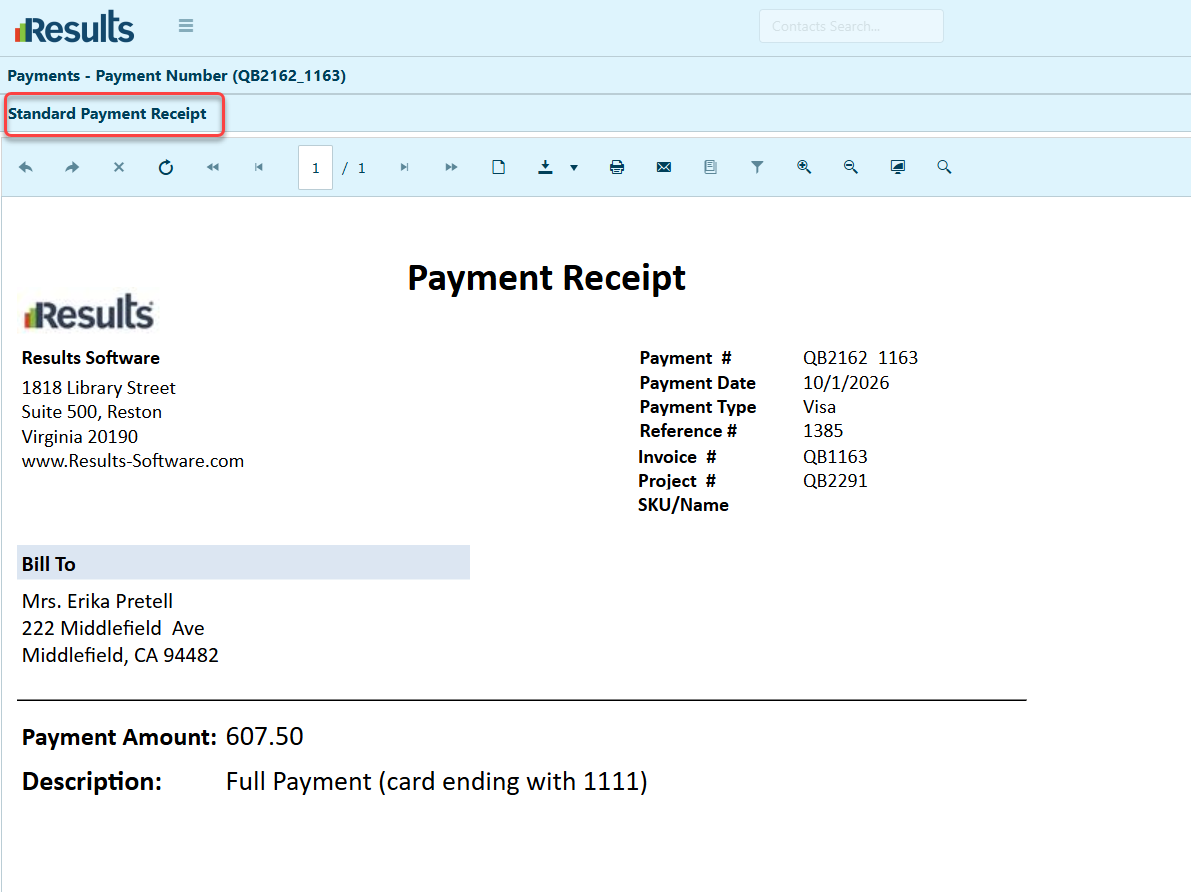
Standard Payment Receipt Enhancement

Results includes a Standard Payment Receipt in the Payments module, giving users a convenient way to generate and access a standardized receipt for payment records. 

What's New?

Standard Payment Receipt – Added a Standard Payment Receipt to the Payments module, allowing users to generate a consistent receipt format for documenting payments received.

Why This Matters?

Consistent Documentation – Provides a standardized format for payment receipts across the system.

Improved Recordkeeping – Helps users maintain clear documentation of payments received.

Convenient Payment Processing – Makes it easier for users to access a standard receipt format directly from the Payments module.

Standard Payment Receipt Enhancement

Results includes a Standard Payment Receipt in the Payments module, giving users a convenient way to generate and access a standardized receipt for payment records. Standard Payment Receipt –...

FSM Portal Job Card Quick Access Enhancements

Results now provides improved navigation on the FSM Portal with new Quick Access buttons on the Job Card, allowing users to jump directly to key sections of a job. These shortcuts help field service...

Create a QB Job Along with an Opportunity or a Project

Results makes it easier to create QuickBooks (QB) Jobs from Parent Contact records. New menu options let you create a QB Job along with an Opportunity or Project. These enhancements simplify record...

Unit Price and Cost Decimal Precision Enhancements

Greater precision and flexibility in managing financial values with a new setting in Admin Settings > Billing Settings. This enhancement lets users configure up to five decimal places for Unit...

Quantity Decimal Precision Enhancements

Greater precision and flexibility in managing quantities are available in Admin Settings > Billing Settings. This enhancement allows users to configure the number of decimal places displayed for...

Split Activity – Simplifying Team Assignments and Scheduling

The Split Activity feature in Results provides greater flexibility in activity management, allowing users to divide an existing activity into up to three additional activities and assign them to...

Expanded User Permissions and Key Utilities Access

Results provides administrators with greater control over user access to key utilities and integration configurations. New permission options have been added to the Users module, making it easier to...

Streamlined Refund Processing in Results Payments Integration

Results Payments Integration now provides a more streamlined way to process and track Refunds directly from Results. With the new “Issue Refund” functionality and enhanced transaction tracking,...

Generate Payment Links for Deposits

Results Payments Integration now makes it easier to collect Deposit payments directly from Projects. With the new Generate Payment Link for Deposit option, users can generate a secure payment link...

Who’s Working Module Enhancements

Results offers greater flexibility and convenience in the Who’s Working module, with enhancements to how Assigned Activity information is displayed and how users manage settings.Default Assigned...

FSM Portal Job Card Quick Access Enhancements

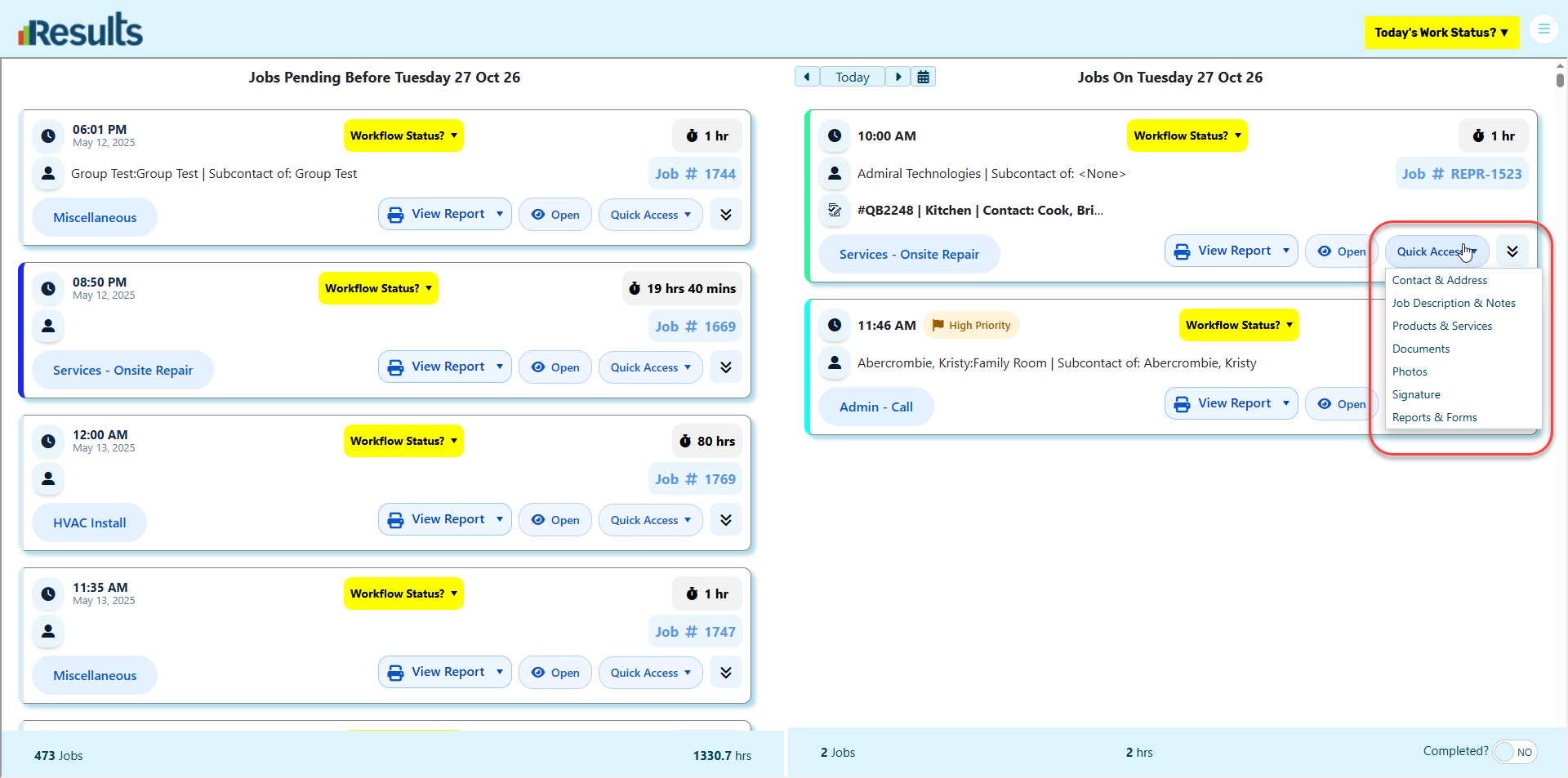
Results now provides improved navigation on the FSM Portal with new Quick Access buttons on the Job Card, allowing users to jump directly to key sections of a job. These shortcuts help field service users access important job information and complete their tasks more efficiently.

What's New?

Quick Access Buttons on the Job Card – Added Quick Access buttons to the Job Card on the FSM Portal, allowing users to navigate directly to the following sections:
  • Contact & Address
  • Job Description & Notes
  • Products & Services
  • Documents
  • Photos
  • Signature
  • Reports & Forms

Why This Matters?

Faster Navigation – Users can jump directly to the required section of a Job Card without having to scroll through the entire page.

Improved Field Efficiency – Easy access to job details, products and services, documents, photos, and signature sections helps field service users complete job-related tasks more efficiently.

Convenient Access to Job Information – Contact details, job notes, and other essential information are easier to locate while working on a job.

Streamlined Workflow – The new shortcuts simplify navigation across the FSM Portal Job Card, helping users save time and focus on completing their field service tasks.

Standard Payment Receipt Enhancement

Results includes a Standard Payment Receipt in the Payments module, giving users a convenient way to generate and access a standardized receipt for payment records. Standard Payment Receipt –...

FSM Portal Job Card Quick Access Enhancements

Results now provides improved navigation on the FSM Portal with new Quick Access buttons on the Job Card, allowing users to jump directly to key sections of a job. These shortcuts help field service...

Create a QB Job Along with an Opportunity or a Project

Results makes it easier to create QuickBooks (QB) Jobs from Parent Contact records. New menu options let you create a QB Job along with an Opportunity or Project. These enhancements simplify record...

Unit Price and Cost Decimal Precision Enhancements

Greater precision and flexibility in managing financial values with a new setting in Admin Settings > Billing Settings. This enhancement lets users configure up to five decimal places for Unit...

Quantity Decimal Precision Enhancements

Greater precision and flexibility in managing quantities are available in Admin Settings > Billing Settings. This enhancement allows users to configure the number of decimal places displayed for...

Split Activity – Simplifying Team Assignments and Scheduling

The Split Activity feature in Results provides greater flexibility in activity management, allowing users to divide an existing activity into up to three additional activities and assign them to...

Expanded User Permissions and Key Utilities Access

Results provides administrators with greater control over user access to key utilities and integration configurations. New permission options have been added to the Users module, making it easier to...

Streamlined Refund Processing in Results Payments Integration

Results Payments Integration now provides a more streamlined way to process and track Refunds directly from Results. With the new “Issue Refund” functionality and enhanced transaction tracking,...

Generate Payment Links for Deposits

Results Payments Integration now makes it easier to collect Deposit payments directly from Projects. With the new Generate Payment Link for Deposit option, users can generate a secure payment link...

Who’s Working Module Enhancements

Results offers greater flexibility and convenience in the Who’s Working module, with enhancements to how Assigned Activity information is displayed and how users manage settings.Default Assigned...

Create a QB Job Along with an Opportunity or a Project

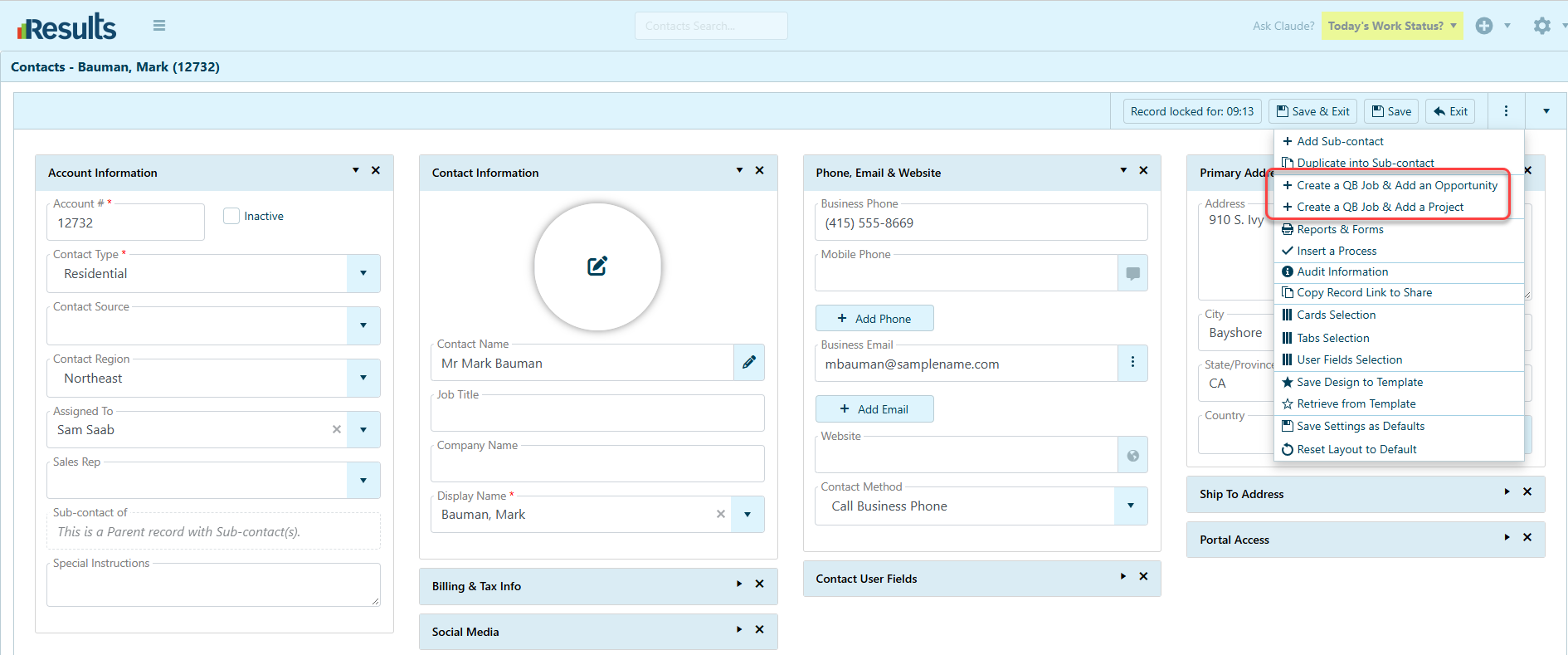
Results makes it easier to create QuickBooks (QB) Jobs from Parent Contact records. New menu options let you create a QB Job along with an Opportunity or Project. These enhancements simplify record creation, automate related record setup, and ensure Job Names export correctly to QuickBooks.

What's New?

New Menu Options for Parent Contacts – The Parent Contact record’s 3-dot menu now includes two new options:

  • Create a QB Job & Add an Opportunity
  • Create a QB Job & Add a Project

These options allow users to create a QuickBooks Job and automatically associate it with a new Opportunity or Project.

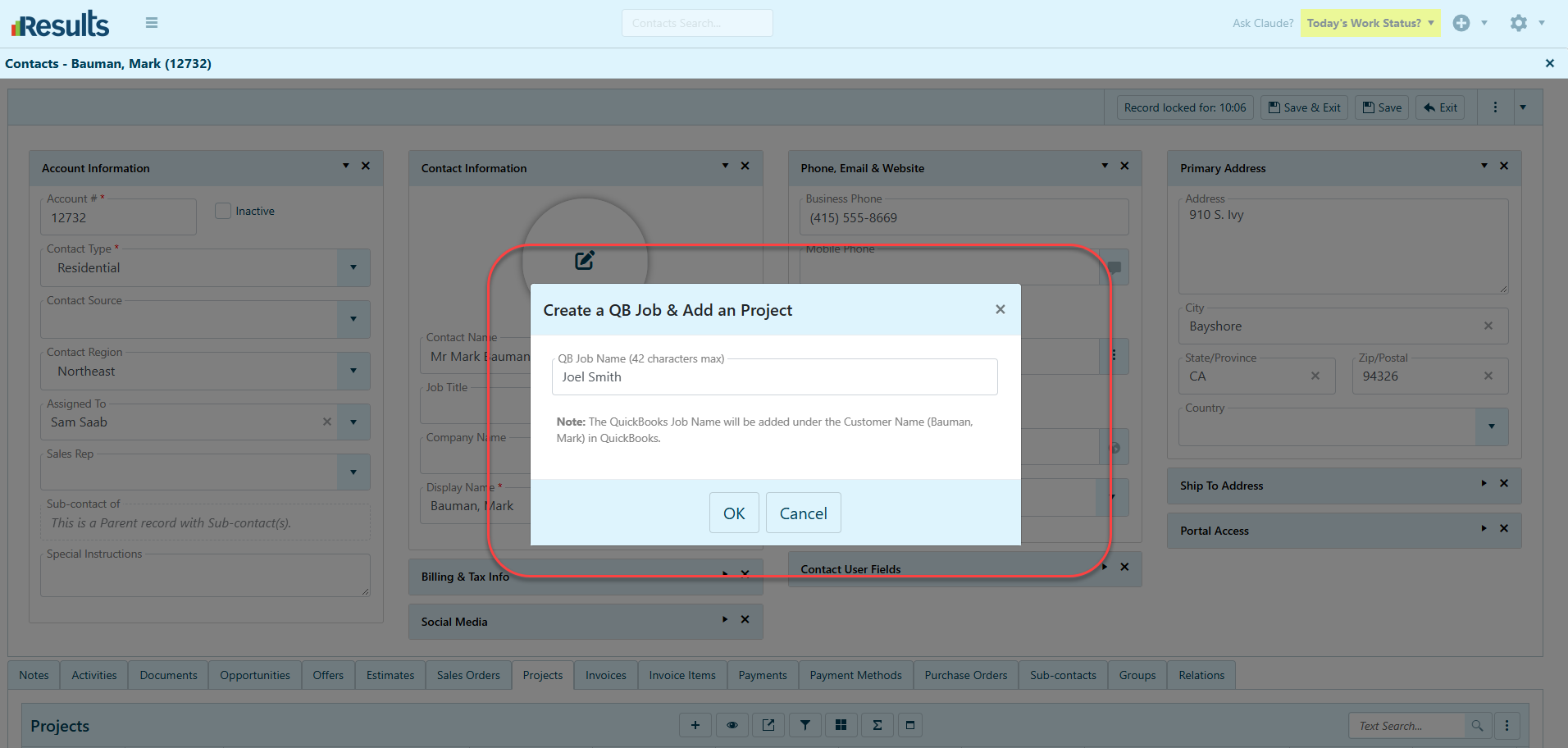
Job Name Validation – Selecting either menu option prompts the user to enter a Job Name for the new QuickBooks Job.

The system validates that the entered Job Name does not already exist before accepting it, helping prevent duplicate Job Names.

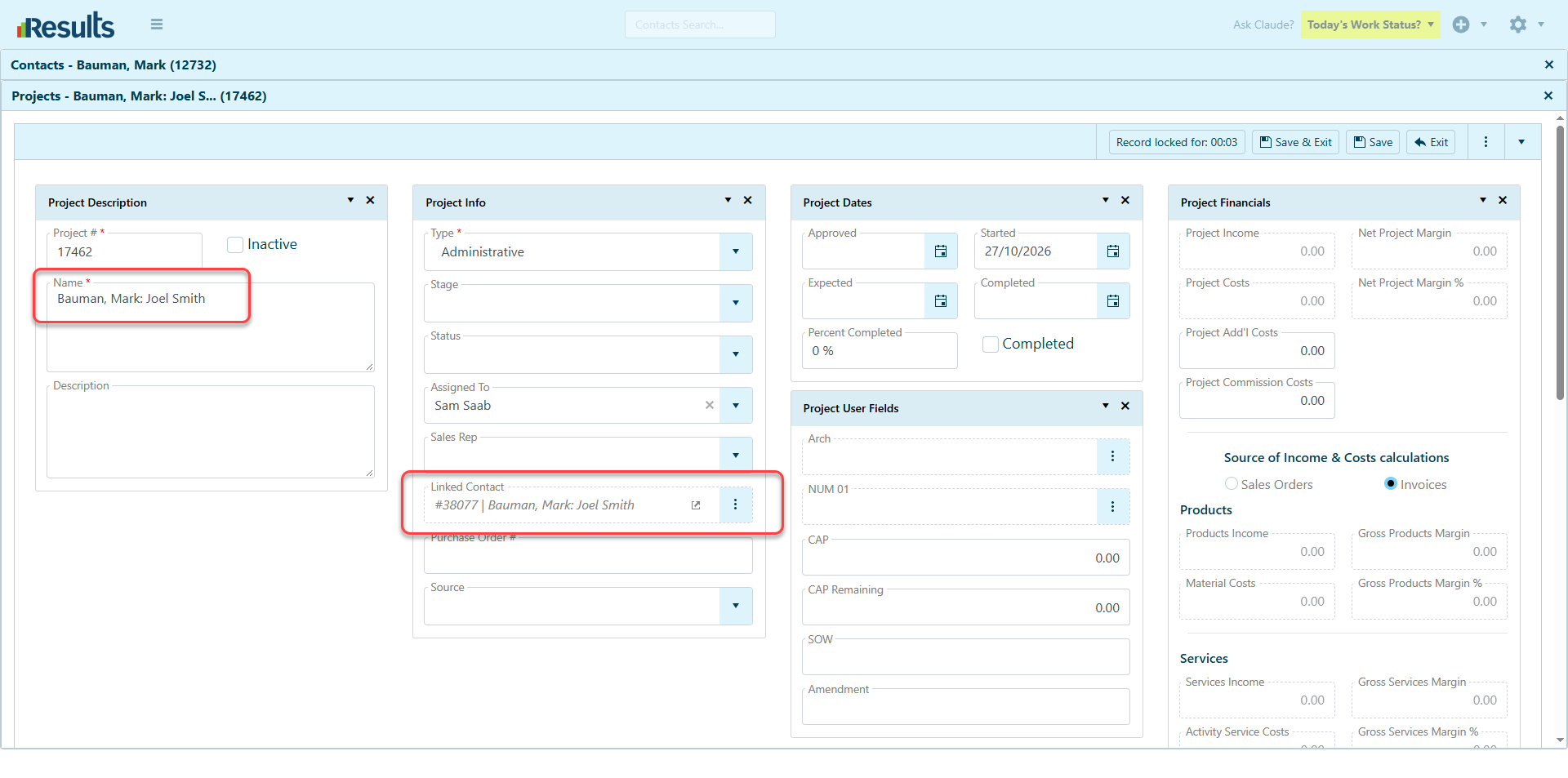
Automatic Sub-contact Creation – The new options follow the existing Copy into a Sub-contact process, with an additional step to construct the Sub-contact’s Display Name. The Display Name is automatically set to: Parent Contact Display Name + “: ” + Job Name – For example, if the Parent Contact Display Name is ABC Company and the Job Name is Office Renovation, the new Sub-contact Display Name will be: ABC Company: Office Renovation. The system automatically saves the Sub-contact record and creates the selected Opportunity or Project.

Automatic Opportunity and Project Linking – When users create an Opportunity or Project through these menu options, the system automatically populates its Name field with the Display Name of the newly created Sub-contact, ensuring consistency between the related records.

QuickBooks Export Name Handling – When exporting a Sub-contact to QuickBooks, Results removes the Parent Contact Display Name and the following colon and space from the Sub-contact Display Name before sending it.

In the example above, the Sub-contact Display Name “ABC Company: Office Renovation” is exported as “Office Renovation” for the Job Name. This ensures that QuickBooks receives the intended Job Name rather than the combined Parent Contact and Job Name.

Why This Matters?

Simplified Job Creation – Users can create a QuickBooks Job and its associated Opportunity or Project directly from a Parent Contact record without manually creating each record separately.

Improved Data Consistency – Automatically populating the Sub-contact Display Name and the related Opportunity or Project Name helps maintain consistent naming across records.

Duplicate Prevention – Job Name validation helps prevent duplicate Job Names during creation.

Reduced Manual Effort – Automatic saving and related record creation eliminate additional steps and streamline the workflow.

Accurate QuickBooks Integration – The export process sends only the intended Job Name to QuickBooks, while Results retains the combined Display Name format for organizing Sub-contacts under their Parent Contacts.

Standard Payment Receipt Enhancement

Results includes a Standard Payment Receipt in the Payments module, giving users a convenient way to generate and access a standardized receipt for payment records. Standard Payment Receipt –...

FSM Portal Job Card Quick Access Enhancements

Results now provides improved navigation on the FSM Portal with new Quick Access buttons on the Job Card, allowing users to jump directly to key sections of a job. These shortcuts help field service...

Create a QB Job Along with an Opportunity or a Project

Results makes it easier to create QuickBooks (QB) Jobs from Parent Contact records. New menu options let you create a QB Job along with an Opportunity or Project. These enhancements simplify record...

Unit Price and Cost Decimal Precision Enhancements

Greater precision and flexibility in managing financial values with a new setting in Admin Settings > Billing Settings. This enhancement lets users configure up to five decimal places for Unit...

Quantity Decimal Precision Enhancements

Greater precision and flexibility in managing quantities are available in Admin Settings > Billing Settings. This enhancement allows users to configure the number of decimal places displayed for...

Split Activity – Simplifying Team Assignments and Scheduling

The Split Activity feature in Results provides greater flexibility in activity management, allowing users to divide an existing activity into up to three additional activities and assign them to...

Expanded User Permissions and Key Utilities Access

Results provides administrators with greater control over user access to key utilities and integration configurations. New permission options have been added to the Users module, making it easier to...

Streamlined Refund Processing in Results Payments Integration

Results Payments Integration now provides a more streamlined way to process and track Refunds directly from Results. With the new “Issue Refund” functionality and enhanced transaction tracking,...

Generate Payment Links for Deposits

Results Payments Integration now makes it easier to collect Deposit payments directly from Projects. With the new Generate Payment Link for Deposit option, users can generate a secure payment link...

Who’s Working Module Enhancements

Results offers greater flexibility and convenience in the Who’s Working module, with enhancements to how Assigned Activity information is displayed and how users manage settings.Default Assigned...

Unit Price and Cost Decimal Precision Enhancements

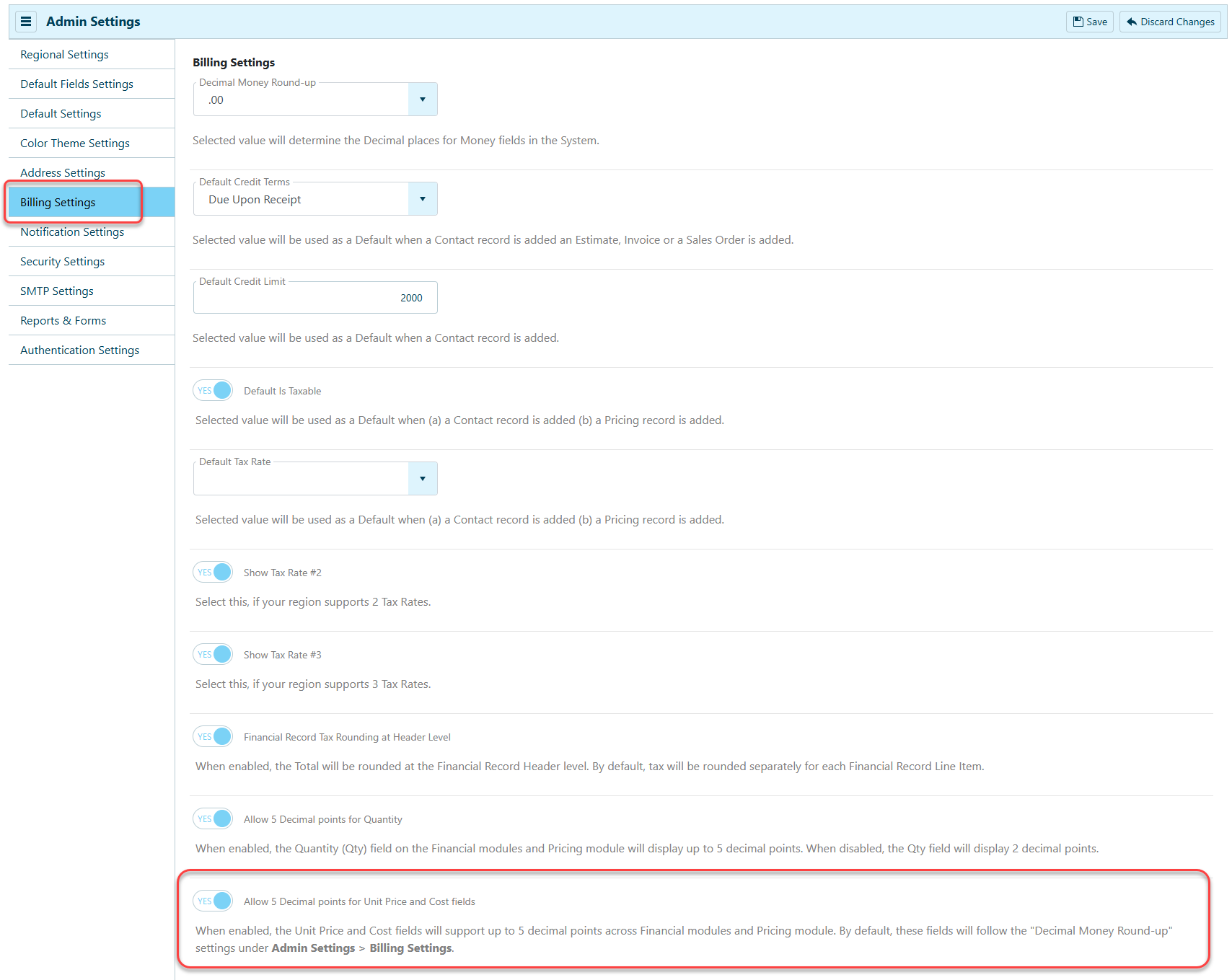
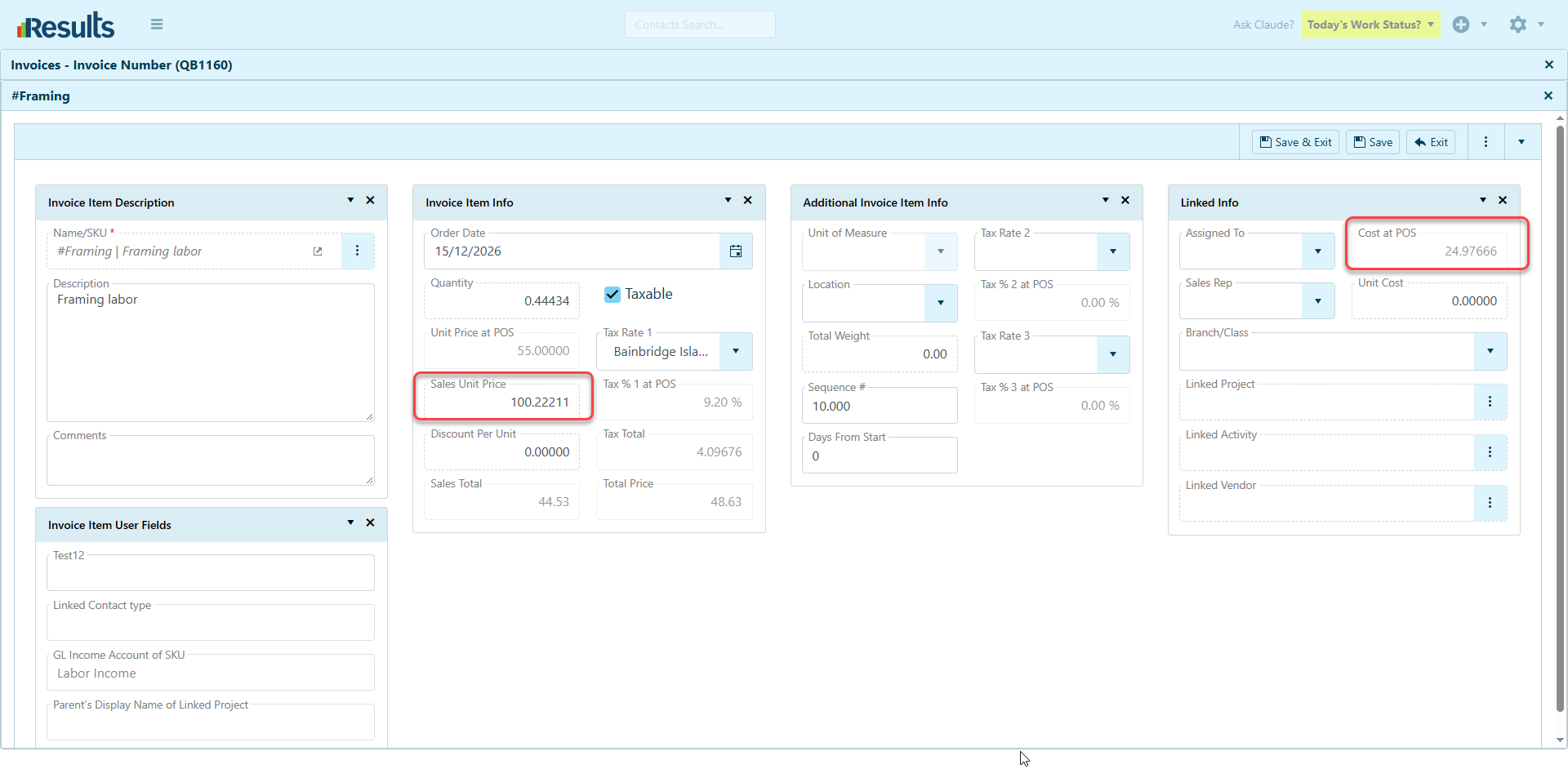
Greater precision and flexibility in managing financial values with a new setting in Admin Settings > Billing Settings. This enhancement lets users configure up to five decimal places for Unit Price and Cost fields across the Financial and Pricing modules, while remaining compatible with existing decimal rounding settings.

What's New?

Configurable Unit Price and Cost Precision – A new toggle in Admin Settings > Billing Settings allows administrators to enable support for up to 5 decimal places for Unit Price and Cost fields.

When enabled, the Unit Price and Cost fields across the Financial and Pricing modules support up to five decimal places. By default, these fields continue to follow the existing Decimal Money Round-up settings under Admin Settings > Billing Settings.

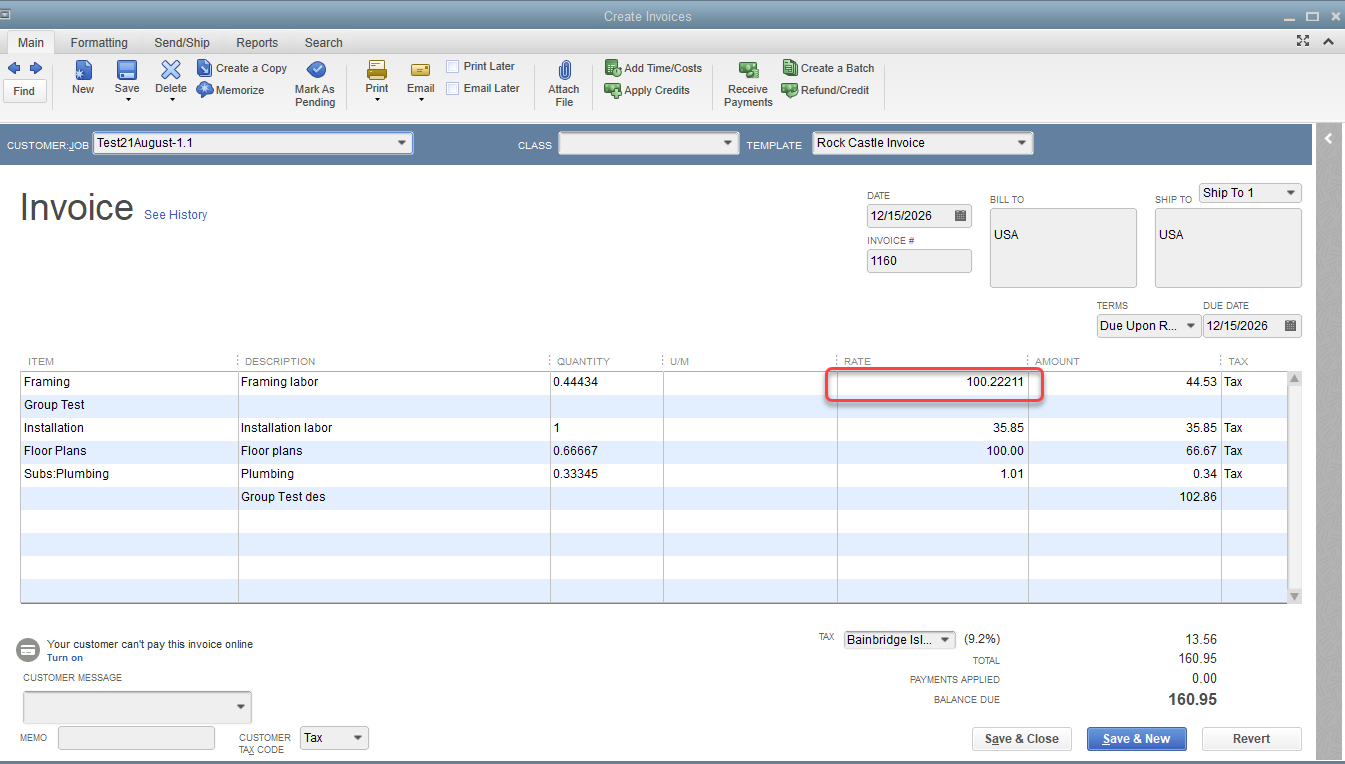
QBD/QBO Import Enhancements – The financial record import process for QuickBooks Desktop (QBD) and QuickBooks Online (QBO) supports up to five decimal places for Unit Price and Cost when the corresponding Billing Settings are enabled.

When configured appropriately, this lets imported financial records retain greater decimal precision.

Why This Matters?

Greater Financial Accuracy – Additional decimal places help reduce rounding differences when dealing with precise unit prices and costs.

Flexible Configuration – Administrators can enable higher decimal precision based on their business requirements while retaining the existing rounding behavior by default.

Improved QuickBooks Integration – Enhanced QBD and QBO import processes support greater precision for Unit Price and Cost, helping maintain consistency between QuickBooks and Results.

Consistent Financial Calculations – By matching decimal precision to Billing Settings, Results gives users greater control over unit prices and costs across financial workflows.

Standard Payment Receipt Enhancement

Results includes a Standard Payment Receipt in the Payments module, giving users a convenient way to generate and access a standardized receipt for payment records. Standard Payment Receipt –...

FSM Portal Job Card Quick Access Enhancements

Results now provides improved navigation on the FSM Portal with new Quick Access buttons on the Job Card, allowing users to jump directly to key sections of a job. These shortcuts help field service...

Create a QB Job Along with an Opportunity or a Project

Results makes it easier to create QuickBooks (QB) Jobs from Parent Contact records. New menu options let you create a QB Job along with an Opportunity or Project. These enhancements simplify record...

Unit Price and Cost Decimal Precision Enhancements

Greater precision and flexibility in managing financial values with a new setting in Admin Settings > Billing Settings. This enhancement lets users configure up to five decimal places for Unit...

Quantity Decimal Precision Enhancements

Greater precision and flexibility in managing quantities are available in Admin Settings > Billing Settings. This enhancement allows users to configure the number of decimal places displayed for...

Split Activity – Simplifying Team Assignments and Scheduling

The Split Activity feature in Results provides greater flexibility in activity management, allowing users to divide an existing activity into up to three additional activities and assign them to...

Expanded User Permissions and Key Utilities Access

Results provides administrators with greater control over user access to key utilities and integration configurations. New permission options have been added to the Users module, making it easier to...

Streamlined Refund Processing in Results Payments Integration

Results Payments Integration now provides a more streamlined way to process and track Refunds directly from Results. With the new “Issue Refund” functionality and enhanced transaction tracking,...

Generate Payment Links for Deposits

Results Payments Integration now makes it easier to collect Deposit payments directly from Projects. With the new Generate Payment Link for Deposit option, users can generate a secure payment link...

Who’s Working Module Enhancements

Results offers greater flexibility and convenience in the Who’s Working module, with enhancements to how Assigned Activity information is displayed and how users manage settings.Default Assigned...