Results includes new visibility settings within Activity Type configuration, giving administrators greater control over where Activities appear throughout the platform. These settings help organizations tailor Activity visibility based on user roles, workflows, and portal requirements.
Administrators can now decide which Activity Types appear in employee-facing modules and which remain available through external-facing portals, creating a more focused user experience across the system.
What's New?
-
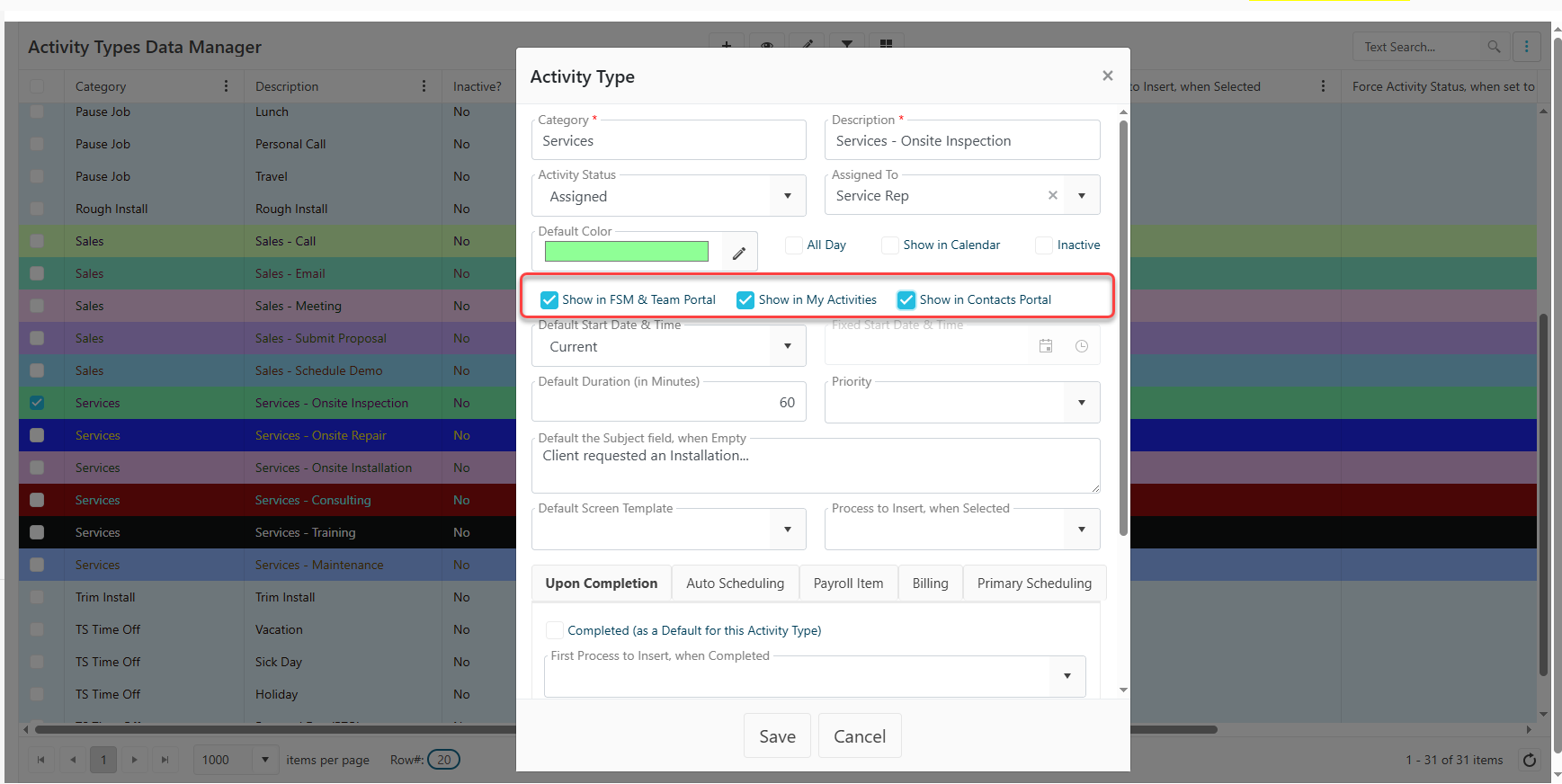
New Activity Type Visibility Settings – Results includes three new visibility options on the Activity Type setup screen:
• Show in FSM & Team Portal
• Show in My Activities
• Show in Contact Portal
-
Flexible Visibility Management – Administrators can configure Activity Types independently for:
• FSM & Team Portal
• My Activities views
• Contact Portal access
Why This Matters?
-
Improved User Experience – Users see only the Activities that are relevant to their role, reducing clutter and improving navigation.
-
Better Portal Control – Organizations can manage which Activity Types appear in external portals and which remain internal.
- More Efficient Activity Management – Targeted visibility settings help teams focus on the Activities that support their daily workflows.
- Increased Administrative Flexibility – Additional configuration options allow organizations to align Activity behavior with operational and security requirements.